
Lieferung heute & morgen

Qualitätsgarantie

Willkommens-Angebote freischalten: KOSTENLOSE Lieferung | Bis zu 80 % RABATT | Kostenlose 30-Tage-JoyPlus-Testphase
App herunterladen
Whether you're trying to focus in a busy open-plan office or need crystal-clear audio for a critical conference call from home, the challenges are familiar. Background noise doesn't just disrupt your concentration; it also compromises communication with colleagues and clients. A high-quality noise-cancelling business headset is the ideal solution.
This article serves as your guide. We'll highlight the key features to consider when making your choice and present a selection of models designed for professional use in 2026.
From your Joybuy Product Recommendation Officer
Choosing the right headset depends on the unique demands of your workday. The following criteria will help you make an informed decision.
A core feature is the ability to reduce ambient noise. There's a key distinction between passive and active noise cancellation.
Furthermore, a professional headset with a microphone must ensure your voice is transmitted clearly and without interference. Models with multiple microphones and Digital Signal Processing (DSP) filter out background noise, allowing the person you're speaking with to focus solely on your words.
Seamless integration into your work environment is crucial. A wireless PC headset offers maximum freedom of movement, which is particularly useful in home office scenarios.
A headset worn for several hours a day must be comfortable. Key factors include its weight, the earpad materials, and the adjustability of the headband. The battery life should cover at least a full workday to avoid constant recharging. Models offering over 20 hours of talk time are a good benchmark.
Based on the criteria above, we've curated a selection of headsets suited for various professional needs.
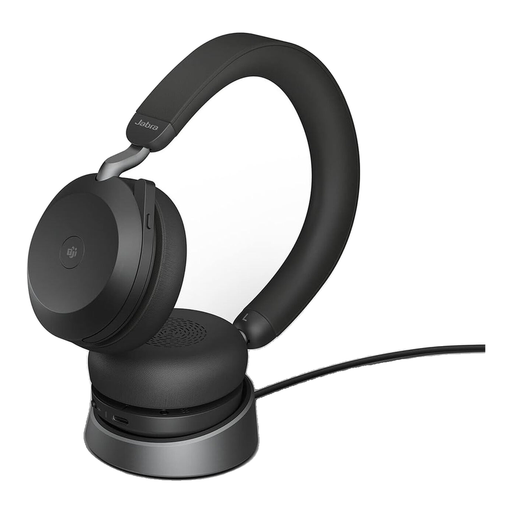
Why it stands out: The Jabra Evolve2 75 is designed for professionals who demand advanced noise cancellation and seamless software integration. Its combination of Advanced Active Noise Cancellation and an 8-microphone technology aims to both minimise ambient noise for the wearer and ensure crystal-clear voice transmission for the listener. The MS version is specifically optimised for Microsoft Teams.
Benefits:
Who it's for: Professionals in hybrid or noisy office environments who demand the highest standards for call quality and focus, and who are heavy users of Microsoft Teams.
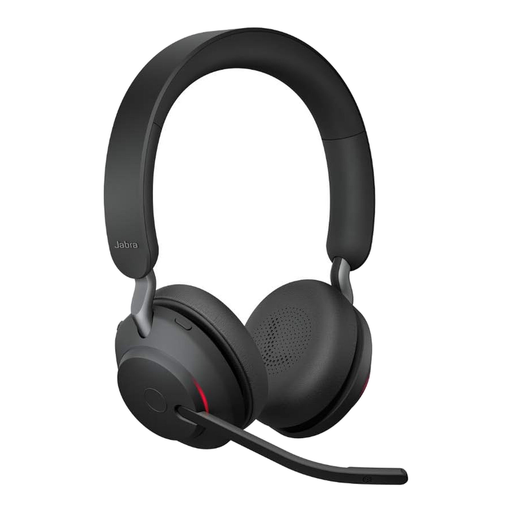
Why it stands out: The Jabra Evolve2 65 focuses on exceptionally long battery life and reliable performance for the daily office grind. Its on-ear design provides good passive noise isolation, and as a UC-certified model, it's built for a wide range of communication platforms.
Benefits:
Who it's for: Users looking for a reliable wireless headset with maximum battery life for all-day use in the office or at home, who also value broad software compatibility.
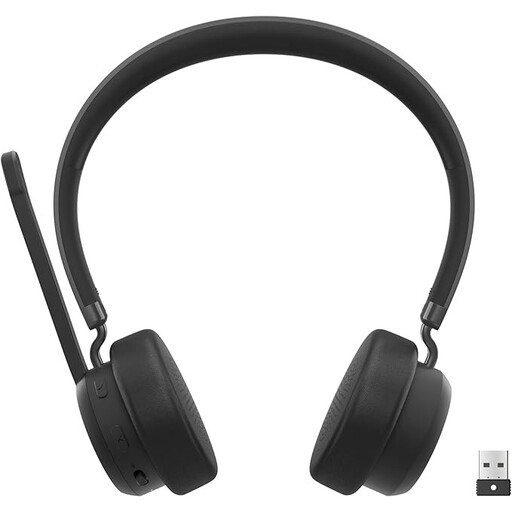
Why it stands out: This headset from Lenovo is a pragmatic solution for professionals whose priority is deep integration with Microsoft Teams. It is officially certified for Microsoft Teams and offers straightforward plug-and-play setup via the included USB-A Bluetooth receiver. It does not feature active noise cancellation but is designed for clear communication in typical office environments.
Benefits:
Who it's for: Professionals who work primarily in Microsoft Teams and need a straightforward, certified, and cost-effective headset for clear communication in environments with moderate noise levels.
If you already own a favourite wired headset and want to improve its connectivity with modern laptops or PCs that lack the right port, an adapter can be a practical alternative. Explore our selection of USB headphone adapters to upgrade your existing gear.
1. What does "Microsoft Teams Certified" mean? A headset certified for Microsoft Teams has been tested by Microsoft for compatibility and performance. It guarantees a seamless plug-and-play experience, and functions like answering, ending, or muting calls can be controlled directly via a dedicated button on the headset. The busylight is also often automatically synchronised with your call status in Teams.
2. Is an ANC headset necessary for a home office? The necessity depends on your specific situation. If your home office is quiet, a headset with good passive isolation and a high-quality microphone may be sufficient. However, if you work in an environment with disruptive sounds—such as family members, pets, or construction noise—an ANC headset can significantly improve your concentration and call quality.
3. What is the difference between "UC-certified" and "optimised for MS Teams"? A UC-certified (Unified Communications) headset is designed for general use with a wide variety of softphone applications like Zoom, Cisco Jabber, or Google Meet. An optimisation for MS Teams goes a step further, offering specific, deeply integrated features exclusively for the Microsoft platform, such as the aforementioned dedicated Teams button.