
Lieferung heute & morgen

Qualitätsgarantie

Willkommens-Angebote freischalten: KOSTENLOSE Lieferung | Bis zu 80 % RABATT | Kostenlose 30-Tage-JoyPlus-Testphase
App herunterladen
An NVIDIA GeForce RTX graphics card is often marketed by highlighting CUDA cores, boost clock speed or “8K support”. These specifications are relevant, but they are not enough to make a confident purchasing decision. What matters is whether the card is suitable for your desired resolution, power supply and PC case.
Many models can output a signal of up to 7,680 × 4,320 pixels. However, this does not mean that current games will run at a high frame rate in 8K. 8K gaming also depends on GPU performance, memory capacity, in-game settings and support for upscaling technologies. An 8K graphics card is therefore not automatically suitable for demanding gaming at this resolution.
A graphics card with 16 GB VRAM can offer benefits when working with high-resolution textures, 3D scenes and video projects. However, memory capacity alone does not indicate overall performance. The memory interface and bandwidth are also important. GDDR7 provides high transfer rates on many RTX 50 models, while the RTX 5050 comes with GDDR6 in the variants mentioned.
Triple-fan designs and large heatsinks require space. For example, the GIGABYTE AORUS GeForce RTX 5080 MASTER 16G measures 360 × 150 × 75 mm and is classified as “Overwidth”. A 3.8-slot design, such as that used by the ASUS ROG Astral GeForce RTX 5080, can also cover neighbouring slots. Before buying, you should therefore check the length, height, slot width, PSU output and power connectors against your own system.
For 1080p gaming, entry-level and lower-mid-range cards such as the RTX 5050 or RTX 5060 are often sufficient, depending on the game. For 1440p, RTX 5060 Ti, RTX 5070 and RTX 5070 Ti models are worth considering. In addition to processing power, a 4K gaming graphics card should offer sufficient VRAM and suitable memory bandwidth.
For 4K gaming and creative workflows, RTX 5080 models with 16 GB GDDR7, a 256-bit memory interface and 960 GB/s bandwidth are examples of suitable options. The GeForce RTX 5090 in our selection features 32 GB GDDR7 and a 512-bit interface. However, its dimensions, power consumption and PSU requirements are significantly higher than those of more compact cards.
The RTX 50 Series uses GDDR7 in many models. Among the products mentioned, memory capacity ranges from 8 GB on the RTX 5060 and RTX 5050 to 32 GB on the GeForce RTX 5090. For modern games, 3D applications and video editing, memory capacity should match the size and complexity of your projects.
A DLSS 4 graphics card can use AI-assisted image reconstruction and other supported features in compatible games. The actual impact depends on the game, driver and selected settings. DLSS does not replace sufficient native performance, but it can provide an additional option for achieving higher frame rates. Ray tracing also requires additional processing power, so an RTX graphics card with ray tracing should be selected based on the level of detail you want to use.
A PCIe 5.0 graphics card will generally also work in a compatible PCIe slot using an older standard, although the platform determines the available bandwidth. Even so, you should compare the specific product specification with your motherboard and processor. For example, the Palit GeForce RTX 5090 GameRock OC is listed in the product data as using PCIe 4.0 x16, while many RTX 5080 and RTX 5070 models specify PCIe 5.0.
For connections, DisplayPort 2.1 and HDMI 2.1 are relevant for current monitors. You should also check the power supply: the RTX 5080 models in our selection specify 850 watts as the recommended PSU output and use a 12V-2x6 connector. An RTX 5060 requires around 550 watts, depending on the variant, and uses an 8-pin connector. The plug must be fully inserted, and cables should not be routed under excessive sideways pressure.
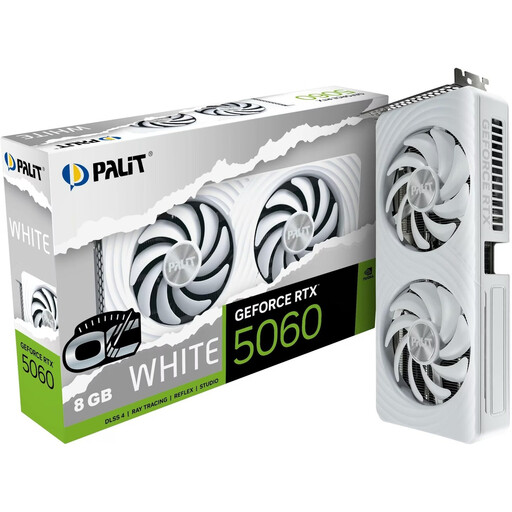
Why this product suits this profile: This card is aimed at users looking for 1080p and selected 1440p gaming performance in a relatively compact desktop model.
The 2-slot design with two fans makes case planning easier. 8 GB GDDR7 and PCIe 5.0 are clearly specified.
3,840 CUDA cores, 8 GB GDDR7, two fans and a recommended 550-watt PSU.
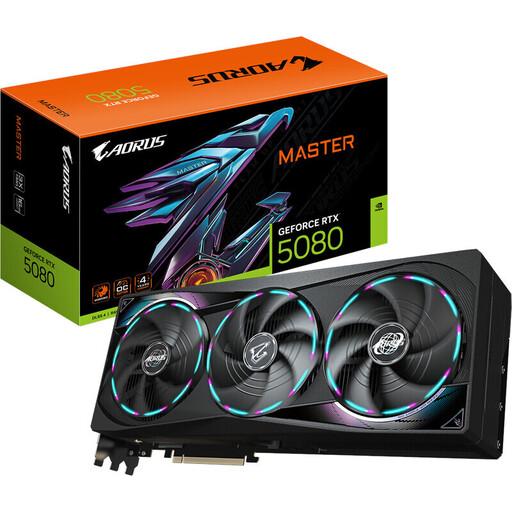
Why this product suits this profile: With 16 GB GDDR7 and several modern video outputs, it is suitable for 4K gaming, creative applications and multi-monitor workstations.
The dimensions and 12V-2x6 connector are specified. Before buying, check the 360 mm card length, 150 mm width and 850-watt PSU requirement.
10,752 CUDA cores, 16 GB GDDR7, a 256-bit interface, 960 GB/s bandwidth and three fans.
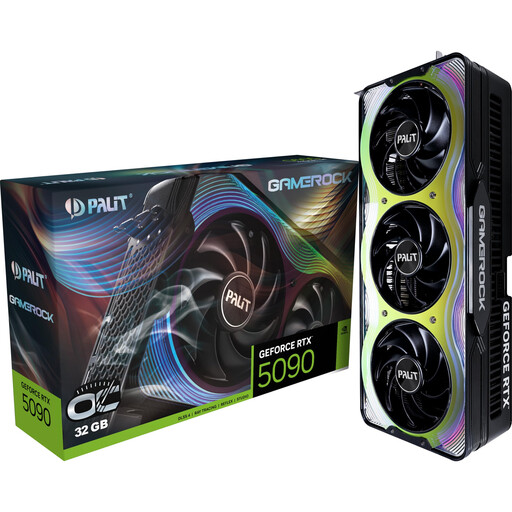
Why this product suits this profile: Designed for large-scale 3D projects, AI workloads, 4K and selected 8K scenarios, this model offers a generous memory capacity.
The 32 GB VRAM reduces the risk of insufficient memory capacity. With a length of 332 mm, a width of 150 mm and a recommended 1,000-watt PSU, checking system compatibility remains essential.
21,760 CUDA cores, 32 GB GDDR7, a 512-bit memory interface and 1,792 GB/s bandwidth.
We have put together a complete, regularly updated list of products that fully meet these strict selection criteria and the safety regulations applicable in the EU.
Depending on the game and desired frame rate, models such as the RTX 5060 Ti, RTX 5070 or RTX 5070 Ti may be suitable for 1440p. Pay attention to VRAM, cooler size and the requirements of individual games. An RTX 5070 with 12 GB GDDR7 can provide a suitable specification for many 1440p systems, although actual frame rates can only be assessed based on the game and settings.
Its lifespan depends on temperature, dust levels, fan operation, PSU quality and usage time. A well-ventilated case, correctly connected power cables and regular driver maintenance can help ensure reliable operation. Before installation, the PC should be completely switched off and disconnected from the mains.
Costs depend on power consumption, usage time and your individual electricity tariff. A card consuming 360 watts requires more energy under heavy load than a 145-watt model. For a rough calculation, multiply power consumption in kilowatts by the operating hours and the price per kilowatt-hour. Actual consumption varies depending on the game, application and power profile.