
Lieferung heute & morgen

Qualitätsgarantie

Willkommens-Angebote freischalten: KOSTENLOSE Lieferung | Bis zu 80 % RABATT | Kostenlose 30-Tage-JoyPlus-Testphase
App herunterladen
The launch of the NVIDIA Blackwell architecture marks a significant leap forward for PC enthusiasts. With models like the RTX 5090, RTX 5080, and RTX 5060, new dimensions of performance are now available for 4K gaming, AI applications, and creative workflows. However, the selection is complex, and marketing can be misleading. An ill-considered decision can quickly lead to an expensive component that doesn't deliver the expected performance or is simply incompatible.
This guide will help you understand the crucial technical aspects and avoid common purchasing traps, ensuring you find the graphics card that precisely fits your needs and your system.
Before diving into specific models, it's important to know the typical stumbling blocks that often lead to disappointment.
To make an informed decision, focus on these three objective criteria that directly impact performance and compatibility.
The RTX 5000 series uses the new GDDR7 memory, which offers higher bandwidth and efficiency. However, the size is crucial for your application scenario:
Before buying, be sure to check the following three values to avoid compatibility issues:
The NVIDIA Blackwell generation is equipped with modern interfaces across the board. PCI Express 5.0 offers double the bandwidth of PCIe 4.0, ensuring the card is not limited by the connection in future systems. DisplayPort 2.1 is crucial for users of monitors with extremely high refresh rates at 4K or 8K resolution.
Here are some recommendations tailored to specific user profiles and their requirements.

Why This Fits Their Persona: Ideal for gamers aiming for smooth frame rates in WQHD (1440p) without stretching the budget for a high-end model. The TUF series is known for its robust build and reliable cooling.
With a recommended PSU wattage of 550W and an efficient triple-fan cooler, it sidesteps the trap of excessive system requirements (Trap 1). The 8 GB of VRAM is appropriately sized for 1440p gaming (Trap 3).
Robust Cooling: The Axial-tech fan design and MaxContact technology ensure low temperatures and consistent performance. Durability: Utilises military-grade components.
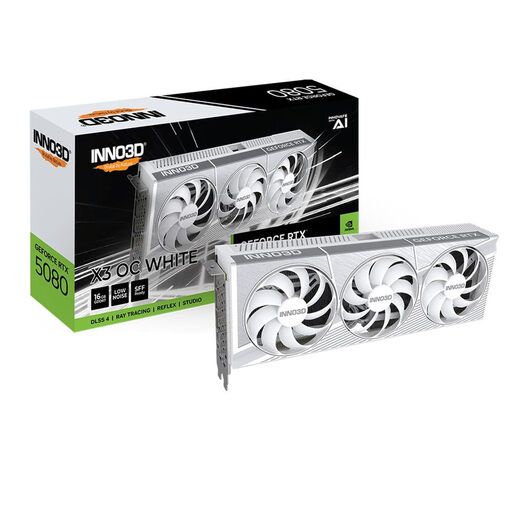
Why This Fits Their Persona: Perfect for users seeking uncompromising 4K performance who also value aesthetics. This white graphics card is a centrepiece in any custom build and also offers a high factory overclock.
The 16 GB of GDDR7 VRAM directly addresses the bottleneck with 4K textures (Trap 3). The powerful triple-fan cooling system ensures the high clock speed is maintained under load, proving it's more than just a marketing figure (Trap 2).
High Memory Bandwidth: With 960 GB/s, it's ideal for 4K gaming and demanding rendering workflows. Elegant Design: The all-white shroud makes it a perfect choice for themed PC builds.
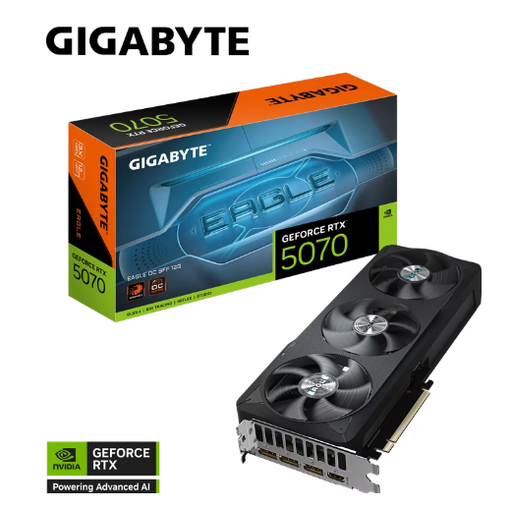
Why This Fits Their Persona: Specifically for PC builders who want to fit maximum performance into a compact Small Form Factor (SFF) case. This card delivers high performance with reduced dimensions.
Solves the compatibility problem (Trap 1) with its compact 29 cm length and a moderate 250W TGP, which is manageable even in SFF systems with appropriate power supplies.
Compact Form Factor: One of the few high-performance cards optimised for SFF builds. Strong Performance: With 12 GB of GDDR7 and a 2587 MHz boost clock, it delivers solid performance for 1440p and light 4K gaming.
We have compiled a complete, real-time updated list of products that fully meet these strict selection criteria and rigorous safety standards.
What power supply do I need for an RTX 5000 series graphics card? The requirements vary by model. As a rule of thumb: for an RTX 5060 / 5060 Ti, a PSU of at least 550W is recommended. If you plan to buy an RTX 5070 Ti or RTX 5080, you should budget for a high-quality 750W to 850W PSU. For the flagship model, the RTX 5090, a 1000W or higher PSU is advisable. Also, ensure you have a native 12V-2x6 (16-pin) PCIe Gen 5 connector or use the included adapter.
Will an RTX 5080 or 5090 fit in my case? That depends on your case. High-end models are often over 33 cm long and occupy 3 or more slots. Before buying, measure the maximum available space for graphics card length in your case. Also, check the width and ensure no other components will block the installation. The exact dimensions are always listed on the product page.
Is the price premium for an RTX 5090 over an RTX 5080 worth it? For most users, including demanding 4K gamers, the RTX 5080 offers a more balanced price-to-performance ratio. The significant price premium for an RTX 5090 is mainly justified for professional users and enthusiasts who need the maximum VRAM capacity (32 GB) for 8K workflows, large AI datasets, or extremely complex 3D scenes and are willing to invest in the corresponding cooling and power supply infrastructure.