
Lieferung heute & morgen

Qualitätsgarantie

Willkommens-Angebote freischalten: KOSTENLOSE Lieferung | Bis zu 80 % RABATT | Kostenlose 30-Tage-JoyPlus-Testphase
App herunterladen
An illuminated check engine light can quickly cause anxiety. A trip to the mechanic often means high costs and long waits, even for a simple diagnosis. Owning your own OBD2 diagnostic tool promises a solution: quickly identify issues yourself, perform maintenance tasks, and save money in the long run. But the market is overwhelming and full of marketing promises that often obscure more than they clarify.
As your Joybuy Product Recommendation Officer, I'm here to help you separate fact from fiction. Before you make a decision, you should know the three most common traps that lead to a costly purchasing mistake:
To find the right automotive diagnostic tool, don't be dazzled by long feature lists. Instead, focus on the parameters that are relevant to your specific needs.
The most important distinction lies in the depth of system access. There are two main categories here:
Modern vehicles require an electronic reset after many maintenance tasks. A good diagnostic tool should support the service reset functions that are important to you:
For advanced users, bidirectional control (also called active test) and ECU coding are also relevant. With bidirectional control, you can directly actuate individual components (e.g., fans, windows, fuel pump) to test their function. ECU coding allows you to adapt control units after a replacement or activate hidden vehicle features.
Pay close attention to the update model. A device with genuine, lifetime free updates for all functions and vehicle brands is a valuable investment. Also, check for support for modern protocols like CAN FD and DoIP to be prepared for future vehicle generations. For maximum flexibility, consider OBD2 Bluetooth adapters that work with an app on your smartphone or tablet.
Based on these criteria, we have compiled a selection of devices suitable for different needs and budgets.
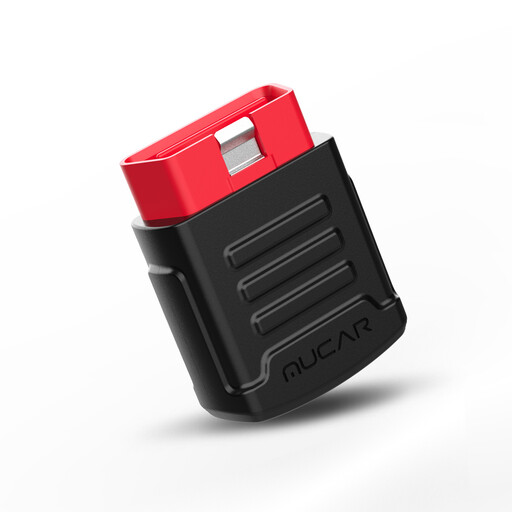
Why This Fits Their Persona: Ideal for anyone looking for a cost-effective solution to read and clear fault codes without having to buy an expensive tablet. The adapter connects directly to your smartphone and provides access to all major vehicle systems via the app. Perfect for quick, on-the-go diagnostics.
It sidesteps the trap of an oversized feature set. It offers full system diagnostics with lifetime free updates, without making you pay for expensive pro features that a beginner doesn't need.
Compact OBD2 Bluetooth adapter with lifetime free updates for all-system diagnostics. Using your own smartphone as the display saves cost and space.
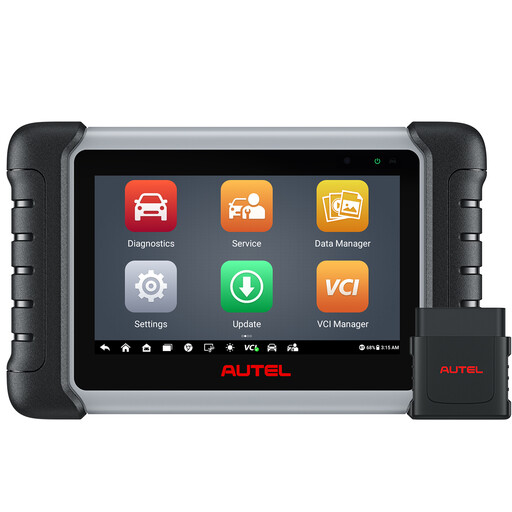
Why This Fits Their Persona: For car enthusiasts who regularly perform their own maintenance like oil changes, brake service, or battery replacements. This tool offers deep system diagnostics and a wide range of service functions that go far beyond just reading fault codes.
Provides a clear distinction between free updates (1 year) and the associated functions. The bidirectional control and over 38 service functions justify the price for users who will actually use these capabilities and save on workshop costs.
Wireless diagnostics via Bluetooth for maximum flexibility. Comprehensive all-system diagnostics and a very broad coverage of service functions, including active tests for rapid troubleshooting.
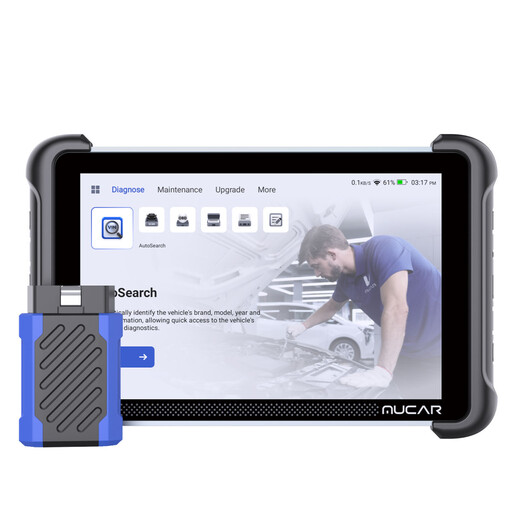
Why This Fits Their Persona: A cost-effective solution for small workshops or very ambitious mechanics who need a professional diagnostic tool with advanced features like ECU coding and support for modern protocols, but want to avoid high recurring costs.
Delivers on the "lifetime free updates" promise without hidden costs. All functions, including advanced coding and new vehicle models, remain accessible without subscription fees. Support for CAN-FD & DoIP avoids the trap of an obsolete device.
Offers advanced ECU coding and bidirectional tests with lifetime free updates. The hardware is optimized for workshop use with an 8-inch touchscreen and magnetic VCI.
We have compiled a complete, up-to-date list of products that fully meet these strict selection criteria and UK/EU regulations.
In principle, yes, if your vehicle complies with the OBD2 standard. In the EU, this is mandatory for petrol cars manufactured from 2001 and diesel vehicles from 2004. However, the OBD2 standard is primarily limited to emissions-related systems. To access other control units like ABS, airbag, or transmission, you need a tool that supports your vehicle's manufacturer-specific protocols. Therefore, always check the manufacturer's compatibility list before purchasing.
This promise should be viewed critically. Often, it only applies to the basic OBD2 software for reading and clearing fault codes. Updates for new vehicle models, additional service functions, or software for individual car brands may become paid after an introductory period (usually one year). Models that explicitly offer lifetime updates for all functions and brands without a subscription are rarer and represent a particularly economical choice.
When simply reading fault codes and live data, the risk is virtually zero. However, caution is advised with active functions. Improperly resetting service intervals or performing active tests is generally safe. But for advanced functions like ECU coding or adapting components, you should know exactly what you are doing. Incorrect coding can render control units inoperable. For beginners, it is recommended to stick to purely diagnostic and simple service functions.