
Lieferung heute & morgen

Qualitätsgarantie

Willkommens-Angebote freischalten: KOSTENLOSE Lieferung | Bis zu 80 % RABATT | Kostenlose 30-Tage-JoyPlus-Testphase
App herunterladen
The complexity of modern vehicle electronics is constantly increasing. For professional automotive mechatronics, independent workshops, and ambitious DIY enthusiasts, a powerful OBD2 diagnostic tool is no longer a luxury, but an indispensable tool. Simply reading fault codes is often not enough to solve complex problems efficiently. The demand is for devices that enable in-depth analysis, service resets, and even vehicle customisation.
This article serves as a guide. We present a selection of devices with different feature sets and explain the crucial criteria that will help you choose the right tool for your requirements.
The choice of the right device depends on your specific needs. You should consider three central aspects in your decision.
There is a fundamental difference between simple code readers and professional diagnostic tools. While the former often only display generic fault codes from the engine control unit, advanced models offer all-system diagnostics. This means they can access all control units in the vehicle—from ABS and airbags to the transmission and comfort electronics.
Look for the following key functions:
Compatibility is critical. An all-makes diagnostic tool offers the greatest flexibility, especially for independent workshops. However, check not only the supported brands but also the specific models and years of manufacture.
Modern vehicles use advanced communication protocols. Support for CAN FD & DoIP is a clear sign of a future-proof device:
Vehicle technology is evolving rapidly. Regular software updates are therefore essential to cover future vehicle models and new functions. Manufacturers offer different models:
Before buying, check exactly which licensing model is offered and whether the device remains fully functional even without an active subscription.
Based on the criteria mentioned, we have compiled a selection of diagnostic tools that are suitable for various professional applications.
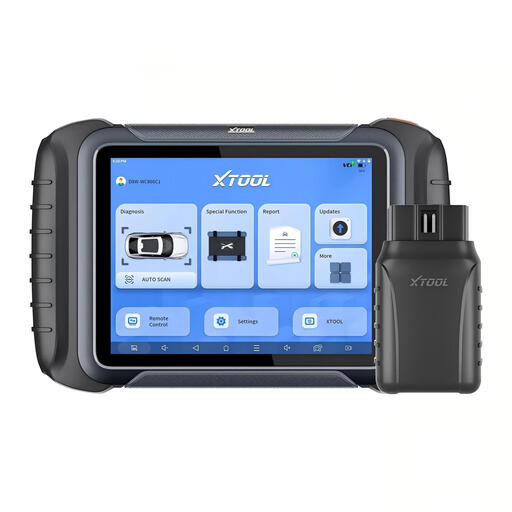
XTOOL D8W OBD2 Scanner Diagnostic Tool Wireless Bidirectional Scan Tool
Why it stands out: The D8W combines powerful hardware with advanced software functions. The wireless Wi-Fi connection offers maximum flexibility in the workshop. A special feature is the intelligent topology map, which graphically displays the communication structure of all control units, providing a quick overview of the system status and any faults.
Pros:
Who is it for? Professional workshops and technicians who need a versatile and powerful tool with advanced coding functions and the convenience of a wireless connection. The topology view is ideal for efficiently diagnosing complex electronic systems.
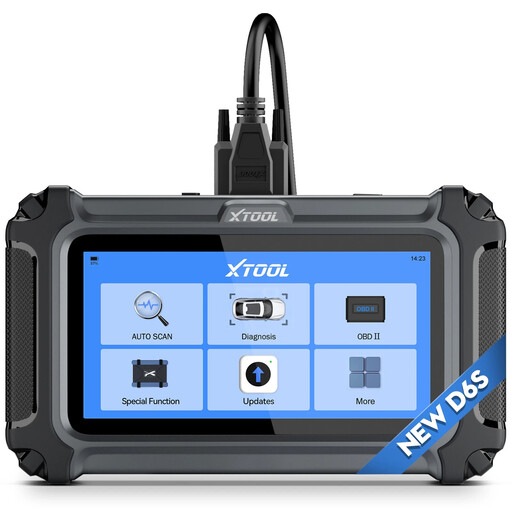
XTOOL D6S OBD2 Scanner Diagnostic Tool with 30+ Resets
Why it stands out: The main selling point for the D6S is its licensing model: lifetime free software updates. This eliminates recurring costs and makes the device a predictable investment. Despite its attractive price-performance ratio, it offers full system diagnostics and a solid selection of service functions.
Pros:
Who is it for? Cost-conscious professionals, smaller workshops, and ambitious DIY enthusiasts looking for a reliable car diagnostic tool without ongoing subscription fees. It is an excellent choice for anyone who values long-term usability and predictable costs.
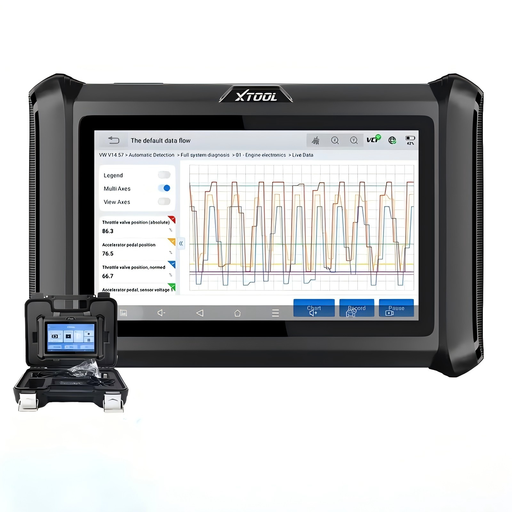
XTOOL D7S Bidirectional Scan Tool, 2026 OBD2 Scanner Diagnostic Tool
Why it stands out: The D7S positions itself as a powerful all-rounder that bundles many features of high-end devices into a more compact and attractively priced package. It offers both bidirectional control and ECU coding and, thanks to CAN FD & DoIP, also supports the latest vehicle architectures.
Pros:
Who is it for? Technicians and workshops looking for a balanced price-to-performance ratio. The D7S is ideal for users who need advanced diagnostic capabilities like bidirectional tests and coding but don't necessarily require a wireless connection or a topology view.
The selection presented here covers a broad spectrum of professional requirements. If the right model for your specific needs is not yet included, you will find an even greater variety of devices in our main category.
Discover more models in our Diagnostic Tool Scanners category
A basic OBD2 scanner can typically only read and clear generic fault codes (P-codes) from the engine control unit. A professional car diagnostic tool, on the other hand, allows for all-system diagnostics, meaning it can access all control units installed in the vehicle (ABS, airbag, transmission, etc.). It also offers advanced functions such as bidirectional control, ECU coding, and a variety of service resets.
Bidirectional control, also known as an active test, means that the diagnostic tool can not only receive data from the vehicle but also send commands to the control units and actuators. This allows a mechanic to, for example, manually turn on a radiator fan, activate the fuel pump, or test injectors without having to remove the parts. This significantly speeds up troubleshooting.
That depends on the manufacturer and the specific device model. Many professional devices are sold with a period of 1 to 3 years of free updates. After that, annual subscription fees apply. However, there are also models, like the XTOOL D6S, that are offered with lifetime free updates, which eliminates long-term operating costs. It is important to check this before purchasing.