Adventure gamers without reliable Wi-Fi
If you want to pass the time with a game you’ve installed in advance, check whether it will also launch on your device without an internet connection.


Start by checking whether your chosen adventure will launch on the device without Wi-Fi. A Nintendo console could suit compatible Switch titles, a Steam Deck compatible Steam games, and a Windows handheld games or launchers that require Windows. Install and launch the game offline before you travel. Then focus on weight, screen size and battery life for the game you want to play.
If you want to pass the time with a game you’ve installed in advance, check whether it will also launch on your device without an internet connection.
If you want to carry on playing a particular Switch or PC adventure, check whether it’s available for your device and compatible with it before comparing devices in general.
If you tend to play in short bursts, compare the weight, screen size and accessories needed for the specific model.
First, check whether your adventure can be played offline on the device you want. Then use compatibility, portability, battery life and the accessories you’ll actually need to help you choose.
| Buying consideration | What to check | Especially important if |
|---|---|---|
| Launching offline | Install updates and the game in advance, then test that it launches without a network connection. On Steam, a requirement to stay online or an external launcher can prevent offline play; Switch 2 software-key cards need to be downloaded first. | I can’t rely on Wi-Fi at the terminal, so I want to be able to launch the game offline beforehand. Around 28% of consumers put offline launch at the top of their list. |
| Game compatibility | Check the specific title, platform, game mode, controls and any Windows or launcher requirements. Nintendo says that the Nintendo Switch Lite supports titles that support Handheld Mode. | I want to play a particular adventure from my library, so I’ll first check that it runs on the handheld and is easy to control. Around 22% of consumers prioritise compatibility with the games they want to play. |
| Weight and screen | Nintendo lists the Switch Lite at around 275 g with a 5.5-inch screen, and the Switch 2 at 7.9 inches. Valve lists the Steam Deck OLED at around 640 g with a 7.4-inch screen. Check the dimensions of the specific device, too. | I want to hold the device for longer while I wait, but still travel light, so the screen size needs to suit the weight. Around 22% of consumers put portability first. |
| Battery life | Valve lists 3 to 12 hours of play time for the Steam Deck OLED, depending on the content; this isn’t a guarantee of how long your adventure will last. You can’t convert Wh figures directly into hours of play. | I want to play without a socket nearby, so I’d rather rely on a test using my game and similar settings than on battery capacity alone. Around 17% of consumers prioritise battery life. |
| Storage and accessories | Check what’s included in the specific offer and what charging accessories or extra storage you’ll need. Nintendo specifies microSD Express for expanding the Switch 2’s storage. | I don’t want to find myself sorting out missing accessories or storage at the terminal, so I’ll check what’s included and what’s compatible in advance. Around 11% of consumers pay particular attention to storage and accessories. |
A Switch 2 software-key card doesn’t contain the full game data. You’ll need to download it before you can play.
Check the card type and available storage. Download the game and launch it once before you travel.
A download may need extra storage space.
According to Steam Support, games that require an active internet connection or an external launcher won’t work in Offline Mode.
First update and launch the specific adventure online, then test it on the device you plan to use, without a network connection.
Valve lists a range of 3 to 12 hours for the Steam Deck OLED, depending on the content. Wh figures for other devices don’t tell you how long they’ll run the same game.
Test your adventure with similar settings and plan around how long you expect to wait, rather than battery capacity alone.
Names such as MSI Claw 8 EX AI+ CG3EM and Claw 8 AI+ A2VM refer to different model numbers. Make sure the full model name is correct for ROG Ally models, too.
Before ordering, check the full model number, operating system, storage and what’s included.
The Switch Lite and Switch 2 are worth considering if your chosen adventure is available for the specific model.
The Steam Deck OLED suits Steam adventures that run on the device and can be launched offline.
The ROG Xbox Ally X RC73XA-NH011W is a Windows option for compatible PC games and launchers.
The Legion Go Gen 2 is a model option with a large screen and detachable controllers.
Claw models are another Windows handheld option; the exact model number matters when comparing them.
This selection of Joybuy products includes portable gaming consoles and handheld PCs. For each adventure, check the platform, whether it launches offline and the exact device variant.
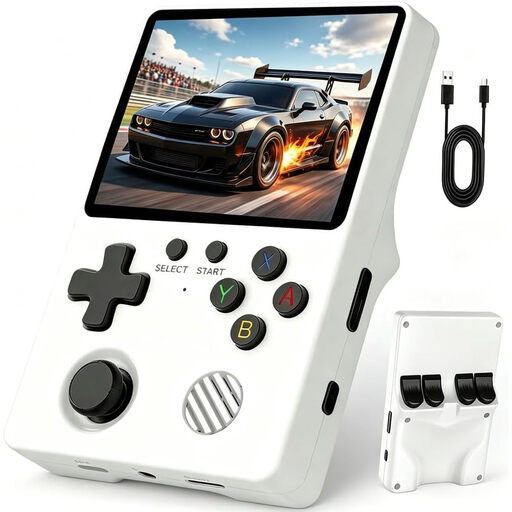 Image unavailable
Made for gaming on the go; check in advance that the adventure titles on offer meet your needs.
The product name specifies a 3.5-inch IPS screen and a Linux system.
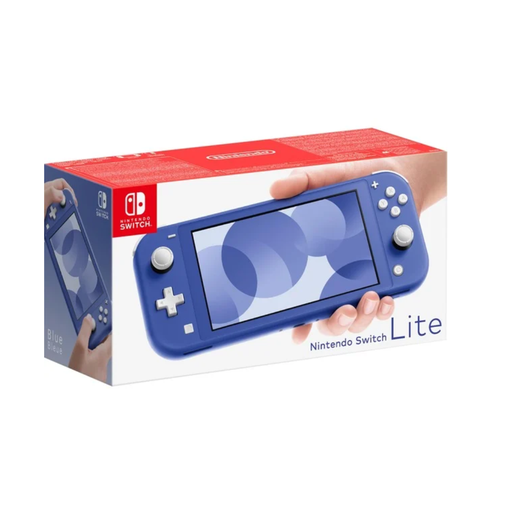 Image unavailable
For Switch adventures that support Handheld Mode; check the mode supported by the specific title.
Nintendo lists the Switch Lite at around 275 g with a 5.5-inch screen. Some Joy-Con features may require extra controllers.
 Image unavailable
For adventure gamers looking for a Nintendo Switch OLED; check that it supports your chosen game and that the game launches offline.
The product name specifies a white OLED model.
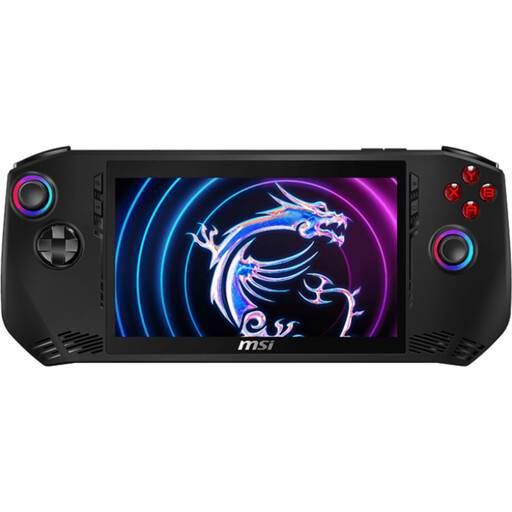 Image unavailable
For PC adventures compatible with the specified version of Windows and the relevant launcher; test that they launch offline before you travel.
Windows 11 Home, Intel Core Ultra 7 155H, 16 GB LPDDR5, 1 TB PCIe SSD and a 7-inch FHD touchscreen with 120 Hz.
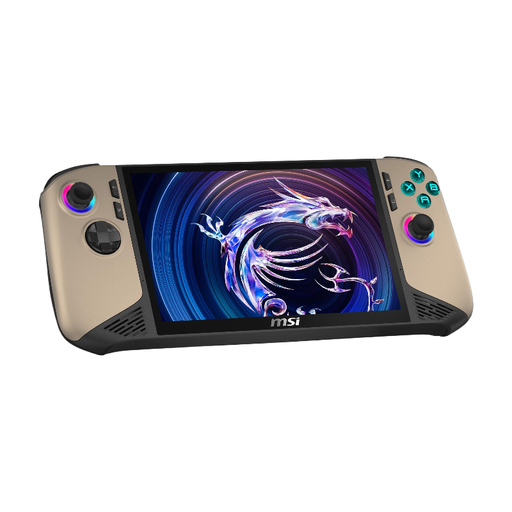 Image unavailable
For PC adventures compatible with the specified version of Windows and the relevant launcher; check that the specific game works offline in advance.
Windows 11 Home, Intel Core Ultra 7, 32 GB RAM, 1 TB SSD and an 8-inch FHD+ touchscreen with 120 Hz.
Not with every Switch 2 software-key card. According to Nintendo, it doesn’t contain the full game, so you’ll need to prepare the download and first launch in advance. Download the specific title before you travel and launch it once.
First update and launch Steam and the game online, then test Offline Mode. According to Steam Support, games that require an active connection or an external launcher won’t work in Offline Mode.
Nintendo specifies microSD Express for expanding the storage. According to Nintendo, other microSD cards can only be used to copy certain Switch screenshots and videos; using a microSD Express card requires a system update over an internet connection first.
Your statutory rights for faulty goods are generally against the seller and are separate from any voluntary manufacturer’s warranty. According to Verbraucherzentrale (13 August 2026), online consumer purchases generally come with a 14-day right to cancel, starting from the day you receive the goods; exceptions and the terms of the specific purchase should be checked.
For the specific device, check that it has the correct CE marking, identifiable product and manufacturer details, safety information in German and a declaration of conformity. The Bundesnetzagentur lists these checks for market surveillance; according to the European Commission, the CE marking is a declaration by the manufacturer, not an individual approval from a government authority.