What should you look for when buying?
Download maps in advance or use your smartphone as a hotspot
Best suited if: you can save the map area before your journey, or you only occasionally need to get another device online.
Things to consider: you won’t need an additional router, but any new downloads on the go will still depend on your tariff and signal.
Mobile LTE router with its own SIM
Best suited if: several devices need to download maps regularly, and you’re considering a separate tariff and a power supply that doesn’t rely on your smartphone.
Things to consider: the additional device needs a suitable tariff. LTE coverage and SIM compatibility should match your route and contract.
Mobile 5G router
Best suited if: you regularly need to connect several data-intensive devices, and your tariff and destinations have suitable 5G networks.
Things to consider: the extra features may be unnecessary for occasional map downloads. 5G and eSIM or vSIM can’t replace network coverage or a data allowance.
For new downloads, signal at your location and a suitable tariff come first. Battery life and the number of devices matter when several people travelling with you need to use the connection regularly.
| Buying criterion |
What to check |
Who is it important to? |
| Coverage where you download |
Check LTE or 5G coverage at your stops and which mobile bands are supported. Save important maps in advance wherever possible. |
If I need to download maps at a stop, I need a usable connection there. Around 36% of consumers put coverage where they download first. |
| Data allowance and tariff |
Check your contract’s data allowance and conditions for router or hotspot use. If you’re travelling abroad, check the roaming rules against your destination. |
If I want to avoid a data limit or cross a border while travelling, I want to know my tariff conditions in advance. Around 29% of consumers prioritise a usable data allowance and suitable tariff conditions. |
| Power supply |
Don’t treat the manufacturer’s battery-life figures as a guarantee of how long it will last in a car. Check the power source and charging accessories for the specific model. |
If the journey is a long one and I don’t want to use my smartphone as a hotspot, a separate power supply matters to me. Around 21% of consumers focus primarily on battery operation. |
| Multiple devices |
Count the devices that will be connected at the same time and check the maximum number supported by the specific model. |
If people travelling with me need to download maps on several devices, we need to be able to share the connection. Around 14% of consumers put support for multiple devices first. |
Joybuy products for mobile internet
This selection of Joybuy products includes mobile network routers and hotspots that may be useful for downloading maps on the go. For each model, check that its power supply and intended use are suitable for your trip.
 No image available
AVM FRITZ!Box 6825 4G LTE
May be worth considering if you want a mobile network router with a Nano-SIM and Wi-Fi, and can provide a suitable power supply.
Features listed in the product name: Cat 6 with 300 Mbps, Wi-Fi 6 AX 600 Mbps, 1× Gigabit LAN and USB-C power supply. These data rates are product specifications, not a guarantee of coverage along your route.
Joybuy
 No image available
MERCUSYS MT110 4G LTE Mobile Wi-Fi
Could suit a group travelling together that wants to use a portable LTE hotspot with its own Nano-SIM.
Check the exact hardware version before buying: the MT110 V1 and V2 differ in battery and Wi-Fi features.
Joybuy
 No image available
ASUS 4G-AX56
May be suitable if you’re looking for a 4G router with a Nano-SIM and Wi-Fi for your intended use.
Listed features include Wi-Fi 6, dual-band Wi-Fi and Gigabit Ethernet. For use on the go, check the power supply for your specific setup.
Joybuy
 No image available
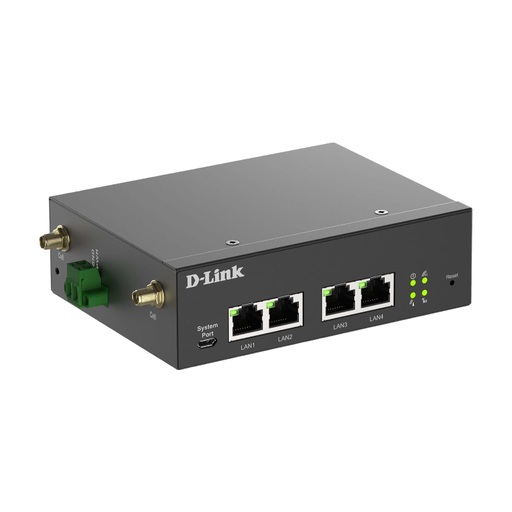
D-Link DWM-314-G
May be worth considering if you need a mobile network router with an external power supply and a suitable installation.
Specifications include 5G NR, LTE, two SIM slots, four Gigabit Ethernet ports and a DC input range of 9–36 V. Check whether this type of device suits your trip.
Joybuy
 No image available
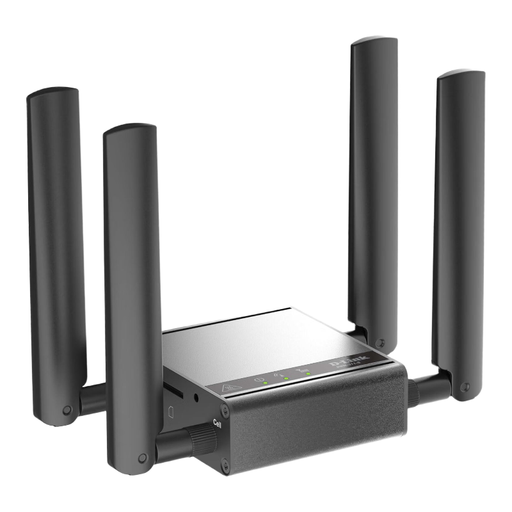
D-Link DWM-311-G
Only an option if a 5G M2M modem suits your intended use and planned installation.
Listed features include 5G M2M, 802.11n and a 2.5-GbE connection. Before setting off, check that the features and power supply suit your specific setup.
Joybuy
Frequently asked questions
Can I use maps without a continuous mobile connection?
Yes, as long as you download the area in advance and your entire route falls within the saved map. According to Google Maps Help, the offline map can then guide you even with a slow or unavailable connection. Check the map area before setting off.
How do I set up a separate hotspot for downloading maps?
For the MT110 V1, MERCUSYS describes using a SIM card and managing the device through an app. Beforehand, check the SIM format, activation, tariff and instructions for the specific hardware version you’ve bought.
Can the driver use the hotspot or maps app while driving?
Under Section 23(1a) of the German Road Traffic Regulations (StVO), drivers may only use a relevant electronic device under the conditions set out there. In particular, they must not pick it up or hold it, and may only use permitted voice control or glance at it briefly in a way that’s appropriate to the situation. The Federal Ministry of Justice and the Federal Office of Justice include this provision in the legislation. More involved setup and downloads should be done while parked with the engine completely switched off, or by another passenger.
Is data roaming included in German tariffs for every trip abroad?
No, it depends on your destination and contract. The Federal Network Agency describes roaming at domestic prices in the EU, as well as Liechtenstein, Norway and Iceland, provided your contract includes roaming. It also notes that exceptions and surcharges may apply. For other destinations, check the conditions of your tariff.
What extra costs or checks should I allow for after choosing a router?
A separate router needs a usable mobile tariff. Roaming charges may also apply when travelling abroad, depending on your tariff. Check whether the charging accessories you need are included, and review the conformity information for the specific wireless device.
How can I check that a product meets the requirements for Germany?
The Federal Network Agency lists CE marking, manufacturer details, German-language instructions and a declaration of conformity among the points to check for wireless and Wi-Fi products. A shop listing alone doesn’t confirm this information for the specific device.


