A USB stick may be enough for occasional copying between compatible devices. For a larger local archive, consider an external HDD, while an SSD may be a good choice if you copy files frequently. First check your devices’ connections and file systems, and don’t keep important sewing patterns on just one external drive.
Who is this guide for?
Anyone backing up offline
You want to make a second copy of your sewing patterns and keep it locally so you can open it later. Germany’s Federal Office for Information Security lists USB sticks and removable hard drives as possible storage media for personal backups.
Anyone switching between Windows and Mac
You copy files between different computers, so you need to consider both the connections and the file system. Apple describes ExFAT as an option for sharing files on drives over 32 GB; according to Apple, a Windows-formatted volume can’t be used as a Time Machine destination.
Anyone sewing on the go
You take sewing pattern files to another workspace and want a portable storage device. Make sure the connection is compatible there; for example, Kingston lists USB-A for the DataTraveler Exodia M.
What should you look for when buying?
USB stick
A good fit if: You want to carry individual sewing pattern files between devices with a compatible connection.
Keep in mind: A single stick is no substitute for a separately stored backup.
External SSD
A good fit if: You copy files frequently or want a portable option for larger transfers.
Keep in mind: Samsung’s figure of up to 1.050 MB/s for the T7 is a manufacturer’s claim, not the result of a test using sewing pattern files.
External HDD
A good fit if: Plenty of storage space for your local archive matters, and the fastest transfer times aren’t your priority.
Keep in mind: CHIP considers HDDs an option for archives where capacity is a priority; this isn’t a test of a specific model.
First decide whether you mainly need a restorable copy, device compatibility, archive space or a portable storage device.
| Need |
What to check when buying |
Who is this most important for? |
| Restorable copy |
Keep the original files, try opening copies and keep the backup up to date; Germany’s Federal Office for Information Security recommends keeping backups usable. |
If I want to access my sewing patterns again after losing them or changing devices, I keep a separate copy. Around 36 % of consumers prioritise having a restorable offline copy. |
| Device compatibility |
Check that the connection and supplied cables are compatible. Apple lists ExFAT for sharing files on drives over 32 GB; according to Apple, a Windows-formatted volume can’t be used as a Time Machine destination. |
If I want to open files on both my Windows and Mac devices, I check the format as well as the connector. Around 29 % of consumers prioritise device compatibility. |
| Archive capacity |
Check the size of your current folder and how much extra space you want; compare the capacities of specific models rather than assuming there’s a universal minimum. |
If my collection is growing or I want to copy over more files, having enough free space is essential. Around 21 % of consumers prioritise archive capacity. |
| Portability |
Consider the connections available at your other workspace and how to store the drive safely; check encryption options if your files are sensitive. |
If I take sewing patterns to another workspace, I need a portable device with a compatible connection. Around 14 % of consumers prioritise portability. |
Common buying and usage mistakes
-
Moving your only copy to the new drive
An external drive can also fail or get lost. If that happens, you could lose your only copy of the sewing patterns too.
Keep the original files for now, open a few copies directly from the drive and update your backup regularly.
-
Assuming a shared drive is suitable for Time Machine without checking
A file system for sharing files between devices isn’t automatically suitable for every type of backup. According to Apple, a Windows-formatted volume can’t be used as a Time Machine backup volume; formatting erases any files already on it.
Before formatting, decide whether you want to share files between systems or create a Time Machine backup, and back up any existing data first.
-
Assuming an SSD’s advertised speed is a reason to buy
A manufacturer’s speed claim for a particular SSD doesn’t tell you how quickly your sewing patterns will transfer. With small files, the connections available and your actual copying habits may matter more when choosing a drive.
First consider how often you copy files and which ones; then choose between a stick, SSD and HDD.
Key brands to consider
Kingston
The DataTraveler Exodia M is a USB-A option for transferring files locally.
- Kingston offers the range in capacities including 128 GB, with a loop for attaching it to a key ring.
- Check that your destination device supports USB-A. These specifications don’t make the stick suitable as your only backup.
Samsung
The Portable SSD T7 is a portable SSD option for frequent local file transfers.
- For the MU-PC1T0T/WW 1 TB model, Samsung lists two cable types, optional password protection and speeds of up to 1.050 MB/s.
- The speed is a manufacturer’s claim, not a measurement using sewing pattern files; the 1 TB specifications apply to this particular model.
Western Digital
WD Elements Portable is an HDD range for locally stored files and archives.
- For the WDBU6Y0020BBK-WESN model, Western Digital lists 2 TB and USB 3.2 Gen 1 or USB 3.0. In its HDD test, CHIP considers HDDs an option for archives where capacity is a priority.
- CHIP’s assessment isn’t a test of this particular model, nor does it mean an HDD is right for every collection.
Seagate
The Basic Portable Drive is a range of wired HDDs for local file copies.
- Seagate says it runs via USB 3.0 without a separate power supply.
- According to Seagate, reformatting may be required for Mac use. This information applies to the Basic range, not all Seagate drives.
Joybuy products for keeping local copies of sewing patterns
For local copies of sewing patterns, choose from USB sticks, external SSDs and external HDDs.
 No image available
WD Elements Portable 4TB USB-C
For a larger local archive, if 4 TB of storage and a USB-C connection suit your needs.
Joybuy
 No image available
WD My Passport, 2 TB, Black
A 2 TB external hard drive for local copies, if this capacity suits your sewing pattern archive.
Joybuy
 No image available
MOVESPEED USB flash drive, 128 GB, YSUSP05-128GSR
For transferring files between devices, if the drive is compatible with their USB-A or USB-C connection.
128 GB; dual interface with USB-A and USB-C.
Joybuy
 No image available
Samsung Portable SSD T7, 2 TB, Titanium Grey
For frequent local transfers, if a portable 2 TB SSD suits your needs.
USB Type-C 3.2 Gen 2.
Joybuy
 No image available
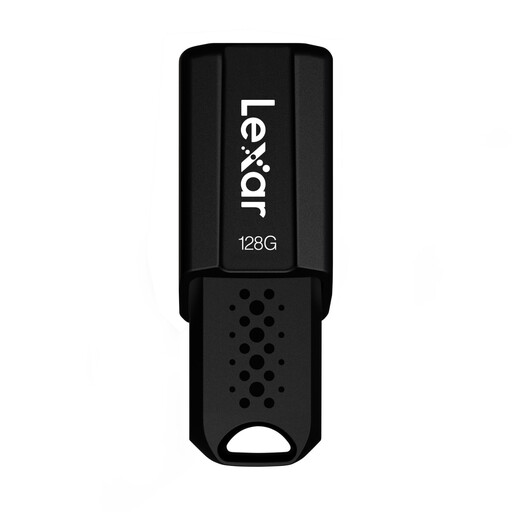
Lexar JumpDrive S80, 128 GB, USB 3.1
For a local copy on a portable USB stick, if 128 GB is enough for your collection.
128 GB; USB 3.1.
Joybuy
Frequently asked questions
How can I copy sewing patterns without using the cloud?
Use your file manager to copy the files to a connected external drive, then check that you can open them from there. Microsoft describes transferring files using an external storage device; you don’t need a cloud account for this copying process.
Can I use the same drive for Windows, Mac and Time Machine?
For sharing files between Windows and Mac in the usual way, Apple lists ExFAT for drives over 32 GB. According to Apple, a Windows-formatted volume can’t be used as a Time Machine backup volume; Apple recommends APFS or APFS (Encrypted) for this. Formatting erases any files already on the drive.
Can I copy purchased sewing patterns to an external drive for my own use?
Under certain conditions, section 53(1) of the German Copyright Act (UrhG) allows individuals to make individual copies for private, non-commercial use, but not from a source that is obviously unlawful. Under subsection 6, these copies must not be distributed. Whether a particular pattern is protected may depend on the circumstances; this does not constitute blanket permission for commercial use or sharing.
Who should I contact if the drive I bought is faulty?
For a consumer purchase, the seller is responsible for statutory liability for defects. EU information states that the minimum period is two years from receipt of the goods. A voluntary manufacturer’s warranty may offer additional benefits, but it does not replace your statutory rights.


