Who should give this choice particular thought?

Close-up photographers using a tripod

If you’re capturing small surface details, you can trigger your mounted camera remotely without touching the body. Nikon Germany recommends using a tripod for close-ups and describes remote shutter release as an additional option.

Buyers unsure about their camera’s connector

If you’re not sure which connector or wireless features your camera has, check the exact model against the manufacturer’s specifications before buying. Canon Germany and Fujifilm provide guidance by model and connector type.

Photographers who change their composition

If you want to rearrange the keys or check your framing from a little further away, consider a compatible remote control or app. Canon Germany explains how supported cameras can be controlled using Camera Connect.

Cable, wireless remote or app: what matters?

Cable release

A good fit if: you’re working right next to a securely mounted camera and the release connector matches your specific model.

The trade-off: the cable limits how far away you can stand; depending on the setup, you may need an adapter.

Wireless remote

A good fit if: you need to stand back from the camera while rearranging the keys, and your exact camera model supports the remote.

The trade-off: you’ll need to set up the connection as well as check model compatibility; you can’t assume a camera supports wireless control just because of its brand.

Camera app

A good fit if: your camera supports remote control through the manufacturer’s app and you’d like to check settings or framing on your smartphone.

The trade-off: this depends on your camera model and a properly set-up connection; an app isn’t a universal compatibility fix.

What to consider What to check before buying Who is it important to?
Camera compatibility Check the full camera model, connector socket and any adapters against the manufacturer’s specifications. I want to avoid choosing a release with the wrong connector. Around 36 % of consumers place the greatest importance on finding the right combination.
Taking photos without touching the camera Check that the camera can be mounted securely and that the release supports the function you need. When photographing small details, I don’t want to touch the camera body to take the shot. Around 29 % of consumers place the greatest importance on this.
Freedom of movement Compare the operating distance and the functions you need with the specifications for the exact camera and remote models. When rearranging the keys, I want to take the shot from a little further away or check the framing on my smartphone. Around 21 % of consumers prioritise this.
Extra device and ease of use Try any existing app-based remote control before buying, and check what’s included and how a separate remote is powered. If my camera can already take photos through an app, I want to try that option first. Around 14 % of consumers would prefer to avoid buying an extra release.

Avoiding common buying mistakes

  • Buying based on the camera brand alone

    Connectors and accessories can vary between models, even within the same brand. A cable release that works with one camera won’t automatically work with other models from the same brand.

    Check the full camera name, remote model and connector against the manufacturer’s specific guidance. Fujifilm explicitly states that certain cameras need an additional adapter for the RR-100.

  • Assuming a remote release can replace a stable setup

    Taking a photo without touching the camera body won’t make up for an unstable camera position or poor focusing.

    Mount the camera securely, set your framing and focus, then take the shot. Nikon Germany recommends using a tripod for close-ups.

  • Buying a remote without checking the app first

    For supported cameras, the manufacturer’s app can be an alternative to a separate shutter release.

    First, try the remote-control features available for your exact camera model. Canon Germany describes Camera Connect for many Canon cameras; Nikon Germany lists SnapBridge as an option for close-ups.

Camera brands and compatible shutter releases

Canon

Canon lists cable and Bluetooth releases, as well as Camera Connect as a possible app alternative, for compatible cameras.

  • Canon specifies an N3 connector and a shutter lock for the RS-80N3; the BR-E1 uses Bluetooth.
  • The connector and wireless support must match your specific camera model.

Nikon

Nikon lists model-specific cable releases, such as the MC-DC2 and MC-DC3, as well as the ML-L7 Bluetooth remote control.

  • Nikon also describes the MC-DC3 as suitable for macro and close-up photography; the MC-DC2 is listed for certain DSLR cameras.
  • Check the specific camera and accessory combination rather than assuming compatibility based on the brand.

Fujifilm

The RR-100 is a wired option for the X and GFX cameras listed by Fujifilm.

  • Fujifilm publishes a model-specific compatibility list.
  • Fujifilm says certain models require a third-party adapter; this doesn’t mean the RR-100 is compatible with every Fujifilm camera.

Sony

Sony describes the RMT-P1BT as a Bluetooth remote control for cameras that support it.

  • According to Sony, the RMT-P1BT uses the camera’s built-in Bluetooth receiver and doesn’t need an additional receiver.
  • Check whether the remote is supported by your specific camera model.

Joybuy products for smartphone photography

The products below are smartphone tripods or smartphone accessories with a remote control. They’re designed for smartphone photography and aren’t a substitute for a remote shutter release confirmed to be compatible with your camera.

Verbex K60 Black selfie stick with floor tripod and remote control

Verbex K60 Black selfie stick with floor tripod

For smartphone photography when you want your phone to stand on its own and take photos from a little further away.

Includes a smartphone holder and Bluetooth remote control; the description lists a range of around 10 m and a maximum smartphone size of 6.0 inches.

View at Joybuy
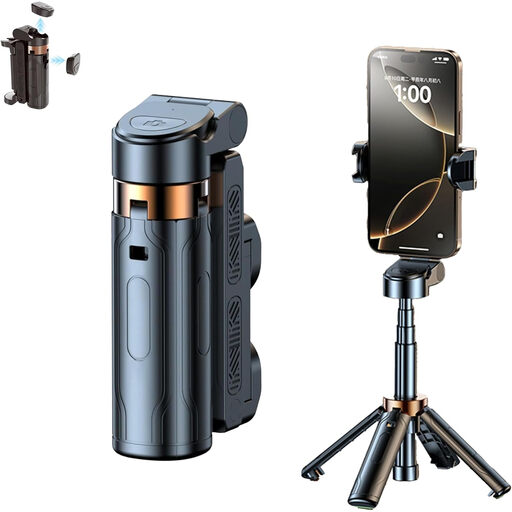
3-in-1 Bluetooth selfie stick with tripod and remote control

3-in-1 Bluetooth selfie stick with tripod

For smartphone photography when you want to mount your phone and take photos using a detachable Bluetooth remote control.

The product description lists an extendable stick and a smartphone holder that rotates through 360°.

View at Joybuy

KINSI smartphone tripod with Bluetooth remote control

KINSI smartphone tripod with Bluetooth remote control

For smartphone photography when you want to take a photo from a distance with your phone mounted on its own stand.

The description lists a folding, height-adjustable stand for use on a table or outdoors.

View at Joybuy

Ulanzi JJ02 phone tripod with Bluetooth remote control

Ulanzi JJ02 phone tripod with Bluetooth remote control

For smartphone photography when you want to mount your phone and take photos wirelessly.

The product description lists a 3-in-1 design that works as a selfie stick, handgrip and extendable tripod, plus two cold shoe mounts.

View at Joybuy

Magnetic smartphone grip with detachable remote control and fill light

Magnetic smartphone grip with remote control and fill light (Black)

For smartphone photography when you want to use a grip or attach the accessory to a tripod.

The description lists a detachable Bluetooth remote control, a 1/4-inch tripod thread and a fill light.

View at Joybuy

Frequently asked questions

Do I definitely need a separate remote control to photograph keys by a window?

No, not necessarily. If you can control your camera remotely using the manufacturer’s app, try this feature first with the camera mounted securely. A separate release may be worth considering if you prefer a different way of working or need extra features.

How can I set up the shot without camera shake when I take the photo?

Mount your camera securely, set your framing and focus, then take the shot without touching the body. Nikon Germany recommends using a tripod for small subjects and notes that even a slight shift can change the focus point.

Will any cable release from the same camera brand fit?

No. Check the full camera name against the manufacturer’s list, and check the socket and any adapter requirements. For example, Canon Germany specifies an N3 interface for the RS-80N3.

What costs or consumer rights should I consider when buying online?

Check whether any adapters or batteries you need are included. The German consumer advice centre explains that consumers buying online in Germany generally have a 14-day right of withdrawal. Your statutory rights against the seller are separate from any voluntary guarantee.

What should I look out for with a wireless remote control in Germany?

Check the information about the specific product and its wireless features. The German Federal Network Agency explains that products covered by the relevant harmonisation legislation must carry CE marking; this doesn’t confirm that a remote is compatible with your camera.