For an online quiz where several people in a shared flat are joining in around the table, a speakerphone could be a good fit if its stated microphone coverage suits your seating arrangement and it offers full-duplex audio and echo cancellation. Jabra, EMEET, Yealink and Dell list these features for certain models, but manufacturer specifications don’t guarantee that voices will come through clearly over the background noise in your flat. A test call in the room you’ll actually use is essential. If you’re hosting the quiz alone, or don’t want the sound playing out loud in the room, a headset or a quieter space may be a better choice. Also check the connection type and exact product variant.
Who is a speakerphone suitable for?
Quiz group around the table
When several people are playing together in person, voices need to be picked up from different seats. Jabra lists a microphone range of up to 2.3 m and full-duplex audio for the Speak2 55; EMEET lists eight microphones, 360° voice pickup and full-duplex audio for the Luna Plus. Compare these manufacturer specifications with your actual table layout and test from every seat.
Hosting a quiz amid flatmate noise
If you’re hosting in a busy room, what matters is whether people sitting further away can understand you over the background noise you’ll actually have. Yealink and Dell list noise or echo cancellation for certain models, but these manufacturer specifications are no substitute for a test call in the room where you’ll be playing.
Hosting on your own
If you’re hosting alone, first decide whether you’re happy for your flatmates to hear the quiz audio in the room. A speakerphone plays sound out loud; if you’d rather listen privately, consider a headset or a quieter room.
What should you look for when buying?
First, decide whether several people will be speaking around the table and whether the quiz audio can play out loud in the room. Then consider how background noise and the connection to your device will affect how you use it.
Speakerphone for a group around the table
A good fit if: several people are playing in person and you want everyone’s voices to be heard together in the room.
Consider: The quiz audio will play out loud in the room; test the seating distances and how clearly everyone can be heard at the table you’ll actually use.
Headset or quieter room
A good fit if: you’re hosting alone and don’t want the quiz audio playing out loud in the room.
Consider: Other people at the table won’t be able to join in easily through a shared central device.
| What matters |
What to look for when buying |
Who this matters to |
| Picking up everyone at the table |
Compare the distances between seats with the microphone coverage; test voices from every seat. |
If several of us are playing around the table, answers need to come through from every seat. Around 31% of consumers put taking part together around the table first. |
| Being heard over flatmate noise |
Check echo cancellation; make a test call with typical background noise. |
If conversations or other noise can be heard during the quiz, I want my voice to remain clear. Around 25% of consumers prioritise clarity over the noise of a shared flat. |
| Being considerate and choosing how audio is played |
Decide in advance who should be able to hear the sound in the room; consider a private listening option if needed. |
If I’m hosting alone, I want to choose who hears the quiz audio in the room. Around 25% of consumers prioritise private listening. |
| Connection and product variant |
Check how it connects to your computer or mobile device, as well as the adapters and contents included with the exact variant. |
If I change quiz location or device, I want to be able to set up a connection that suits it. Around 19% of consumers focus above all on connectivity and getting started easily. |
Common buying mistakes
-
Assuming microphone range guarantees clear speech
Manufacturer specifications for range and noise cancellation don’t tell you how clearly voices will come through with your seating arrangement and the noise in your shared flat.
Plan where everyone will sit, then test a call in the room you’ll use for the quiz. Include voices from all the seats you plan to use, as well as people speaking at the same time.
-
Assuming similarly named versions are identical
HP distinguishes between the Sync 20 and Sync 20+ based on whether a Bluetooth PC adapter is included. The EMEET Luna Plus Meeting Kit is a separate package that includes an expansion microphone.
Before deciding, compare the full model name and the stated contents of the specific variant.
-
Automatically choosing a speakerphone to host a quiz alone
Sharing the audio can be a drawback if your flatmates don’t want to hear the quiz.
First decide whether several people will actually be playing around the table. If not, consider a private listening option or a quieter room.
Key brands to consider
Jabra
The Speak2 55 is described as a compact speakerphone for a smaller group around the table or for switching between devices.
- Jabra lists four microphones, full-duplex audio and a microphone range of up to 2.3 m for the Speak2 55.
- These manufacturer specifications don’t prove that everyone will be heard clearly over background noise in a shared flat. Check computer and mobile connections separately.
EMEET
The Luna Plus is designed for a group around the table; the separately named Meeting Kit adds an expansion microphone.
- EMEET lists eight microphones, 360° voice pickup and full-duplex audio for the Luna Plus.
- Room coverage details are manufacturer specifications, not the results of an independent hands-on test. Check whether the expansion microphone is included with the variant you’re considering.
Dell
The SP3022 is a wired option for a fixed quiz setup at your computer.
- Dell lists USB, full-duplex audio and echo cancellation for the SP3022.
- The wired connection limits where you can set it up. Dell’s noise cancellation details are manufacturer specifications, not proof that you’ll be heard clearly in your shared flat.
Yealink
The SP92 is described as a portable speakerphone with several connection options.
- Yealink lists Bluetooth, USB, full-duplex audio and echo cancellation.
- The data sheet describes a variant with a BT51C dongle. Check what’s included with the specific variant.
HP Poly
HP says the Sync range includes versions for individual workspaces and smaller meeting rooms.
- HP lists a USB connection to a PC and a Bluetooth connection to a smartphone for the Sync 20.
- HP lists the included Bluetooth PC adapter for the Plus version. Don’t assume this applies to every variant.
Joybuy products for group quizzes and solo hosting
The Joybuy products below include portable speakerphones for groups around the table, a wired model and a headset alternative for hosting on your own.
 No image available
Insta360 Wave AI Conference Speakerphone with Bluetooth, White
A portable option for a group around the table if you want to use a Bluetooth connection.
Joybuy
 No image available
EMEET Luna Plus Bluetooth Conference Speaker, 8 Microphones, 360° Voice Pickup, AI Noise Reduction, Dual Connection, 5W Speaker
For a group around the table when you need to pick up voices from different seats.
Features listed in the product name: 8 microphones, 360° voice pickup, AI Noise Reduction, Dual Connection and 5W Speaker.
Joybuy
 No image available
Dell Pro Desktop Speakerphone SP3022
An option for a fixed quiz setup at your computer if you prefer a wired connection. Test how clearly everyone can be heard from the seats you’ll use, with the background noise you’ll have.
Joybuy
 No image available
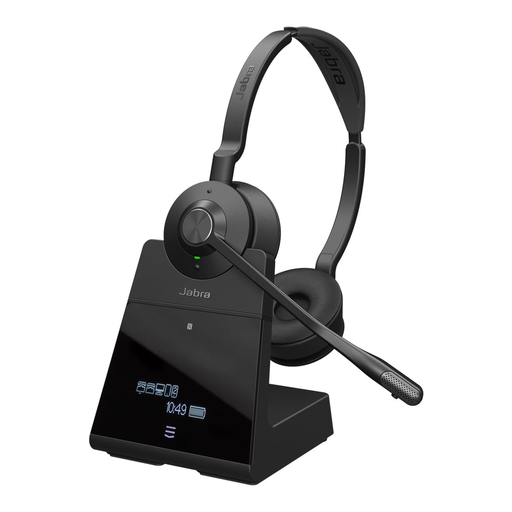
Jabra Engage 75 SE Wireless Stereo Headset, DECT, 150m Range, USB-C to USB-A, with Stand and Cable, Black
A headset alternative for hosting on your own if you don’t want the quiz audio playing out loud in the room. It isn’t a replacement for a speakerphone when a group is playing around the table.
Features listed in the product name: DECT, on-ear design, noise-cancelling microphone, 150m Range, USB-C to USB-A, stand and cable.
Joybuy
Frequently asked questions
How can I check that my speakerphone is set up correctly before the quiz?
Select the device as both the input and output device on your computer, then test a call with answers from every seat you plan to use. Jabra specifically recommends selecting the Speak2 40/55 as the default input and output device; testing it at the table will show whether it works for your group.
Do I need a Bluetooth PC dongle for a Yealink SP92 or HP Poly Sync 20?
It depends on the exact variant. The Yealink data sheet describes an SP92 version with a BT51C; HP specifically lists the included Bluetooth PC adapter for the Sync 20+. Check the model name and what’s included with the specific product listing.
What should I do if a device is faulty or an online purchase isn’t suitable?
The Verbraucherzentrale distinguishes between your statutory rights when goods are faulty and a voluntary guarantee. For online consumer purchases, you generally have a 14-day right to cancel after receiving the goods; exceptions may apply, and you should check the terms of your specific purchase.
What should I check when buying a Bluetooth speakerphone in Germany?
As part of its market surveillance, the Bundesnetzagentur checks for things including a CE mark that is present and correct, an identifiable product and accurate manufacturer details. Check this information on the specific product; this does not amount to an individual assessment of a particular model.
Do I need to record a private online quiz?
No. You don’t need a recording function to transmit live audio during a quiz. Whether recording a particular quiz is permitted can’t be answered in general; check before recording anyone’s voice.


