Teaching alone in a shared flat
If you want to teach hands-free, consider whether a desktop speaker is suitable for your session given the background noise and how audible it will be in the room, or whether a headset would provide better isolation.


A conference speakerphone is a good choice if you teach hands-free, are happy for the audio to be heard in the room and your tutoring space is quiet enough. If you can hear your flatmates or the conversation is confidential, a headset is often a better fit. Manufacturer claims about microphones and filters don’t guarantee that your voice will come through clearly in a shared flat.
If you want to teach hands-free, consider whether a desktop speaker is suitable for your session given the background noise and how audible it will be in the room, or whether a headset would provide better isolation.
If you both want to speak through one device, you’ll need to consider how smoothly you can take turns and whether the device will also pick up unwanted voices in the room.
If you teach using different devices or from different locations, check that each device supports the USB or Bluetooth connection you need.
A good fit if: You teach hands-free at your laptop and are happy for the audio to be heard in the room.
The trade-off: Your flatmates’ voices may be picked up during the session, and a speaker can also cause echo.
A good fit if: Your flatmates are talking or you don’t want the session to be heard through a room speaker.
The trade-off: You’ll have less freedom to move around, and you can’t include other people at the table through a shared device.
A good fit if: You want someone else at the same table to be able to join in.
The trade-off: Check that the microphone’s pickup pattern suits your seating arrangement; an all-round pickup may also capture other voices.
The percentages refer to the single most important buying priority for each consumer giving online tutorials in a German shared flat; each person is counted in one category only.
| Priority | What to check when buying | Who cares about this? |
|---|---|---|
| Background voices and audibility | Test how your voice is picked up from your usual seat, and consider whether the session can be heard in the room. The number of microphones doesn’t prove that unwanted sound will be filtered out effectively. | If I can hear my flatmates or want to keep the session private, good isolation is my top priority. Around 36% of consumers put background voices and audibility first. |
| Natural conversation | Check that the exact model supports full-duplex audio and echo cancellation, then test alternating and simultaneous speech in your conferencing app. | If I want to ask questions at the table without awkward pauses, a natural flow of conversation matters most to me. Around 29% of consumers prioritise clear questions or having several people speak at the table. |
| Connection to your tutoring computer | Check that the USB-A or USB-C connection and the specified computer connection are compatible with your laptop. Not every model is designed to connect to a computer via Bluetooth. | If I want to set the device up easily with my laptop, its connection needs to match the equipment I already have. Around 21% of consumers prioritise laptop compatibility. |
| Moving between locations and power | Compare the connection type and the talk time specified for the exact model. Make sure it has enough charge for longer sessions. | If I move between teaching spaces, set-up and power are key. Around 14% of consumers prioritise a flexible teaching space. |
The stated number of microphones or advertised noise filtering doesn’t prove how clearly your voice will come through amid the noise and distances in your shared flat.
First, decide whether a headset would be more suitable because of the background noise or how audible the session would be in the room. If you choose a desktop device, test it in the place where you’ll actually teach.
The recommended connection depends on the model. Jabra specifies USB for a computer and Bluetooth for a smartphone or tablet with the Speak2 55; the dongle supplied with EPOS models can vary by version.
Check the connection details and what’s included with the exact version against the computer you use for tutoring.
Echo can also be caused by the combination of a speaker and microphone. Your conferencing app may apply its own audio filters, too.
Before your tutorial, test the microphone, playback and a conversation with questions in the app you’ll be using.
The Speak2 range is worth considering for conversations around a table. For the Speak2 55, Jabra lists four beamforming microphones, full-duplex audio, and USB-A and USB-C connections for a computer.
The EXPAND 40 is a USB-C and Bluetooth option for conversations around a table. EPOS offers the EXPAND 40, 40+ and 40T versions.
According to AnkerWork, the PowerConf S3, model A3302, supports USB-C and Bluetooth, making it an option for switching between devices.
The OfficeCore M0 Plus is a desktop device with USB-C, Bluetooth and four microphones.
The Poly Sync 20 is a portable USB and Bluetooth option. HP’s documentation specifically refers to the USB-A version.
This selection includes personal headphones as an alternative to a conference speakerphone, as well as desktop devices for individual use and conversations with several people.
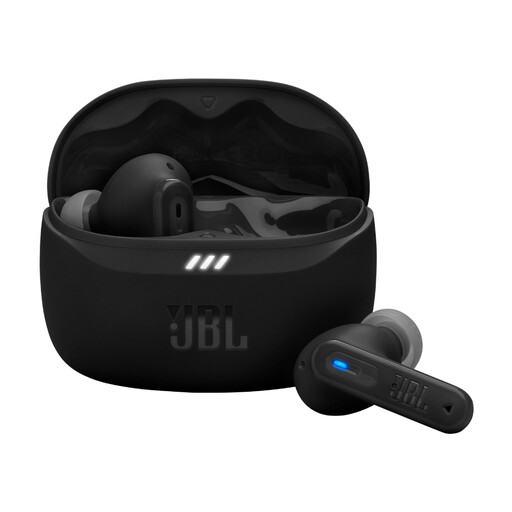 No image available
These earbuds are an option for individual tutoring if you’d prefer personal listening rather than a desktop speaker.
Product details list Bluetooth multipoint, beamforming microphones and adaptive noise cancelling.
 No image available
This model is an alternative to a personal headset if you need a conference speakerphone for a tutoring space at a table.
Product details list Bluetooth, a built-in battery, eight microphones, 360° voice pickup and echo cancellation.
 No image available
For a tutorial with several people at the table, the stated 360° voice pickup and the option to place the device in the centre of the table are worth considering.
Product details list eight microphones, USB-C, Bluetooth, 10 hours of talk time and AI noise cancellation.
Select the microphone and output device you want to use in your conferencing app, then test a conversation with questions before you start. Zoom lists speakers that are too loud and echo cancellation that isn’t working as possible causes. So, a device with echo cancellation doesn’t guarantee an echo-free session.
No, not necessarily. Zoom notes that audio filters can reduce noise and echo, but may affect recordings when the full audio spectrum is important. Test the settings in the app you actually use and for the type of tutorial you teach, to find the one that makes speech and examples clear.
Not without checking that you have permission. Section 201 of the German Criminal Code (StGB) covers the unauthorised recording of another person’s non-public spoken words. Before recording, also check the applicable data protection requirements. Buying a conference speakerphone doesn’t give you permission to record.
Check whether your computer needs an additional adapter and what’s included with the specific version. For a consumer purchase from a business seller in the EU, you have a statutory guarantee of at least two years from receipt of the goods. This is separate from any voluntary manufacturer’s warranty.