Which type of board is right for you?

Online players who want their opponent’s pieces to move automatically

You want to move your own pieces and see your remote opponent’s moves appear automatically on the board. Chessnut and Particula describe these features for their respective robotic models, with platform connections available through their apps.

Online players who don’t want to use an additional smartphone

You want to start and play your game directly on the board. Bryght Labs and Chess.com describe ChessUp 2 as allowing online play without an additional smartphone. However, check which accounts and game modes you’ll need.

Over-the-board players who are happy to move their opponent’s pieces themselves

You want to play with real pieces and are happy to move your opponent’s displayed moves yourself. MILLENNIUM describes the eONE as sending moves to compatible apps; DGT says the Pegasus uses LED rings to show your opponent’s moves.

What to check before you buy

Buying consideration What to check Who it matters most to
Platform and game mode Check the specific model, app, platform and preferred time control together. Lichess requires the official Board API. If I want to use my usual platform and time control, I check that the specific device and app work together. Around 28% of consumers put platform and game mode compatibility first.
Automatic piece movement Check the exact model variant: piece recognition or LED indicators don’t automatically mean that the pieces will move. I don’t want to have to move my opponent’s pieces myself. Around 22% of consumers prioritise automatic piece movement.
Devices and accounts Check whether you’ll need a smartphone, app, Wi-Fi or a specific platform account for the connection you want. If you want to play as directly as possible on the board, check how it’s operated and how you sign in. Around 17% of consumers prioritise the right device and account setup.
Connectivity and updates Check the update process, promised support period and compatibility of the specific model with the app you plan to use separately. If reliable connectivity and maintainable software matter to me, I want to know how updates and integration are handled. Around 22% of consumers prioritise connectivity and software maintenance.
Ongoing costs and documentation Distinguish basic online features from optional services; check the seller, declaration of conformity, instructions and safety information. I want to understand any ongoing costs and check the documentation for the radio equipment before buying. Around 11% of consumers prioritise ongoing costs and safeguards.

Common buying misconceptions

  • Confusing piece recognition with pieces that move by themselves

    Particula distinguishes between GoChess Mini and Lite boards and the robotic XR models. So an online connection or piece recognition alone doesn’t mean the board will move your opponent’s pieces.

    Check the full model name and look for an explicit mention of automatic piece movement.

  • Assuming a free companion app includes every extra feature

    A free app doesn’t mean that learning content, extra features or services are free too. Particula offers the Educators Club separately for teachers, clubs and institutions.

    Separate the online feature you need from optional services and check the terms for each. Paid extras may involve ongoing costs.

  • Assuming an update feature guarantees a set support period

    Bryght Labs describes ChessUp 2 as supporting over-the-air updates. But an update feature alone doesn’t say how long the software or platform integration will be supported.

    Ask for separate confirmation of the promised support period and update process. Changes to external services may mean you need to set up the software again.

Leading brands for online chessboards

Chessnut

Move is a robotic product range. Chessnut describes online play through the Chessnut app, with connections to Chess.com and Lichess.

  • Chessnut describes automatic piece movement and connection through its own app.
  • Its privacy policy mentions that moves, game histories and preferences may be collected. Check the app’s privacy information and the platform connection you’ll need.

Particula / GoChess

According to Particula, GoChess includes non-robotic Mini and Lite models as well as robotic XR versions. The manufacturer’s documentation describes online play through an iOS and Android app.

  • Particula distinguishes the 1XR, which moves one piece at a time, from the 4XR, whose four internal robots can move up to four pieces at once.
  • Using the same app doesn’t mean the models have the same hardware or piece movement. Check the exact version and the features that matter to you.

MILLENNIUM

The eONE M841 is an electronic online chessboard. MILLENNIUM lists Lichess, Chess.com and Tornelo; its quick-start guide explains how to connect to Lichess through the ChessLink app.

  • The German-language instructions and the in-app board connection provide useful guidance for setting it up.
  • Check that the specific app version is compatible with your operating system and preferred game mode.

Bryght Labs / ChessUp

ChessUp 2 is an electronic board with built-in Wi-Fi. Bryght Labs and Chess.com describe online play without an additional smartphone.

  • Chess.com confirms its own integration for rated games; the manufacturer also lists Lichess and over-the-air updates.
  • Check that the specific platform connection works with your account and preferred game mode. An update feature doesn’t guarantee a set support period.

DGT

Pegasus is an electronic online chessboard. DGT says it displays your opponent’s moves using pulsing LED rings.

  • DGT describes connecting to Lichess through the DGT app.
  • DGT’s information about Chess.com varies between FAQs. Before relying on it, ask for confirmation that it’s supported with your specific app and in your region.

Joybuy products with a robotic arm

This selection includes chess robots with a robotic arm. One product listing mentions Lichess integration; before buying, check that the specific app supports your platform and preferred game mode.
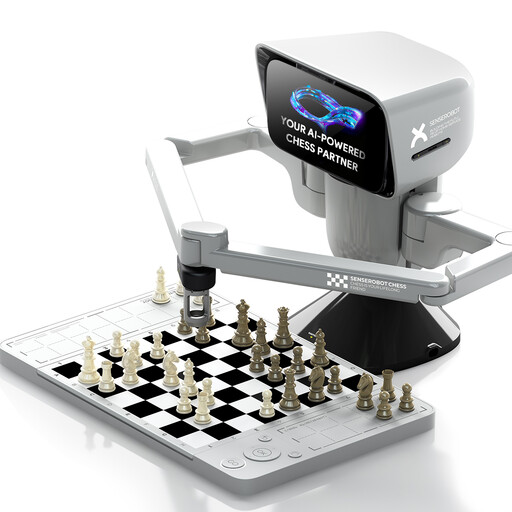
SenseRobot mini AI chess robot with robotic arm

SenseRobot mini – AI chess robot with robotic arm

An option if you’re looking for a portable chess set with a robotic arm and app connectivity. For online games, check that the app supports your preferred platform and game mode.

Described as a portable travel chess set; according to the product title, it supports 3D-printed DIY pieces.

View at Joybuy
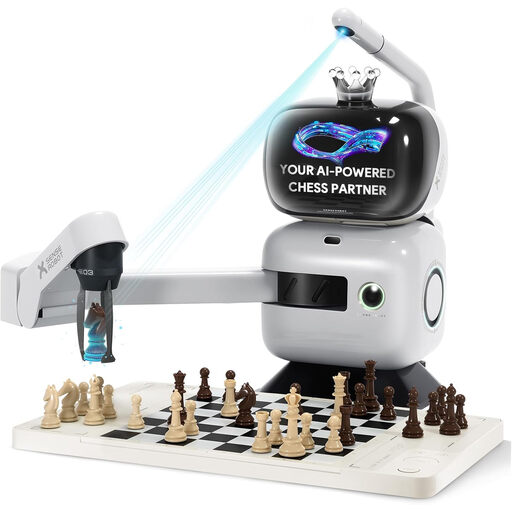
SenseRobot AI chessboard with robotic arm and Lichess integration

SenseRobot AI Chess Board Robot with robotic arm

An option if you’re looking for Lichess integration and pieces that move automatically. Before buying, check that the specific connection works with your preferred game mode.

Listed in the product title: Lichess integration, app synchronisation, 25 AI difficulty levels and more than 1,200 training exercises.

While the robot is operating, keep hands, fingers, loose clothing, hair and small objects away from the moving arm. Place the board on a stable, flat surface.

View at Joybuy

Frequently asked questions about online chessboards

Can I play any time control on Lichess with an electronic board?

No. Lichess requires electronic boards to use the official Board API. According to Lichess, it supports Rapid, Classical and Correspondence; Blitz is available for direct challenges, games against AI and bulk pairing. Bullet isn’t among the listed options.

How do I start a Lichess game with the eONE?

Connect the board within the ChessLink app, not through your Bluetooth system settings. Then sign in to Lichess in the app, set up the pieces and find an opponent there. The MILLENNIUM quick-start guide mentions location access for older Android configurations; check the requirements for your current app version.

Can I use the board’s AI hints during an online game?

In ordinary competitive games against people, you shouldn’t use an engine or ask another person to help you find better moves. Chess.com classifies this kind of assistance as cheating. Transmitting your moves and displaying your opponent’s actual moves are different things.

What documentation should I look for with a Bluetooth or Wi-Fi chessboard?

Check that the EU declaration of conformity relates to the specific radio equipment. Under § 20 FuAG, the instructions and safety information needed for the product’s intended use must also be included. The European Commission outlines the Radio Equipment Directive framework; a shop description isn’t a substitute for product documentation.

Is a manufacturer’s guarantee the same as your statutory rights?

No. A commercial manufacturer’s guarantee is an additional promise. According to consumer information from Your Europe, when you buy from a business, it can’t reduce or exclude the minimum two-year legal protection.