Players with a specific title in mind
If you have particular open-world games in mind, check their platform and edition before choosing a console. Sony, Microsoft and Nintendo each offer quest games for specific platforms.


Start by choosing a console based on the specific quest games you want to play: a title for PS5, Xbox Series X|S or Nintendo Switch 2 won’t automatically be available on the other platforms. For a fixed home-working screen, the next things to consider are compatible game modes, connections and a disc drive. If you’d also like to play in other places, factor in the Switch 2’s handheld mode too.
If you have particular open-world games in mind, check their platform and edition before choosing a console. Sony, Microsoft and Nintendo each offer quest games for specific platforms.
If you mainly play on your home-working screen, compare the connections, supported display modes and disc drive of the specific console variant. Microsoft and Sony list different features for different models.
If you’d like to continue your quests away from your desk, handheld mode is an important factor to consider. Nintendo offers the Switch 2 with both handheld and TV modes.
Start with the specific game, then match the screen, where you want to play, and the disc drive and storage to the way you’ll use your console.
| What matters to you | What to check when buying | Who is this important to? |
|---|---|---|
| Quest game availability | Check the platform, game version and whether an upgrade is required. | If you want to play a specific quest game, check the platform and edition first. Around 29% of consumers say access to their preferred title is their top priority. |
| How it looks on your screen | Check your screen’s HDMI input and supported display modes against those of the game. | If how games look on my home-working screen matters most, I compare the monitor and game modes rather than relying on the console’s maximum stated output alone. Around 23% of consumers put screen quality first. |
| Playing in other places | Check that handheld and TV modes, as well as the games you want, suit the way you’ll play. | If you’d like to play away from your desk too, you’ll need a handheld mode that suits you and supports the quest games you want to play. Around 18% of consumers prioritise being able to change where they play. |
| Features you need | Factor in the games you want, add-ons, storage and the online features you’ll actually use. | When planning my set-up, I only include games and extra features I really want to use. Around 18% of consumers say the features they need are their main consideration. |
| Playing physical games | Check the disc drive, console variant and compatibility with the specific game. | If you want to keep using games you already own on disc or game cards, check the format and model first. Around 12% of consumers say playing physical games is their top priority. |
Open-world games and specific editions are available for certain platforms. The Switch 2 Edition of The Legend of Zelda: Tears of the Kingdom may require an upgrade.
Make a note of the games you want first, then check the platform and edition for each one.
Depending on the title, you may need a different version of the game or an upgrade.
The PS5 Digital Edition, PS5 Pro and the Xbox Series S included in this comparison don’t have a built-in disc drive. The Xbox Series X Carbon Black, on the other hand, is available with a disc drive.
Check the full model name and what’s included before planning to use games you already own.
To play disc games, you may need a compatible disc drive sold separately or a digital version of the game.
Nintendo’s maximum Switch 2 output over HDMI applies in TV mode. PS5 Pro enhancements require a game that supports them.
Check the display modes of the specific game separately from the console’s maximum stated output, and make sure they match your screen.
Storage, game formats and additional content vary by model and game. Add-ons and online services depend on which features you use.
Compare the same games across each option, and only plan for extras you genuinely need.
Additional game content, storage or online services you choose to use may add to your set-up.
PS5 home consoles for playing on a fixed screen; the PS5 Pro is a separate option for supported titles.
Home console variants in the Series X and Series S ranges for Xbox Series X|S games, with different disc drive, storage and resolution specifications.
Switch 2 lets you play in handheld and TV modes, including with a dedicated Switch 2 Edition of Tears of the Kingdom.
The following models cover playing digitally on a fixed screen with a PS5, as well as switching between handheld and TV modes with the Switch 2.
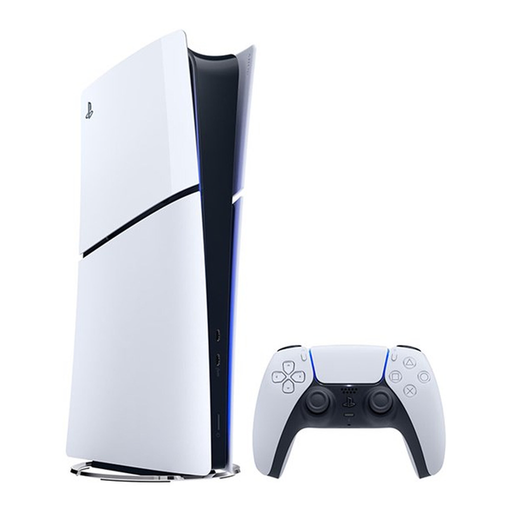 No image available
A good fit if your chosen quest game is available for PS5 and you mainly play on a fixed screen.
825 GB SSD; digital edition with no built-in disc drive. A compatible drive is sold separately.
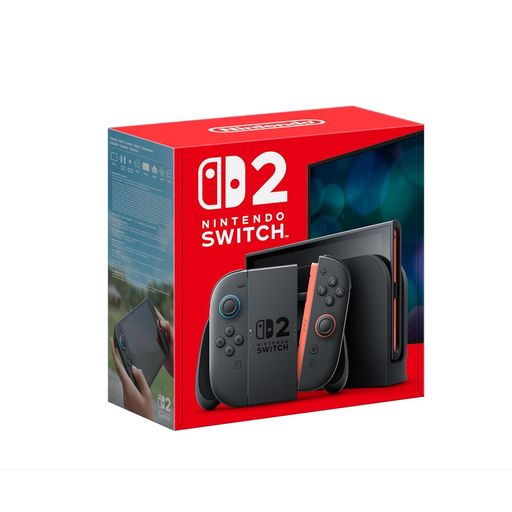 No image available
A good fit if you want to play at your desk and in handheld mode, and your quest game is available for Switch 2.
256 GB internal storage. HDMI output is listed at a maximum of 3840 × 2160 at 60 fps; game output depends on the game and screen.
Some older Switch games may not be compatible, or may not be fully compatible.
No. Availability depends on the specific game and its edition. Sony offers Horizon Forbidden West for PS5, Microsoft offers Starfield for Xbox Series X|S, and Nintendo offers a Switch 2 Edition of The Legend of Zelda: Tears of the Kingdom. Check the details for the title you want before choosing a console.
Check that your screen has an HDMI input and find out which display modes it supports. Nintendo lists the Switch 2’s maximum HDMI output of 3840 × 2160 at 60 fps in TV mode; this doesn’t guarantee the resolution or frame rate of every game.
A console without a built-in disc drive can’t play discs you already own directly. The PS5 Digital Edition and PS5 Pro don’t have a built-in drive; check whether a compatible drive is sold separately for the specific PS5 variant.
The variants described here differ: Nintendo lists 256 GB of internal storage for Switch 2, while the Microsoft comparison lists 512 GB for Series S and 1 TB for Series X Carbon Black. Also check how much storage is needed for system data and the games you install.
Not all of them. Nintendo notes that some older Switch games may not be supported, or may not be fully supported. Check compatibility for the specific games you want to keep playing.