Quest fans with a specific game in mind
You already have a particular open-world game in mind and want to find the right platform and edition first. Nintendo and Sony list specific games and platforms.


Start by checking the specific game and edition: a space-saving console won’t help if the game doesn’t run on that platform. If you want to play quests without having a monitor tied up all the time, the Switch 2 is an option thanks to its built-in display. If you already have a monitor, compare the Xbox Series S and PS5 based on their game libraries, footprint and whether you need a disc drive. A Steam Deck OLED is another option if you want to play compatible PC games on the go – check each game’s compatibility separately.
You already have a particular open-world game in mind and want to find the right platform and edition first. Nintendo and Sony list specific games and platforms.
You want to weigh up playing on a built-in display or an existing monitor, rather than deciding on technical specifications alone. Nintendo, Microsoft Xbox and Sony PlayStation each describe different devices and ways to play.
You want to check in advance whether downloads, expandable storage and not having a disc drive will suit your game collection. Information from Nintendo, Microsoft Xbox and Sony PlayStation relates to specific variants.
| What you’re looking for | What to check before buying | Who will find this most important? |
|---|---|---|
| Availability of your chosen game | Check the official game page, platform and edition; check compatibility for each Switch game individually (Nintendo). | If there’s a particular game I want to play, I’ll check the platform and edition first. Around 29% of consumers put the availability of their chosen game first. |
| Space needed for your setup | Compare the dimensions of the specific variant with the space available; also allow for how it will be positioned and for the screen (Microsoft Xbox, Sony PlayStation). | If desk space is limited, I want to know whether the console, screen and accessories will all fit together. Around 23% of consumers prioritise the space needed for their setup. |
| Playing without a dedicated monitor | Consider the display and stand in relation to where you’ll play; don’t treat the manufacturer’s variable battery-life estimate as a guaranteed play time (Nintendo, Valve). | If I want to play away from my usual monitor too, I’ll look for handheld or tabletop mode and a way to charge the device. Around 18% of consumers prioritise portability. |
| Discs, storage and accessories | Check whether your existing discs are compatible with the disc drive; check the storage option and expansion possibilities (Microsoft Xbox, Sony PlayStation, Nintendo). | If I want to keep using my existing game cards and plan a digital library, I’ll check the disc drive and storage. Around 18% of consumers give these points priority. |
| Video output to a monitor | Distinguish a game’s resolution from the maximum signal output; check supported game modes and monitor connections (Microsoft Xbox, Nintendo). | If I want to play on my existing monitor, I’ll check its connections and the supported game modes. Around 12% of consumers prioritise video output to their own monitor. |
You can use a handheld without a separate monitor; a home console needs a suitable screen to display the picture. Controllers, cables and positioning also affect how much space your setup takes up.
Measure the available space and allow for the screen, console, controller and cables together.
The Xbox Series S and the documented PS5 Digital Edition don’t have a disc drive. You won’t be able to play games you own on disc.
Check your game collection and planned purchases against the disc-drive specification of the specific variant.
Maximum signal output doesn’t guarantee the resolution of every game. Nintendo says that 4K output from the Switch 2 in TV mode requires a compatible game and display; Microsoft lists a 1440p gaming resolution for the Series S, with possible 4K upscaling.
Check the specific game’s display modes and the features supported by your monitor separately from the console’s maximum output.
Nintendo gives a battery-life estimate of 2 to 6.5 hours for the Switch 2, depending on use. Valve gives 3 to 12 hours for the Steam Deck OLED, depending on the content. Neither figure guarantees play time for a particular open-world game.
Make sure you have a way to charge the device during longer gaming sessions on the go.
The Switch 2 is designed for players who want to switch between handheld, tabletop and TV modes while playing compatible quest games.
The Xbox Series S is a compact, all-digital home console. The Series X, which has a disc drive, is another option for compatible Xbox games on disc.
PS5 variants are worth considering if you’re looking for compatible PlayStation adventures. Before choosing, check whether you want the disc or digital edition.
The Steam Deck OLED is a PC handheld option for players with compatible PC games who want to play on the go.
This selection includes Nintendo Switch 2 handheld and tabletop options, as well as a Windows PC handheld. Before buying, check that the specific open-world quest you want to play is available on the relevant platform.
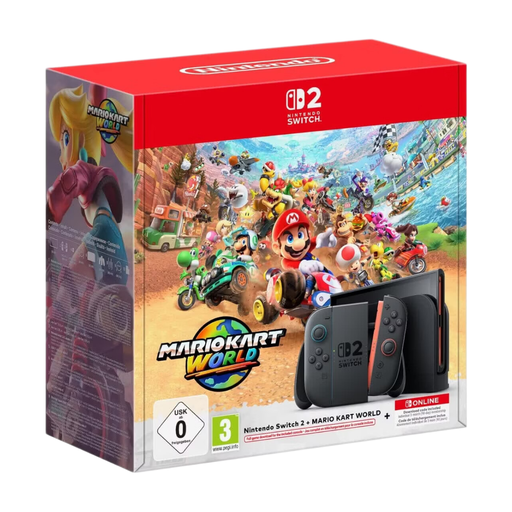 No image available
This bundle is worth considering if you want to play without a monitor connected all the time.
256 GB storage; 1080p screen; TV output up to 4K with a compatible TV and game; HDR; up to 120 fps; Joy-Con 2 controllers; Mario Kart World download; three months of Nintendo Switch Online.
 No image available
The built-in screen and tabletop mode are a good fit if you don’t want to use a dedicated monitor space.
7.9-inch display; 256 GB storage; expandable with microSD cards. Nintendo notes that some older Switch games may not be compatible, or may only be partially compatible.
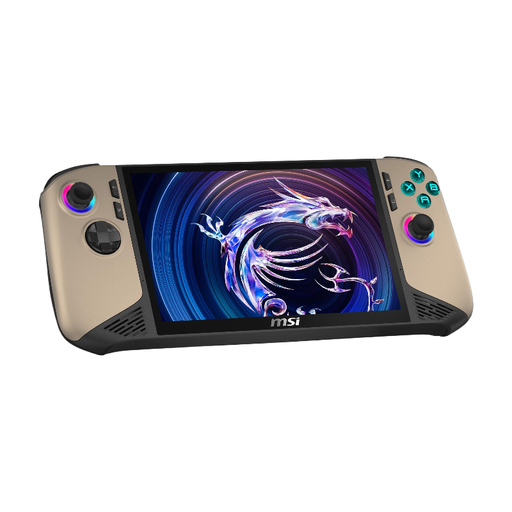 No image available
This PC handheld could suit you if you want to play on the go and use Windows PC games; check compatibility for the specific game you have in mind.
Intel Core Ultra 7; 8-inch FHD+ touchscreen with 120 Hz; 32 GB RAM; 1 TB SSD; Windows 11 Home; two Thunderbolt 4 ports.
Not necessarily for handheld or tabletop mode: the Switch 2 has its own screen and a stand. To display the picture on an external screen, you’ll need the dock and a suitable screen; check that your chosen setup will fit on your desk.
The Switch 2 has a slot for Switch and Switch 2 software cards, but Nintendo warns that some Switch games may have limitations. So check compatibility for each game individually.
Not necessarily: Sony describes Horizon Forbidden West as an offline single-player game. Check the online requirements for other games; according to Sony, digital purchases and downloads on the PS5 Digital Edition require an internet connection and a PlayStation account.
Your statutory rights against the seller are separate from a voluntary guarantee. According to the Verbraucherzentrale, online purchases generally come with a 14-day right to cancel, starting when you receive the goods; how this applies in practice depends on the contract and any applicable exceptions.
Check the USK age rating for the specific game and look for information about in-game purchases or chat features where relevant. The USK notes that an age rating doesn’t indicate whether a game is suitable from an educational perspective.