Start by choosing a controller for your console or PC, then check that the specific game supports it. For gaming from the sofa, the connection type and range are the next things to consider. Extra buttons and advanced haptics only matter if they’re supported by the controller model, connection and game.
Who are the different controllers suitable for?
Players with an existing console
If you already have a PS5, Xbox or Switch 2, first check that the controller and the specific game are compatible with your device. Information from Xbox Support, PlayStation Support and Nintendo applies to specific platforms and features.
PC players gaming from the sofa
When playing on a big screen, the connection and the distance from your PC need to work together. Microsoft lists USB and Bluetooth for Windows, while the wired PowerA model comes with a 3 m cable. What matters is whether the connection reaches your seat.
Fans of customisable buttons and in-game effects
If you want to remap frequently used actions or enjoy supported haptics, check the features of the specific model and game. Sony says adaptive triggers require a supported game; Nintendo describes the Switch 2 Pro Controller’s remappable GL/GR buttons.
What should you look for when buying?
First, make sure your gaming device and game are compatible. Then consider how far you sit from the screen, how the controller is powered and which extra inputs you want. This will help you choose the right connection and features for your setup.
| What matters |
What to check before buying |
Who is this important to? |
| Platform and game |
Check your console or PC operating system, and confirm that the specific game supports the controller. |
If I want to use the controller with a device I already own, I also check that the game supports it. Around 36% of consumers put platform and game compatibility first. |
| Connection from your seat |
Measure the distance and check the cable route or supported wireless connection, including any USB port required. |
If I’m playing from the sofa, the connection needs to reach where I sit. Around 29% of consumers prioritise a suitable distance and connection. |
| Comfort and power |
Consider how the controller feels in your hands and check which charging accessories or power source come with the specific model. |
For longer gaming sessions, I want a controller that feels comfortable and has a power setup that suits the way I play. Around 21% of consumers focus primarily on comfort and power. |
| Extra buttons and effects |
Check the model’s button-mapping options and whether the game supports adaptive triggers or haptics. |
If I want easier access to certain actions or to enjoy supported in-game effects, the specific feature needs to work in the game. Around 14% of consumers prioritise remappable buttons or in-game effects. |
Which common misconceptions should you avoid?
-
Bluetooth doesn’t automatically mean every feature will work
According to Microsoft, on Windows, audio through the Xbox Wireless Controller and connected accessories don’t work over Bluetooth. Sony says haptic feedback on PC requires a supported game and a USB connection.
Check the feature you want, the game, your device and the connection type together.
If one of these features matters to you, you may need a different supported connection; otherwise, you’ll have to go without it.
-
Don’t assume a USB cable will reach your sofa
Even a cable listed by PowerA as 3 m long will only work if the port location and a safe cable route reach your seat.
Measure the actual cable route before choosing a wired model.
If the cable won’t reach, you may need to move your seat or use another supported connection.
-
Don’t assume all 8BitDo models use the same stick technology
The 8BitDo product page lists Hall Effect sticks for the Ultimate 2.4G, while the manufacturer’s FAQ lists ALPS sticks. So don’t assume either specification applies to a particular version without checking.
Before choosing a model based on this feature, confirm the exact version and stick specifications.
Key brands to consider
Microsoft Xbox
An option for Xbox and Windows PC if you want to choose between a wired or wireless connection supported by your device.
- Microsoft lists USB and Bluetooth for Windows.
- According to Xbox Support, audio through the controller and connected accessories don’t work over Bluetooth on Windows.
Sony PlayStation
The DualSense is particularly well suited to PS5 and games that support its features.
- Sony lists adaptive triggers for supported games.
- For haptic feedback on PC, Sony also requires a USB connection and a supported game.
Nintendo
The Switch 2 Pro Controller is designed for Nintendo Switch 2 players who want to use a separate controller.
- Nintendo lists remappable GL/GR buttons, a headphone jack and an included USB charging cable.
- These details apply to the Switch 2 model and shouldn’t be assumed to apply to older Pro Controllers.
PowerA
The Enhanced Wired Controller is a wired option for a fixed gaming spot with a compatible Xbox or Windows device.
- PowerA lists a detachable 3 m USB cable and two remappable buttons.
- The cable limits where you can sit, so check that it’s long enough and can be routed safely to your gaming spot.
8BitDo
The Ultimate 2.4G is worth considering as a PC option with a receiver, dock and rear buttons.
- 8BitDo describes Windows support and use with a receiver.
- The manufacturer’s product page and FAQ list different stick types, so check the specifications for the exact version.
Controllers at Joybuy
The following Joybuy models are listed for a range of Xbox, PC and Nintendo Switch setups. Check the stated platform for each model and make sure its wired or wireless connection suits where you sit.
 No image available
Razer Wolverine V3 Tournament Edition, White
For Xbox or Windows PC players if a wired connection reaches your seat.
Listed as a USB gamepad for Xbox Series X|S and PC.
The product details state that the cable is 3 m long, which limits where you can sit.
View at Joybuy
 No image available
BIGBIG WON Rainbow 2 Pro Wired
For players whose device and game are compatible with the platforms listed in the product name.
Described as a wired controller for PC, Switch Lite and PS4.
Check the cable length before choosing it for gaming from the sofa.
View at Joybuy
 No image available
Microsoft Xbox Wireless Controller, Pulse Red
For Xbox and Windows PC players looking for a wireless controller. Check that its supported connection works with your device.
Listed for Xbox One, Xbox Series X|S and PC. Microsoft lists USB and Bluetooth for Windows; audio through the controller isn’t supported over Bluetooth.
According to the product details, the controller runs on two included AA batteries.
View at Joybuy
 No image available
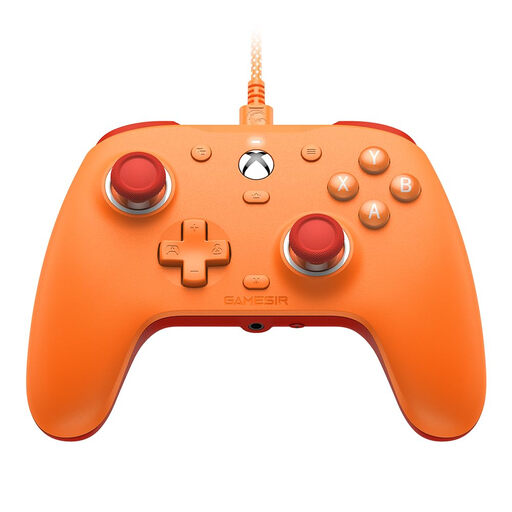
GameSir G7 SE, Orange
A wired option for players with a compatible Xbox or Windows PC device.
Listed as a wired model for Xbox Series X|S, Xbox One and Windows 10/11; the product name specifies Hall Effect sticks.
View at Joybuy
 No image available
Nintendo Switch 2 Pro Controller
For Nintendo Switch 2 players who want extra remappable inputs.
Nintendo lists GL/GR buttons and a headphone jack.
Nintendo describes the included USB cable as a charging cable, so make sure you have a suitable way to charge the controller.
View at Joybuy
Frequently asked questions
Will any Bluetooth controller work straight away with a TV?
No. A Bluetooth specification alone doesn’t mean your TV or its gaming app supports the controller. Check your device’s requirements and whether the specific game supports the controller.
What do I need for haptic feedback with a DualSense on PC?
According to Sony, you need a supported game and a USB connection. Pairing over Bluetooth alone doesn’t mean the haptics will work in that game.
What ongoing costs or rights should I consider when buying online?
Check which charging accessories or power source are included with the model. For a typical online purchase from a trader, Your Europe says you generally have a 14-day right to cancel from the date of delivery. Goods bought in the EU are also covered by a minimum two-year legal guarantee against the seller. This is separate from any voluntary manufacturer’s warranty.
What does the Bundesnetzagentur check on wireless controllers?
The Bundesnetzagentur says that its market surveillance checks, among other things, for the CE marking, that the product can be identified and that the manufacturer’s details are correct. According to the Bundesnetzagentur, a CE marking is the manufacturer’s declaration of conformity, not an independent quality mark.


