Which setup is right for you?

Family history recordists

If you want to record someone telling their story at home without lots of equipment, a recorder with built-in microphones can make setup simpler. Freie Universität Berlin recommends choosing a quiet place for oral history interviews; listen back to a test recording featuring both voices.

Interviewers using two microphones

If you want to edit the voices separately, check that the specific device has the right microphone inputs and records separate tracks. Oral-History.Digital describes exporting a stereo file with each voice on a separate channel as one possible approach.

Collection and archive managers

For longer interviews that will be catalogued later, check the file format, backup arrangements and usage rights with the collecting organisation in advance. Oral-History.Digital highlights the flow of the conversation and subsequent documentation as important considerations when recording.

What should you look for when buying?

Priority What to check before buying Who is it important to?
Clear voices Make a test recording of both voices in the room you plan to use, then listen back; check where you can position the recorder and what microphone connections it has. If you want to record someone telling their story in a quiet setting and make sure it’s easy to understand without a complicated setup, a listening test matters more than a single format specification. Around 36% of consumers put speech clarity first.
Recording each voice separately Check that there are suitable inputs for both microphones and that the device genuinely records separate tracks. If needed, check the power requirements too. If the interviewer and interviewee speak at different volumes, separate tracks make editing easier later. Around 29% of consumers prioritise recording each voice separately.
Keeping long recordings safe Check the recording time available for your chosen format; test the storage and power supply before your appointment, then back up the files afterwards. If your conversation is likely to be long or will later become part of a collection, the recording format and backup arrangements need to suit your plans. Around 21% of consumers pay particular attention to recording time and file backup.
Ease of use Try starting a recording, checking the display and listening back before the interview; only factor in extra features if you have a specific need for them. If you want to focus on the person telling their story during the conversation, you should be able to start and check the recording without complicated steps. Around 14% of consumers prioritise straightforward operation.

Common buying mistakes

  • Assuming a higher bit depth can make up for poor microphone placement

    A device setting won’t get rid of distracting room noise or make up for a poorly positioned microphone.

    Start by choosing a quiet room, positioning the recorder appropriately and listening to a test recording. Then compare formats and connections.

  • Confusing a microphone input with two separate channels

    Having a connection doesn’t necessarily mean the interviewer’s and interviewee’s voices will be recorded independently.

    Check the number and type of inputs on the specific model, and confirm that the tracks are actually saved separately.

    Depending on the channel separation you need, you may need a different recorder, along with suitable microphones and cables.

  • Assuming the maximum recording time applies to every format

    For the Sony PCM-A10, Sony lists different maximum recording times for different LPCM and MP3 settings.

    Compare the available recording time and storage requirements with the format you actually plan to use.

    For longer appointments, you may need to allow for extra storage or power.

Brands and suitable product ranges

Zoom

The H1essential is designed for a simple setup with built-in microphones, while the H4essential offers options for external microphones and separate tracks.

  • Zoom says the H1essential has a 3.5 mm microphone input and a headphone output. The H4essential has two XLR/TRS inputs.
  • The H4essential’s connections are not available on the H1essential. If you want to record separate voices, check the recording tracks on the specific model too.

Tascam

The range includes the compact stereo DR-05XP, the DR-40XP with external inputs, and the Portacapture X8 for more extensive multitrack recording.

  • Tascam lists two XLR/TRS inputs for the DR-40XP and describes the DR-05XP as operable with one hand.
  • More tracks won’t get rid of room noise or remove the need to choose the right microphones and recording setup.

OM SYSTEM

The LS-P5 is a compact option with built-in microphones and internal storage.

  • OM SYSTEM lists 16 GB of internal storage, microSD support and WAV recording.
  • Adjustable directionality is no substitute for listening to a test recording in the room you plan to use.

Sony

The PCM-A10 is a compact PCM recorder with internal storage, a recording monitor and an external microphone input.

  • Sony Germany lists 16 GB of internal storage.
  • According to Sony, the maximum recording time depends on the LPCM format. Check the available time for the setting you actually plan to use.

Philips

The VoiceTracer DVT7110 is a voice-focused, easy-to-use option with internal storage.

  • The manufacturer’s manual lists PCM recording, 8 GB of internal storage, an external microphone connection and a headphone socket.
  • Having an external microphone connection alone doesn’t mean you can record two external microphones on separate tracks.

Joybuy products for interviews at home

This selection includes recorders with built-in microphones for oral history interviews at home. A test recording is still important to check how clear the audio is in your own room.

PLAUD Note Pro voice recorder, 64 GB, black

PLAUD Note Pro voice recorder, 64 GB

Could be suitable for a compact recording setup with built-in microphones; test how clear the speech is in the room you plan to use.

The product title lists 4 MEMS microphones, 64 GB of storage and 30 hours of battery life, as well as compatibility with Android and iOS.

View at Joybuy

Mobvoi TicNote Lite AI voice recorder, 4 GB, black

Mobvoi TicNote Lite AI voice recorder, 4 GB

An option for a straightforward recording workflow; before the interview, check that the controls and any text-based work you want to do later suit your process.

The product title lists 4 GB of storage and integration with GPT-5 and Claude Sonnet 4.1.

View at Joybuy
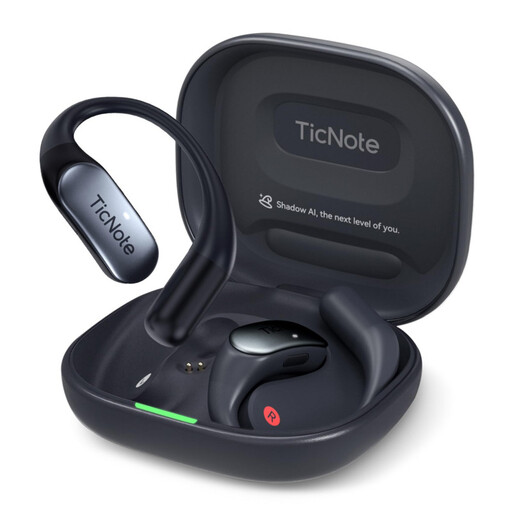
Mobvoi TicNote Pods 4G AI voice recorder, 32 GB, navy blue

Mobvoi TicNote Pods 4G AI voice recorder, 32 GB, navy blue

Could suit a portable recording setup with built-in microphones; check whether it delivers the speech clarity you need in your interview room.

The product title lists 32 GB of storage, a dual-microphone array, 4G and a wireless charging case.

View at Joybuy

Mobvoi TicNote Standard AI voice recorder, 64 GB, dark grey

Mobvoi TicNote Standard AI voice recorder, 64 GB, dark grey

For interviews using built-in microphones, what matters is whether the recording is clear in the room you plan to use. If you’ll be handing it over to a collection later, check the required archive format with them.

The product title lists 64 GB of storage, a 3-microphone array and 20 hours of recording time. According to the product information, it records in Ogg format.

View at Joybuy

Rexsun 64GB portable digital voice recorder, L15

Rexsun 64GB portable digital voice recorder, L15

An option for getting started with minimal fuss. Try it out beforehand to make sure recording and listening back later fit into your interview workflow.

The product title lists 64 GB and the model name L15.

View at Joybuy

Frequently asked questions

How should I prepare the room for recording?

Choose a quiet place with the interviewee, then listen to a test recording featuring both voices. Freie Universität Berlin highlights distracting background noise as a consideration for oral history interviews.

Do I have to use two lavalier microphones for an interview?

No, not for every interview. In a recommendation from 2022, Oral-History.Digital lists two lavalier microphones as part of a professional recording setup. What matters is whether both voices are clear in your room and whether you need separate tracks.

Which audio format should I use if the recording will be added to a collection later?

Check the required format with the collecting organisation before you record. Oral-History.Digital recommends exporting in stereo where possible, for example with the interviewer on the left channel and the interviewee on the right. The collection’s requirements take precedence.

Can I record a private conversation without checking first, or publish it later?

In Germany, recording another person’s non-public spoken words without authorisation is a criminal offence under Section 201(1)(1) of the German Criminal Code (StGB). Check that you have permission before recording. Processing or publishing personal data later is subject to separate legal requirements; according to the Federal Commissioner for Data Protection and Freedom of Information, consent can be one possible legal basis, but it is not the only one.

What rights do I have if the product develops a fault after purchase?

For consumer purchases in the EU, you have at least a two-year legal guarantee from the date you receive the goods, as explained by Your Europe. An additional manufacturer’s guarantee does not replace these rights; check who the seller was for your specific purchase.