What should you consider when choosing?
First decide whether you want to record just the person telling their story or both speakers. This will determine the microphones, connections and recording equipment you need.
| What you need |
What to check before buying |
Who should pay particular attention? |
| Recording the story and questions |
Decide who will wear a microphone and whether you want to record each voice separately. |
If I want to review the account and questions separately, I’ll need microphones and compatible inputs for both voices. Around 34% of consumers in this context make this their main priority. |
| Simple computer recording |
Check whether your computer has USB-A or USB-C, then select the correct microphone input in your recording software. |
If I want to record one voice directly on a computer, I’ll look for a compatible connection and an input source I can monitor. Around 27% of consumers prioritise a simple computer connection. |
| Fit and interview setting |
Check the fit and microphone position with the speaker in advance, then listen to a short test recording. |
If the interviewee will wear the headset during a longer account, I’ll want to check that it fits comfortably and doesn’t unnecessarily disrupt the conversation. Around 20% of consumers prioritise a comfortable fit and an unobtrusive interview setting. |
| Using existing audio equipment |
Check the exact model, microphone and headphone connections, cable and recording equipment required. |
If I already use professional recording equipment, the microphone needs to work with the inputs I have. For example, the Shure WH20XLR does not include headphones. Around 19% of consumers prioritise compatibility with their existing audio equipment. |
Joybuy products for recording a single voice
The following wired headsets are designed for recording a single voice on a computer or compatible recording device. To record the interviewee and interviewer as separate voices, you’ll need a suitable microphone and recording setup for each.
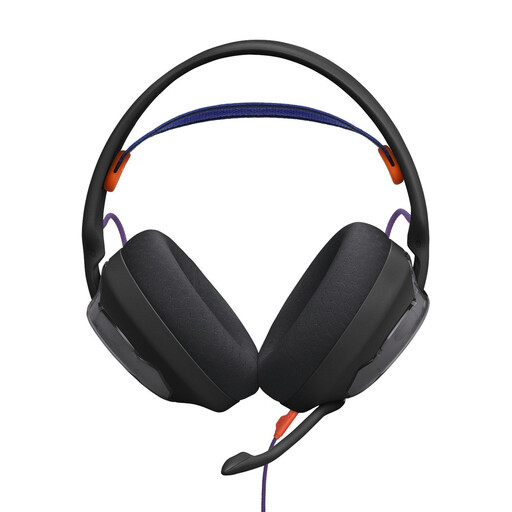 No image available
JBL Quantum 250 wired over-ear gaming headset, black
For recording a single voice, this wired headset could be an option if its 3.5 mm connection is compatible with your recording device.
Over-ear headset with a detachable, unidirectional microphone; the product description lists PC compatibility.
View at Joybuy
 No image available
Logitech H540 stereo headset
For computer recording, check that the USB-A connection is compatible with your device and that the headset is selected as the microphone input in your recording software.
The product description lists an adjustable microphone, plus volume and mute controls on the headset.
View at Joybuy
 No image available
Logitech 960 stereo headset
It could work for recording a single voice on a computer, provided the USB connection is compatible with your device and recording software.
The product name specifies USB and a 2.4 m cable. The description also lists an adjustable microphone boom, plus volume and mute controls.
View at Joybuy
 No image available
Logitech H151 stereo headset
This wired headset could be suitable if your recording device has a compatible 3.5 mm connection.
The product description lists a microphone that rotates through 180° and an inline control with a mute switch.
View at Joybuy
 No image available
Jabra Evolve2 30 SE, 23189-999-779
To record one speaker on a computer, check that the USB-A connection is compatible with your device and recording software.
The product description lists two integrated microphones, plus inline volume and mute controls. This headset is not a substitute for separate microphones for two speakers.
View at Joybuy
Frequently asked questions
Is one headset enough for both people in a seated interview?
A single headset microphone isn’t enough to record two separate voices, as it sits close to the person wearing it. Wherever possible, Oral-History.Digital recommends using a separate lavalier microphone for the interviewee and interviewer, recording them on separate channels.
What should I check just before recording?
Ask both people to speak briefly, check the input source and mute setting, then listen back to the recording. Position the boom microphone and check whether breath or popping sounds are distracting with your chosen headset. Shure’s general advice on microphone positioning is no substitute for a test recording.
What extra equipment might a professional headset require?
Check the cable and connection before ordering: according to the manufacturer, the cable is not included with the Sennheiser HMD 26, item 700318. The Shure WH20XLR is a microphone with an XLR connection and no integrated headphones, so you’ll also need to consider compatible recording equipment and, if required, separate headphones.
What cancellation rights apply to online purchases in Germany?
According to general consumer information from the Verbraucherzentrale, consumers can usually cancel online purchases within 14 days of delivery. Check the terms of the specific offer. This general information is not a guarantee for any particular retailer or item, and does not cover separate rights relating to faulty goods.
Can I record or share a private oral history interview without permission?
Under § 201 StGB, unauthorised recording of another person’s privately spoken words may be a criminal offence. The provision also covers certain uses of, or ways of making available, a recording made in this way. The Federal Ministry of Justice and the Federal Office of Justice explain the legal rules. Get permission to record before the interview; archiving and publication should also be assessed in light of their specific purposes.


