What to look for when buying
First decide whose voice the headset microphone needs to pick up. Then check the fit and connections, and listen back to a test recording.
Wired USB headset
A good fit if: One person is speaking at a computer and you want a simple USB connection. With the Jabra Evolve2 40 SE, check the exact USB, mono/stereo and platform variant.
What to consider: The microphone won’t automatically pick up the person sitting opposite. Check which voices are actually captured in the saved recording.
Analogue TRRS headset
A good fit if: Your recording device has a suitable combined headset socket and you want a detachable microphone. The RØDE NTH-100M is one example.
What to consider: The NTH-100M microphone requires the supplied TRRS cable. A suitable adapter and power solution may be needed for separate mixer inputs; RØDE explains the connection requirements.
Broadcast headset with separate connections
A good fit if: You have a compatible recorder or audio interface and want to focus on the wearer’s voice with a boom microphone. Examples include the Audio-Technica BPHS1, beyerdynamic DT 297 PV MK II and Sennheiser HMD 300.
What to consider: Connections and what’s included vary by model. The BPHS1 has separate XLR and 6.3 mm connections; the DT 297 PV MK II is supplied without a connection cable.
Microphone close to the person telling their story
A good fit if: The person telling their story doesn’t want to wear a headset, or you want their voice to be the focus. A suitable microphone can be positioned nearby, and questions can be recorded separately if needed.
What to consider: An additional microphone means more equipment to set up. Before the long recording, test the distance, rustling noise and levels for both voices.
| Requirement |
What to check when buying |
Who is this important to? |
| Recording both voices |
Plan a microphone position for each person and check that the recorder or software can actually record both required inputs. |
If I want to understand both the questions and the recollections later, I’ll plan a suitable microphone for each person. Roughly 31% of consumers prioritise getting two clear voices. |
| Comfort during long sessions |
Try the chosen style of headset for a realistic length of time, and ask whether the person telling their story wants to wear one at all. |
When choosing a headset for a long storytelling session, I want to know whether the person wearing it finds that particular design comfortable. Around 25% of consumers put comfort during long recording sessions first. |
| Connecting to your recording device |
Check the model variant, what’s included, microphone input, headphone output and any microphone power requirements against your existing equipment. |
With a recorder I already own, I want to check the microphone and headphone signal paths in advance. Around 25% of consumers say checking connections is their main concern. |
| Managing background noise |
Make a test recording from the planned seats, including both quiet and loud sections. Listen to the saved file and check both voices. |
If there’s paper rustling in the room or someone is sitting further away, I want to listen to the recording rather than rely on the headset’s ear cups to block noise. Around 19% of consumers prioritise being able to check recordings for background noise. |
Joybuy product options
The Joybuy options below are headsets with a microphone for the wearer, and include both wired and wireless models. You’ll need to plan a separate, suitable microphone position for the second voice.
 No image available
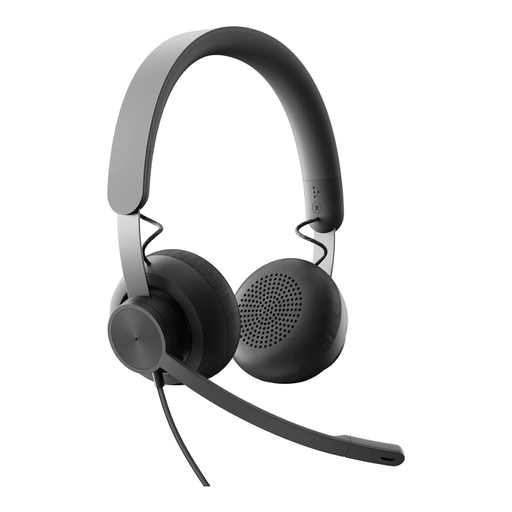
Logitech Business Zone Wired Teams Headset, Graphite
For the wearer’s voice when the recording device has a compatible 3.5 mm connection; the second voice needs its own recording setup.
Wired; 3.5 mm connection; adjustable microphone boom; on-ear design.
View at Joybuy
 No image available
JBL Quantum 400 Over-Ear Gaming Headset, Black
For the wearer’s voice if the recording device supports one of the listed connections; recording both voices requires separate microphone positions.
Wired; USB-C and 3.5 mm connections; flip-up boom microphone with mute function.
View at Joybuy
 No image available
Logitech 960 Stereo USB Headset
For the wearer’s voice when recording on a computer via USB; a second voice needs its own suitable microphone.
USB connection; 2.4 m cable; adjustable microphone boom; volume and mute controls.
View at Joybuy
 No image available
Jabra Evolve2 75 Wireless PC Headset with Charging Dock
For the wearer’s voice, provided the chosen connection is compatible with your recording device; plan a separate recording setup for the second voice.
Wireless headset; Bluetooth and USB-C connection according to the product description; fold-away microphone boom.
View at Joybuy
 No image available
Jabra Engage 75 SE Wireless Stereo Headset, Black
For the wearer’s voice if the base station can be connected to the recording computer in a compatible way; the second voice needs its own recording setup.
DECT wireless; base station with USB connection to PC; on-ear headset with a stated weight of 90 g.
View at Joybuy
Frequently asked questions
Is one headset enough to record both questions and recollections clearly?
Don’t assume so: the boom microphone sits close to the wearer’s mouth. If both voices matter, plan a suitable microphone position for each person and play back a test recording to check which voices have actually been captured.
What should I set up and check before a long interview?
Check the connections, microphone position and recording levels. Make a test recording in the planned location and listen back to it. Also check the cables and cushions on the specific model: Audio-Technica lists replaceable cables and ear cushions for the BPHS1, while RØDE describes detachable cushions on the NTH-100M.
What extra parts might I need for a headset?
It depends on the recording device and model. According to beyerdynamic, the DT 297 PV MK II doesn’t include a connection cable; the BPHS1’s separate XLR and headphone connections need to match your equipment. Recording two voices may also require a second microphone with a suitable recording setup.
Can I simply record and publish an oral history interview in Germany?
Under Section 201(1)(1) of the German Criminal Code (StGB), recording another person’s privately spoken words without authorisation is prohibited; the Federal Ministry of Justice and the Federal Office of Justice provide information on this. Recording and subsequent sharing or publication should be considered separately. If personal data falls within the scope of the GDPR, its processing needs an applicable legal basis. The Federal Commissioner for Data Protection and Freedom of Information explains that consent is one possible basis; whether an exception applies depends on the specific project.


