What should you consider when choosing?
For an interview around a shared table, the main considerations are capturing both voices, the room’s acoustics, reliable recording and how much setup is involved.
| Priority |
What to check before buying |
Who will find this most important? |
| Capturing both voices |
Check the recording coverage against the seating positions, and confirm whether the setup actually saves separate tracks. |
If I want to capture both the person telling their story and the interviewer clearly, I’ll test both seats. Around 36% of consumers put capturing both voices first. |
| Allowing for room noise |
Position the microphones where people will be sitting and make a test recording with the room’s usual background noise. |
If I can’t avoid echo or background noise, I’ll want to position the microphones accordingly. Around 29% of consumers prioritise room acoustics and how to manage them. |
| Recording longer conversations reliably |
Check the storage, power supply and file access, and play back a test recording. |
If I want to keep a longer conversation as a usable file, I’ll check the whole recording process in advance. Around 21% of consumers put reliable recording first. |
| Easy setup |
Check that the connections and recording equipment you need work with your existing technology, and see what accessories are included. |
If I want to get started with my existing equipment and keep setup as simple as possible, I’ll check that all the necessary connections are covered. Around 14% of consumers value straightforward setup above all else. |
Joybuy products for table interviews
This selection includes standalone recorders, two microphones designed for use close to the speakers, and USB microphones for a table setup or a single-speaker position. The right option for you depends on whether you want to position the two people separately, whether you’ll be using a computer and which connections you have available.
 No image available
PLAUD Note Pro Voice Recorder, 64 GB
This model may suit you if you want a standalone recorder that can capture the conversation without a laptop running.
The product information lists 64 GB of storage, four MEMS microphones and up to 30 hours of recording time.
The app is part of the intended process for using the stated file and AI features.
View at Joybuy
 No image available
SYNCO P2ST Dual Wireless Lavalier Microphone, USB-C
This dual system is an option if you want each person in the conversation to use a microphone positioned close to them.
The product information lists two microphones, a USB-C receiver, a 2.4 GHz wireless connection and a charging case.
Check that your recording device has a suitable USB-C connection and that your chosen recording app works with the setup.
View at Joybuy
 No image available
Rexsun Digital Voice Recorder, 64 GB
This standalone recorder is described as suitable for recording without a computer running.
The product information lists two omnidirectional microphones, 360° recording, an included 64 GB TF card and up to 22 hours of recording time.
Wide-area recording can also pick up room noise, so test the placement at the table you’ll actually be using.
View at Joybuy
 No image available
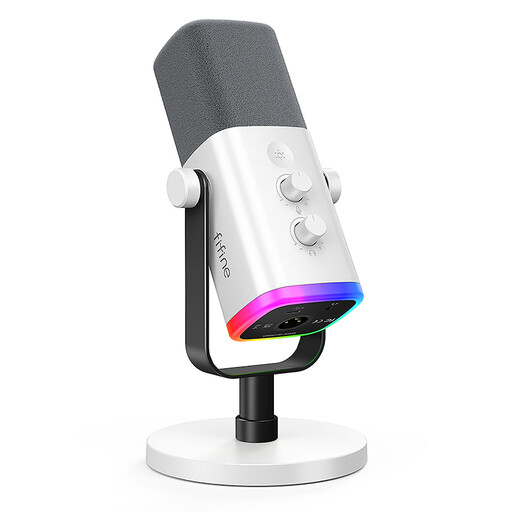
FIFINE AM8 White, XLR/USB microphone
This microphone is better suited to a single speaker sitting close by. You’ll need another suitable microphone position for the second voice.
The product information lists a dynamic, unidirectional microphone with USB-C and XLR connections, plus a microphone stand and a USB-C cable.
Check in advance that your existing recording equipment works with the connection you choose.
View at Joybuy
 No image available
JBL Quantum Stream Studio, USB-C
This USB table microphone is an option if two people are sitting opposite each other and a computer will handle the recording.
The product description lists four selectable polar patterns, including bidirectional recording, as well as headphone monitoring.
USB recording requires a suitable recording device and recording software running. Test both seating positions before the interview.
View at Joybuy
Frequently asked questions
Is one bidirectional USB table microphone enough for two people?
It may work if the two people sit opposite each other at a suitable distance. Bidirectional means sound is recorded from the front and rear. A test recording will show whether both voices are clear at the table you’ll be using.
What should I check on the device before a longer interview?
Make a short recording and play it back, then check the power supply, storage space and both voices. The Library of Congress recommends testing recording equipment before an interview. The Zoom H2essential requires a microSD card to be inserted before it can record.
Does recording from the front and rear automatically mean separate tracks?
No. The recording pattern alone doesn’t tell you whether the voices will be saved separately. Zoom describes the H2essential as offering separate tracks in a suitable mode. Check the track output of the complete setup and open a test file.
Can I record a private oral history interview without the other person knowing?
Don’t assume you’re authorised to do so: § 201 StGB covers the unauthorised recording of another person’s non-public speech. Clarify your permission to record before you start. The Oral History Association recommends discussing the purpose and planned access in advance, and documenting informed consent.
Does consent to recording always have to be in writing in Germany?
No. According to guidance from the Data Protection Conference, consent under data protection law doesn’t generally have to be given in writing. If you rely on consent as your legal basis, it must be freely given, informed and unambiguous, and you must be able to demonstrate that it was given. Whether the GDPR applies to a particular project and which legal basis supports the processing will depend on the project. Make separate arrangements for any later publication.


