For an interview involving storytelling and follow-up questions, two well-placed microphones on separate channels are the best choice. Oral-History.Digital recommends using a lavalier microphone for both the narrator and the interviewer wherever possible. For a single narrator, a portable recorder placed nearby or a microphone aimed at them and connected to a computer may be enough. Choose your setup based on the recording location and number of voices, and allow for power, storage and a test recording that lasts as long as the full interview.
The right setup for you
People recording long reminiscence interviews
If a story would be difficult to repeat, plan ahead for power, storage and recording checks. The Library of Congress recommends testing the recording device, battery life, storage and settings before oral history interviews.
Interview teams with two speakers
To make sure both the stories and follow-up questions are clear, you need two well-placed microphones and the right channel setup. Oral-History.Digital recommends using separate lavalier microphones for the narrator and interviewer wherever possible.
Interviewers recording on location or at home
At the narrator’s home, a portable recorder that doesn’t need a computer can be handy. In a fixed location, an existing computer with a suitable microphone may be enough. What matters is choosing the right position and a setup that will work for the entire recording.
What to look for when buying
Two lavalier microphones on separate channels
Best for: Recording the narrator and interviewer with a microphone each.
Things to consider: The transmitters, inputs and channel recording must be compatible with your recording device. Setup and monitoring take more effort.
Portable recorder with built-in microphones
Best for: Recording in different locations without a computer running.
Things to consider: Plan for positioning, power, storage and backing up files. Built-in stereo microphones won’t automatically record each voice on a separate channel.
USB microphone connected to a computer
Best for: One person telling their story in a fixed location, with the computer recording the interview.
Things to consider: The computer must record throughout the entire conversation. A single microphone won’t necessarily pick up follow-up questions from another seat equally clearly.
For oral history interviews, Oral-History.Digital—a 2022 publication by the University Library of Freie Universität Berlin—recommends using a lavalier microphone for both the narrator and interviewer wherever possible. Whatever your setup, make sure the microphone position and recording method suit the room you’ll actually be using.
| Priority |
What to check before buying |
Who it matters to |
| Long recording without interruptions |
Check the power supply and available storage, and make a test recording in advance using the settings you plan to use. |
If I’m recording a story that would be difficult to repeat, recording time and monitoring are my top priorities. Around 29% of consumers would prioritise recording a long interview without interruptions. |
| Record the narrator and interviewer separately |
Check the number of microphone inputs or transmitters, and whether each channel can be recorded separately. |
If both people need to be heard clearly, I want to capture each voice separately. Around 24% of consumers would prioritise two clear, separately recorded voices. |
| Recording in different locations |
Test the positioning, power supply and storage on your portable setup. |
If I’m recording where the narrator lives, I don’t want to rely on having a fixed computer setup. Around 18% of consumers would prioritise being able to record on the move. |
| One voice with background noise in the room |
Position the microphone close to the speaker and point it in the right direction; listen to a test recording made in the room. |
If a single narrator needs to be heard clearly despite background noise, getting the microphone pointed in the right direction matters to me. Around 18% of consumers would prioritise a clear recording of one voice. |
| Connecting to existing equipment |
Check that the USB or suitable microphone input, computer and recording software all work together. |
If I want to record on my existing computer, the connection needs to work with both the computer and the software. Around 12% of consumers would prioritise a straightforward computer connection. |
Common selection mistakes
-
Confusing internal recording time with battery life
A wireless transmitter’s internal storage capacity doesn’t tell you how long its battery will last. A high storage figure alone doesn’t mean the transmitter can handle a long recording.
Check storage time and battery life separately for the exact set variant and the mode you plan to use.
Depending on the device, you may need to plan for power and possible charging breaks.
-
Assuming one microphone in the middle of the table will capture both voices reliably
Depending on the distance and where each person is sitting, one voice may be recorded much more quietly than the other. Oral-History.Digital recommends using a lavalier microphone for both the narrator and interviewer wherever possible.
Make a test recording of both voices from their actual seats, then listen back to it.
Recording voices separately may require a second microphone and a compatible two-channel input.
-
Assuming one- and two-transmitter sets are equivalent
The number of transmitters affects whether each person in the conversation can have their own microphone. A product range may include variants with different items in the box.
Compare the full set name and what’s included, not just the product range name.
You may need an additional transmitter or a different set variant to use two separate microphones.
Brands to consider
Zoom
The H1essential is a portable recorder with built-in X/Y microphones and an input for a compatible lavalier microphone.
- Zoom says it can record to a memory card while also working as a USB microphone.
- You’ll need to position the built-in microphones to suit the speakers. Check your specific setup if you want to record two voices separately.
Tascam
The DR-05XP is a portable recorder with built-in stereo microphones and an additional mini-jack input.
- Tascam states that it can run for up to 17½ hours on two AA alkaline batteries.
- The manufacturer’s figure isn’t guaranteed for every setting or battery. Make sure the memory card and microphone position suit the interview.
RØDE
Wireless PRO is a two-channel wireless system for two speakers. According to the manufacturer, the set described includes two Lavalier II microphones.
- RØDE states that each transmitter has more than 40 hours of internal audio recording capacity.
- This figure refers to storage capacity, not battery life. According to the manual, 32-bit float applies to internal transmitter recordings, not automatically to recordings made on a connected device.
Audio-Technica
The ATR2100x-USB is a directional dynamic microphone for a fixed computer setup, with USB and XLR connections.
- Audio-Technica lists direct headphone monitoring. The manufacturer says the cardioid pickup pattern reduces sound from the sides and rear.
- A single microphone aimed at one person won’t record both people in the conversation separately to the same standard.
DJI
Whether the Mic 2 is suitable for two voices depends on whether your chosen set variant includes two transmitters.
- DJI states that the transmitters offer six hours of operating time under test conditions, without simultaneous internal backup recording.
- A longer internal recording time advertised by the manufacturer isn’t the same as continuous battery life.
Joybuy products for different recording situations
These products include portable recorders with built-in microphones and microphones for recording at a fixed computer setup.
 No image available
PLAUD Note Pro, 64 GB, Black
For recording speech on the move without a separate microphone; the product specifications list four MEMS microphones.
64 GB storage; stated continuous recording time: 30 hours.
Before a long recording, check the actual battery life using your planned settings.
View at Joybuy
 No image available
FIFINE K688CTW, USB/XLR, with boom arm
For one narrator at a fixed computer setup. When recording via USB, the computer must record the entire interview.
Dynamic microphone with USB and XLR connections, plus a headphone socket.
Check that your computer or recording device supports the connection you plan to use.
View at Joybuy
 No image available
FIFINE AM8, USB/XLR, with desktop stand
For recording one narrator on a computer. When recording via USB, the computer handles the entire interview.
Dynamic microphone with USB and XLR connections, plus headphone monitoring.
A single microphone isn’t a substitute for separate microphones for both people in the conversation.
View at Joybuy
 No image available
Mobvoi TicNote Lite, 4 GB
For mobile interviews, with built-in microphones and a recording function.
The product description lists 4 GB of storage and a three-microphone system.
Before the interview, check that the storage and recording setup will cover the planned duration.
View at Joybuy
 No image available
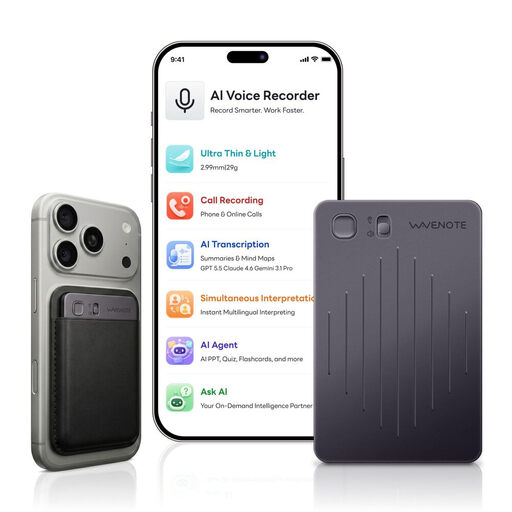
WaveNote voice recorder, 64 GB, Black and Grey
For recording speech on the move without a separate microphone; the product description lists a dual-sensor microphone system.
64 GB storage; stated continuous recording time: 42 hours.
Before a long recording, check the battery life using your planned settings.
View at Joybuy
Frequently asked questions
What should I test just before a long interview?
Make a short recording with everyone speaking, then listen back to it. Also check the battery level, available storage and recording function. The Library of Congress specifically recommends these checks for oral history interviews.
Does more than 40 hours of internal wireless recording mean more than 40 hours of battery life?
No. For the Wireless PRO, RØDE describes more than 40 hours as the internal recording capacity of each transmitter. DJI states that Mic 2 transmitters offer six hours of operating time under test conditions where no internal backup recordings are being made at the same time. Check storage and power separately.
Who should I contact in Germany if something goes wrong after I buy a product?
The seller is generally responsible for statutory consumer rights, which are separate from a manufacturer’s guarantee. The Verbraucherzentrale explains that new goods are generally covered by a two-year statutory warranty.
Can I record private conversations without permission?
No. Section 201 of the German Criminal Code covers recording another person’s words spoken in private without authorisation. Make sure you have permission before recording. If you later process or publish personal data, you’ll also need to consider the purpose for doing so.


