Interviewers recording two voices
If you want to capture memories and follow-up questions at the same table, consider whether one shared table microphone will suit the seating arrangement or whether two separate microphones would work better.


If the storyteller’s voice is your main priority, a directional microphone positioned nearby may be a good fit. If you want both people to be clearly audible, consider a recording mode designed for multiple voices or use two microphones. Two separate microphones give you more control over positioning, but require more equipment and set-up. If you don’t want to use a computer while recording, a portable recorder is an option. You’ll also need to plan where to put it, and how to power it and store your recordings.
If you want to capture memories and follow-up questions at the same table, consider whether one shared table microphone will suit the seating arrangement or whether two separate microphones would work better.
If the focus is on an in-depth account, the distance from the microphone and a test recording in the actual room are important factors. The interviewer’s questions may be less prominent in the recording.
If you want to record without a computer, make sure you’ve sorted out storage, power and the position of the recording device before the interview.
For a face-to-face oral history interview at a shared table, the key considerations are which voice takes priority and how much equipment you’re happy to set up.
| Requirement | What to look for | Who is this most important to? |
|---|---|---|
| Recording both voices clearly | Test the seating arrangement and recording mode; if using separate microphones, make sure you have suitable inputs and tracks. | If you want both the story and follow-up questions to be clearly audible, I’d test both seating positions. Around 36% of consumers put recording both voices first. |
| Capturing the storyteller’s voice | Consider the microphone’s polar pattern, how close it is to the person telling the story, and test how it handles quiet sentence endings. | If your main aim is to capture the memories clearly, you can position the microphone towards the storyteller. Around 29% of consumers prioritise this voice. |
| Recording without a computer | Check that the recorder works independently, and test the storage, power supply and playback of a test file. | If you don’t want a computer running at the table, I’d set up storage and power in advance. Around 21% of consumers make standalone recording their main requirement. |
| Easy set-up and monitoring | Check the connection to the recording device, headphone output, and whether you need a stand or cable. | If you want to focus on the conversation, a straightforward set-up may suit you better. Test it in advance. Around 14% of consumers put ease of set-up first. |
How clearly each voice comes through also depends on seating position, distance and recording mode. With a shared recording, you can’t adjust each voice separately as you would with two separate microphone tracks.
Test both voices at the table you plan to use. If they’re equally important, compare a test recording in a suitable shared mode with a two-microphone set-up.
The recording format won’t fix poor microphone placement or distracting reflections. Zoom warns against placing the H4essential directly on a table without considering its position.
Check the placement and listen to a test recording first; then assess the format and other recorder features.
Inputs give you connection options, but they don’t confirm that two microphones and the necessary accessories are included.
Check the box contents against your planned signal chain, including microphones, cables, mounts, storage and power.
The Lyra is a USB table microphone with a choice of recording modes. AKG describes its ‘Front & Back’ mode as suitable for interviews with multiple people.
The H4essential is a portable recorder with built-in X/Y microphones and inputs for external microphones.
The AT2020USB-X is a USB cardioid microphone designed to capture one voice when connected to a computer.
The MV7+ offers USB-C and XLR connection options for a set-up focused on one voice.
The DR-40XP is a recorder with adjustable stereo microphones and inputs for external microphones.
This selection includes wireless lavalier microphone systems with two transmitters, so both people in an interview can wear a microphone.
 Image unavailable
Two transmitters suit a set-up where both people in the interview wear a microphone.
The product name lists two transmitters, one receiver and a charging case.
 Image unavailable
The two transmitters are an option if both people in the interview need to wear a lavalier microphone.
The product name lists 2.4 GHz, plus USB-C and Lightning connections.
 Image unavailable
This system with two lavalier microphones suits an interview set-up where both people are mic'd up.
The product name lists 2.4 GHz and two lavalier microphones.
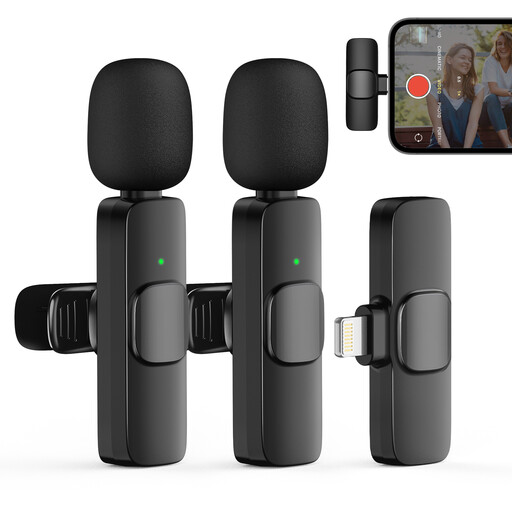 Image unavailable
Two transmitters are an option if both people in the interview need to wear a microphone.
The product name lists two transmitters, one receiver and iPhone as the intended connection type.
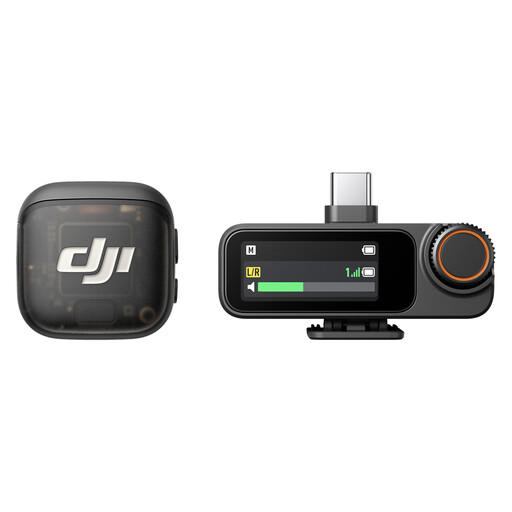 Image unavailable
Two transmitters suit an interview where both people need to wear their own microphone.
The product name lists two transmitters, one receiver and a charging case.
Ask both people to speak from their actual seats, listen to a short test recording straight away, and pay particular attention to quiet sentence endings and room noise. For the H4essential, Zoom advises against placing the recorder directly on the table without considering its position if you want the clearest speech possible.
As well as the recorder, check that you have two compatible microphones, cables and mounts, along with storage and a power supply. Two XLR/TRS inputs alone don’t mean that a complete interview set is included.
Recording someone else’s non-public spoken words without authorisation is covered by Section 201(1) of the German Criminal Code (StGB). Make sure you have permission before you start, and discuss any later sharing or publication separately. For the processing of personal data based on consent, the German Data Protection Conference requires consent to be freely given, informed and unambiguous.
For oral history recordings, the Oral History Society recommends uncompressed PCM WAV files. Also check the required submission format with the archive receiving the recording.