If the interviewee will remain seated, a wired lavalier microphone compatible with your recording device is a sensible starting point. Test it in position and listen back to a sample recording. The East Midlands Oral History Archive at the University of Leicester recommends using a clip-on microphone and keeping your distance from the main sources of noise. If you want questions to be recorded as clearly as answers, plan for two microphone positions. For movement or independent local recording, consider wireless kits or body-worn recorders, but bear in mind that you’ll need to check the connection, power supply and file management.
Who’s conducting the interview?
Interview with a seated interviewee
If the interviewee will stay in one place, you can clip a wired lavalier microphone within reach of the recording device. The oral history guidance from the East Midlands Oral History Archive at the University of Leicester and the UCLA Library, Center for Oral History Research highlights microphone position and distance from noise sources as important considerations when recording.
Interview with two key voices
If you want both questions and answers to be recorded clearly, plan a microphone position for each person and check that your recording setup can capture both signals. The UCLA Library, Center for Oral History Research notes that an additional microphone may require a suitable connection, such as a splitter.
Mobile interview or one that’s difficult to repeat
If the interviewee will be moving, or you want to record their voice independently of the receiver, consider power, recording checks and file management when choosing a setup. A body-worn recorder can record locally; with a wireless kit, you’ll also need to check the specific kit configuration and radio conditions at the recording location.
What should you look for when buying?
First decide whether you mainly want to record the interviewee’s voice or both voices in the conversation. Then check the connection, microphone position and what you’ll need for a longer recording.
| Consideration |
What to check when buying |
Who will find this especially important? |
| Clarity of the interviewee’s voice |
Check the position and how it clips to clothing; listen back to a test recording from the intended seat. |
If I want to capture the interviewee’s voice clearly despite echo and conversation, I pay particular attention to placing the microphone close by. Around 33% of consumers put clarity of the interviewee’s voice first. |
| Both voices in the conversation |
Check whether two microphone positions are planned and that the kit is compatible with the recording device. |
If questions matter as much as answers, I don’t want to rely solely on my voice being picked up from a distance. Around 27% of consumers prioritise clear recordings of both voices. |
| Connection to the recording device |
Check the specific microphone input and any adapters you may need; then test whether the recording app is using the external microphone. |
If I want to keep using my existing phone, computer or recorder, the connection needs to be compatible. Around 20% of consumers put compatibility with their existing device first. |
| Recording reliability |
Check the power supply and storage beforehand; confirm that recording has started, then record and listen back to a short file. |
If an interview would be difficult to repeat, I want to be able to check that recording has started and that the file is there. Around 20% of consumers prioritise reliable recording and ease of use for longer interviews. |
Common buying mistakes
-
Treating a quoted range as a guarantee in a hall
DJI’s quoted range was measured outdoors, without obstructions or interference. Those test conditions don’t predict how the wireless connection will perform in a community hall.
Test the wireless connection at the actual recording location and listen back to the recording. For an important passage that would be difficult to repeat, also check the recording features offered by the specific kit configuration.
If a passage is unusable, you may need to record it again.
-
Choosing TRS, TRRS and USB-C by plug shape alone
These connection types don’t automatically carry the same signal. The RØDE Lavalier GO, RØDE smartLav+ and Sennheiser XS Lav USB-C are designed for different, compatible inputs.
Check the microphone input and the requirements of your specific recording device. Also find out whether you’ll need a suitable adapter.
Depending on your device’s connection, you may need a suitable adapter or a different microphone.
-
Expecting one lavalier microphone to capture two equally clear voices
A microphone clipped to the interviewee may pick up the interviewer’s more distant voice less clearly. The UCLA Library, Center for Oral History Research suggests using a second microphone to record questions deliberately.
Before buying, decide whether questions matter as much as answers, then check how many microphones are included and whether your recording setup can capture both people.
You may need another microphone or an additional recording setup for a second microphone position.
-
Confusing local recording with a fully prepared recording setup
A body-worn recorder such as the Zoom F2 needs a power supply and a compatible memory card. Even when recording locally, you’ll need to check that recording has started and transfer the file afterwards.
Before the interview, check what’s included in the kit, the power supply and the storage. Record a short test file and play it back.
Remember to plan for a memory card, batteries and time to transfer the file.
Key brands at a glance
RØDE
RØDE offers wired lavalier microphones for different connection types.
- According to RØDE, the Lavalier GO has a 3.5 mm TRS connection, while the smartLav+ has a TRRS connection for compatible smartphones.
- The models aren’t interchangeable just because their plugs are the same size. Check the input, power requirements and whether you need a suitable adapter.
Sennheiser
The XS Lav USB-C is a wired option for compatible mobile devices or computers at a fixed interview location.
- According to Sennheiser, the specified version comes with a 2 m cable, clip and windscreen.
- A USB-C connection alone doesn’t confirm that your specific recording device supports the microphone.
Zoom
The body-worn Zoom F2 pairs a lavalier microphone with local recording of one voice.
- Zoom specifies mono WAV recording to a memory card, a Hold switch and operation with two AAA batteries.
- Remember to plan for a memory card, batteries, file transfer and, if you need to record two voices, an additional recording setup.
DJI
The specific DJI Mic 2 kit with two transmitters and a receiver is a wireless option for two people in a conversation.
- DJI specifies two transmitters and internal 32-bit float recording for this kit configuration.
- DJI’s quoted CE range was measured outdoors, without obstructions or interference. It shouldn’t be treated as a guarantee of performance in a community hall.
Shure
The Shure MVL is a lavalier microphone with a 3.5 mm TRRS plug for compatible mobile devices.
- Shure lists a range of compatible Android and iOS devices, or a suitable CTIA-compliant adapter, as connection options.
- This model information doesn’t confirm compatibility with every phone or with a TRS recorder input.
Joybuy products for interviews with a lavalier microphone
The products below are wireless lavalier systems described as being designed for interview recording. Before choosing one, check that the connections and kit configuration suit your recording device and the number of people speaking.
 No image available
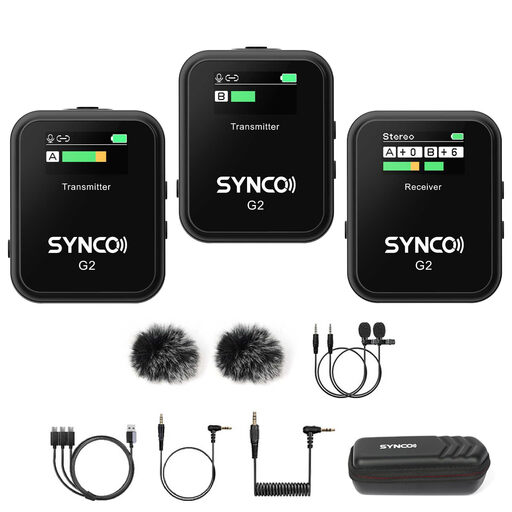
SYNCO G2(A2) Wireless Lavalier Microphone
A wireless lavalier option if you don’t want to connect the microphone to your recording device with a cable.
The product name specifies 2.4G and Dual Channel.
View at Joybuy
 No image available
Wireless Lavalier Microphone Set, 2 Transmitters
The kit description specifies two transmitters for a wireless interview setup.
It also lists 2.4 GHz and USB-C and Lightning connections. Check that these are compatible with your recording device.
View at Joybuy
 No image available
Moman M1CXT Wireless Lavalier Microphone, USB-C
The product name describes this system as a wireless USB-C option.
It specifies a 2TX+1RX configuration. Check whether the USB-C connection is designed for your recording device.
View at Joybuy
 No image available
SYNCO P2ST Wireless Lavalier Microphone, USB-C
A wireless lavalier option with a USB-C connection, according to the product name.
The product name specifies a Dual Mic system, 2.4 GHz and a charging case. Check that the connection is compatible with your recording device.
View at Joybuy
 No image available
SYNCO G3PRO Wireless Lavalier Microphone System
The product name describes a wireless dual-lavalier system for an interview setup.
It specifies 2.4 GHz and two lavalier microphones. Check the connection options for the specific version before buying.
View at Joybuy
Frequently asked questions
Where should I clip the microphone in a community hall?
Clip it around the interviewee’s lapel or chest, making sure their clothing won’t rub against the capsule. If possible, choose a spot away from conversations and highly reflective surfaces, then listen back to a short recording made in the actual location.
Can one clip-on microphone record both people in an interview?
It may pick up the second voice too, but that voice could be quieter if the microphone is clipped to the interviewee. If you want questions to be recorded just as clearly, consider two microphone positions and a suitable recording setup for both signals.
What should I check before a long interview?
Check the power supply, storage medium and recording start at the location, then listen back to a short test recording straight away. If you’re using a body-worn recorder, also plan for transferring the file afterwards and preparing a suitable memory card.
Can I secretly record an oral history interview in Germany?
Recording a person’s non-public spoken words without authorisation may be an offence under § 201 of the German Criminal Code. Check that you’re allowed to record before you begin. You’ll also need an appropriate legal basis to process personal data; agree how the recording may be used or shared later, too. The Federal Ministry of Justice and the Federal Commissioner for Data Protection and Freedom of Information explain these respective requirements.
Do I need to register a wireless clip-on microphone in Germany?
That depends on the frequency band and the conditions of the relevant general assignment. The Federal Network Agency allows certain generally assigned frequencies to be used without registration, provided the specified parameters are met. So check the frequency band and technical specifications of your particular system against the applicable assignment.


