Position the microphone as close as possible to the person speaking. For a seated main speaker, a fixed directional microphone may be suitable, while two lapel microphones are a better choice if both voices matter or the speakers will be moving around. The type of microphone or its digital features alone won’t eliminate room echo. Check the connections and mounting options, then listen to a test recording made in the actual room before the interview.
Who each type of setup suits
Interviewers recording one seated main speaker
If your priority is capturing one speaker clearly in an echoey room, you can position a microphone close to them and keep it securely in place. The East Midlands Oral History Archive at the University of Leicester recommends a lapel microphone rather than a table microphone for this situation.
Interviewers for whom both voices matter
If you want the story, questions and interjections to remain clear, you need a setup that picks up both speakers appropriately. Oral History in the Digital Age at Michigan State University explains how the room can affect intelligibility.
Interviewers working in different locations
If you’re moving between rooms or interviewing people who may move around, secure mounting, a portable recording option and a sound check before the conversation are all important. The Veterans History Project at the Library of Congress also recommends testing your equipment before the interview.
What to consider when choosing
The East Midlands Oral History Archive at the University of Leicester and Oral History in the Digital Age at Michigan State University note that microphone distance and the room can affect how a voice is recorded. First decide which voices you need to capture, then check the mounting options and connections.
| Priority |
What to check when buying |
Who is this most important to? |
| Clarity of the main voice |
Check the microphone distance and make sure it can be positioned securely at the recording spot. |
If I’m recording one seated main speaker, I want to capture their voice clearly despite the echo and be able to position the microphone close to them. Around 36 % of consumers prioritise the clarity of this one voice. |
| Two voices in conversation |
Check the number of microphones and compatible recording channels. |
If the story and questions are equally important, I want to record both people without a noticeable change in microphone distance. Around 29 % of consumers prioritise capturing two equally important voices. |
| Freedom of movement |
Check the mounting, possible clothing noise and power supply. |
If the speaker moves around or the recording location changes, the microphone should stay as close to the voice as possible. Around 21 % of consumers prioritise freedom of movement and the ability to record in different locations. |
| Connections and monitoring |
Check for compatible inputs and a way to monitor the recording. |
If I want to use equipment I already own, the connections and monitoring options need to work with it. Around 14 % of consumers prioritise compatible connections and straightforward monitoring. |
Avoiding common mistakes
-
Choosing a distant table microphone based on its directional pickup alone
A directional pickup pattern only helps if the microphone is positioned appropriately. Distance and reflective surfaces still affect the recording.
Position the microphone as close as possible and listen to a test recording made in the actual interview room.
-
Recording only the main speaker with one microphone when both voices matter
Questions asked from further away may be recorded much more quietly than the speaker’s story.
Decide in advance whether you need to capture both voices throughout, then test that exact setup.
Two close microphones may require a second recording channel and an additional mount.
-
Treating USB, XLR and a portable recorder as interchangeable
An XLR microphone needs a compatible input, and a USB connection must work with the recording device you’re using. An XLR microphone doesn’t automatically record audio by itself.
Compare the connections on your existing equipment with the exact model variant, and check which accessories are included.
Depending on your setup, you may also need an interface or recorder, compatible cables or a mount.
-
Assuming digital features will treat room echo
Recording formats and digital processing features don’t prove that poor microphone positioning or room reflections will be corrected.
Prioritise close microphone placement and a sound check, then assess the digital features afterwards.
Relevant brands to consider
Audio-Technica
Audio-Technica describes the ATR2100x-USB as a dynamic cardioid microphone with USB and XLR connections, suited to one speaker positioned close to the microphone.
- Audio-Technica lists headphone monitoring, cables and a desktop tripod among the accessories for this model.
- One microphone won’t automatically capture two speakers seated further apart evenly; a test recording can help you assess the positioning.
RØDE
RØDE offers two different recording options here: the Wireless PRO is designed for two wearable microphones, while the PodMic USB is for one fixed-position voice, with USB-C or XLR connections.
- RØDE lists two Lavalier II microphones with the Wireless PRO; according to the manufacturer, the PodMic USB has USB-C and XLR connections as well as headphone monitoring.
- Wireless equipment needs preparation and charging. A fixed-position PodMic USB needs to be positioned appropriately, and manufacturer claims about sound and reliability are not independent measurements.
Sennheiser
Sennheiser describes the MD 46 as a wired dynamic handheld microphone with a cardioid pickup pattern and XLR connection, designed for interviews.
- You can move the handheld microphone close to whoever is speaking.
- You’ll need to move the microphone deliberately when the speaker changes, and you’ll also need a compatible XLR input. This information applies to the MD 46, not to every microphone from the brand.
Shure
Shure describes the MV7+ as suitable for fixed-position voice recording, with a USB-C or XLR output and direct headphone monitoring.
- Shure describes automatic level adjustment and digital noise-processing features for this model.
- The manufacturer’s claims about digital features don’t prove that they’ll eliminate room echo during an interview. Also check that you have the right model variant and mount.
Zoom
Zoom describes the H4essential as a portable recorder with built-in X/Y microphones and two XLR/TRS inputs, which can also be used with external interview microphones.
- Zoom lists four-track and 32-bit float recording among the device’s features.
- These features won’t treat room echo. Placement is still important when using the built-in microphones; for two voices speaking from further away, the recorder won’t automatically replace two close microphones.
Microphones at Joybuy
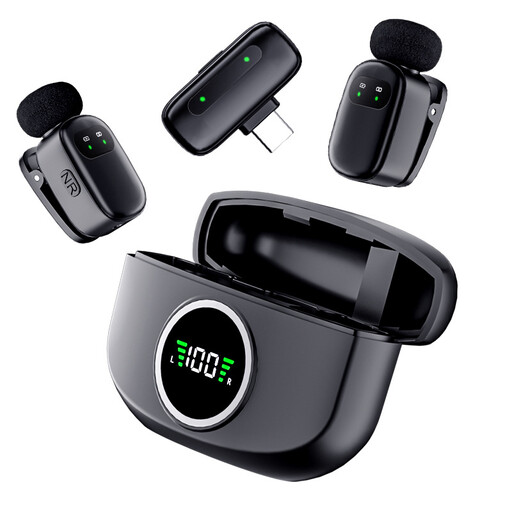
The selection includes USB/XLR microphones for one seated main speaker positioned close to the microphone, as well as a wireless dual-lavalier microphone for two speakers who may move around.
 No image available
FIFINE K688CTW USB/XLR microphone with boom arm, white
For one seated main speaker, when the microphone can be positioned close and securely mounted; the boom arm makes it easier to adjust its position.
USB-C and XLR connections, a headphone socket and a shock mount are listed. An XLR cable isn’t included; if both voices matter equally, the microphone setup needs to capture both speakers.
View at Joybuy
 No image available
FIFINE AM8 USB/XLR dynamic microphone with desktop stand
The desktop stand suits a fixed recording position, where you can point the microphone towards one seated main speaker.
USB-C and XLR connections, as well as a headphone socket, are listed. An XLR cable and microphone arm aren’t included; the XLR connection requires a compatible recording device.
View at Joybuy
 No image available
Dynamic USB/XLR microphone set with RGB and desktop stand
For a fixed recording position when you want to point a dynamic cardioid microphone close to one seated speaker.
USB-C and XLR connections, as well as a desktop stand, are listed. The description also mentions an XLR cable; if both voices matter equally, you’ll need a setup that captures both.
View at Joybuy
 No image available
Verbex K21 wireless dual-lavalier microphone with USB-C
For interviews on the move, when both speakers need their own lapel microphone.
The description lists two lavalier microphones, a USB-C interface and a battery life of 3–6 hours. Bear this battery life in mind for longer conversations, and check that the microphones won’t rub against clothing when attached.
View at Joybuy
Frequently asked questions
Does everyone in an interview need their own microphone?
Not necessarily: one microphone may be enough if it can be positioned close enough to capture everyone’s important contributions. If you need to capture both people clearly throughout, consider two close microphones and the inputs they require, and listen to both voices beforehand.
What should I check just before a longer interview?
Make a short test recording with both people in the planned location, then listen back to it. Also check the batteries, available storage and that all the microphones are working. For wired models, check the connections and cables too.
How can I avoid clothing noise from a lapel microphone?
Attach the microphone so that neither clothing nor the cable rubs against it, then check this in a test recording while making the movements you expect during the interview. For cleaning a Shure microphone, the manufacturer recommends keeping moisture away from the microphone element; follow the care instructions for other models.
What additional recording equipment might I need?
It depends on the microphone and the equipment you already have: check whether you need a mount, a second microphone, a recorder or interface, cables, headphones and a power supply. Audio-Technica says the ATR2100x-USB is supplied with USB and XLR cables and a desktop tripod; the MD 46 XLR handheld microphone needs a compatible recording input.
Can I secretly record an oral history interview in Germany?
Under § 201 StGB, making an unauthorised audio recording of words spoken in private is prohibited, so don’t start the interview secretly. Clarify your authority to record and how you intend to use the recording in advance. If the processing of personal data is based on consent under the GDPR, guidance from the German data protection authorities says that consent must be freely given, informed and specific to the particular case; the precise data protection assessment depends on the project.


