What to look for when buying
Shared USB tabletop microphone
A good fit if: both people are sitting opposite each other at a computer and are easy to understand in a test recording.
The trade-off: You won’t have two independently positioned close-up microphones; the seating arrangement and table noise remain important factors.
Two wired microphones
A good fit if: you want to control each voice separately or one person speaks noticeably more quietly. According to ZOOM, the H4essential has two external XLR/TRS inputs; the Audio-Technica ATR2100x-USB is one example of a suitable microphone with an XLR output.
The trade-off: The microphones, cables and recorder must be compatible; the H4essential’s four recording tracks are not four external microphone inputs.
Two wireless microphones
A good fit if: the interviewees will be moving around or you don’t want microphone stands on the shared table. The third-generation RØDE Wireless GO is a two-channel system; according to RØDE, Split mode assigns the transmitters to different output channels.
The trade-off: The transmitters, receiver, power supply and connection to the recording device all need to be part of your setup; check the channel mode and listen to the recording.
Handheld recorder with built-in microphones
A good fit if: you want to record without a computer and initially without two external microphones. The ZOOM H1essential has built-in X/Y microphones.
The trade-off: A centrally placed recorder doesn’t give you two separate close-mic positions; test the clarity and placement before the interview.
The percentages below show which concern takes priority for people recording an oral history interview around a shared table.
| Priority |
What to check before buying |
Who cares most about this? |
| Recording voices separately |
Number of microphone inputs you can actually use and availability of separate channels; test both microphone positions. |
If I want to control the account and questions separately, I need separate voices. Around 33% of consumers put this first. |
| Simple table setup |
USB connection, suitable pickup pattern and stable positioning; listen to a test recording from both seating positions. |
If I want to record at a computer with as few components as possible, I need one shared recording position where both voices are clear. Around 25% of consumers prioritise a simple setup. |
| Reducing unwanted noise |
Check the pickup direction and microphone position; listen to a test recording with typical table movements. |
If paper or movement at the table might drown out the story, I want to check the recording at the actual location. Around 25% of consumers prioritise low background noise. |
| Recording without a permanent computer setup |
Check the power supply, connections you need and storage medium; play back the saved test file directly. |
If I record in different locations without a permanent computer setup, I need a setup that lets me check the recording on location. Around 17% of consumers prioritise recording on the go. |
Joybuy products for these recording situations
The models below include a shared USB tabletop microphone and wireless sets with two microphones. The key factors are your planned recording setup, the connections available and whether you want to record each voice separately.
 No image available
JBL Quantum Stream Studio USB-C
Could be worth considering for recording at a computer around a shared table; check that its pickup pattern captures both voices in your seating arrangement.
The product name describes a wired condenser microphone with USB-C, a flexible gooseneck, mute button, LED indicator and monitoring mode.
View at Joybuy
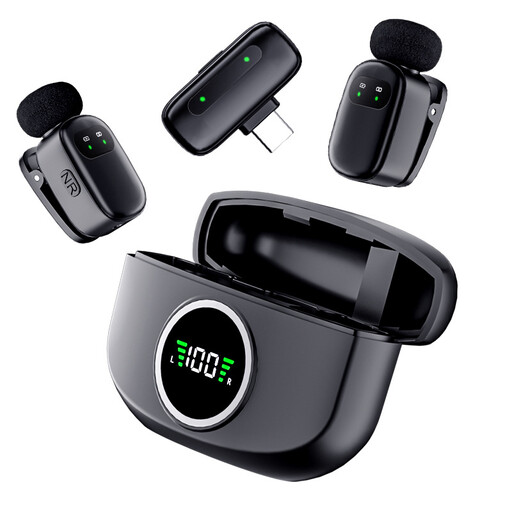 No image available
The Verbex K21 Dual Microphone
This set could work for two microphone positions; check that the Type-C connection is compatible with your planned recording device.
The product name describes it as a wireless mini dual microphone for interviews, with Type-C compatibility.
View at Joybuy
 No image available
DJI Mic Mini 2S (2 TX + 1 RX + Charging Case)
Two transmitters give each person their own microphone position; check that the receiver and recording device are compatible before you buy.
The product name lists two transmitters, one receiver and a charging case.
View at Joybuy
 No image available
SYNCO P2ST USB-C Dual Microphone
This set could work for two interviewees if your recording device supports the USB-C receiver.
The product name describes a wireless dual microphone with 2.4 GHz and a charging case.
View at Joybuy
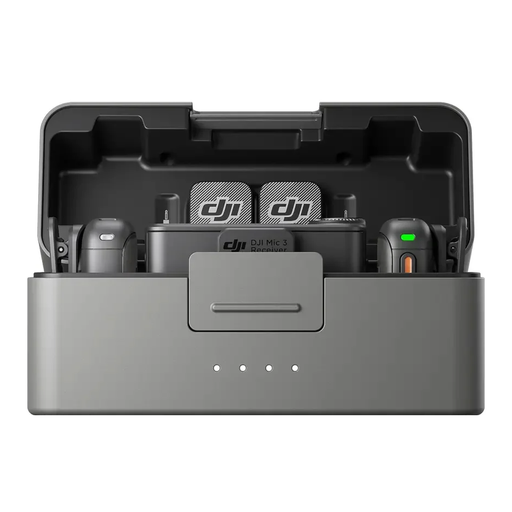 No image available
DJI Mic 3 (2 TX + 1 RX + Charging Case)
Two transmitters give each interviewee their own microphone position; check the connections for your planned recording setup.
The product name lists two transmitters, one receiver and a charging case.
View at Joybuy
Frequently asked questions
Do I need to ask the interviewee before recording?
Discuss the recording before you begin: § 201 StGB makes it a criminal offence to record another person’s words spoken in private without authorisation. The Oral History Association also recommends documenting informed consent and discussing the purpose, storage and access in advance; this is professional guidance, not the wording of German law.
Does consent to recording also cover publication later on?
Don’t assume that it does: discuss and document the intended use and public access separately. Where possible, the Oral History Association recommends giving interviewees the opportunity to approve material before publication. If personal data is processed on the basis of consent under the GDPR, the Data Protection Conference describes that consent as freely given, informed and specific to a particular case; it says that written consent is not generally required.
How can I check the microphone setup before a one-off interview?
Record a short test with both people at the actual location and listen to it straight away. Pay particular attention to quieter answers, paper rustling and objects on the table; Indiana University recommends keeping an eye out for these sources of unwanted noise.
Do I automatically need a four-track recorder for two microphones?
No. What matters is the number of physical inputs you need and the signal chain. ZOOM lists four recording tracks for the H4essential, but it has two external XLR/TRS inputs; you’ll also need to plan for suitable microphones and cables.
What are my rights if a product is faulty?
Your statutory rights and a voluntary guarantee are different things. If a product is faulty, your statutory claims are initially against the seller; the Verbraucherzentrale recommends asking for a repair or replacement first. When putting your setup together, also consider whether you’ll need additional microphones, cables or a recording device.


