What to look for when buying
The University of Leicester’s East Midlands Oral History Archive recommends positioning the microphone close to the speaker. So plan your test at the actual table, with everyone whose voice you want to capture in the final recording.
| What you need |
What to check before buying |
Who this matters most to |
| Record the speaker clearly |
Check the polar pattern and that the microphone can be positioned securely; make a test recording while moving your head naturally. |
If my main priority is to capture the speaker clearly, I’ll position the microphone close to them and point it towards them. Around 36% of consumers have this as their main priority. |
| Capture both voices |
Decide in advance whether the second voice is equally important; test both seats with the setup you plan to use. |
If both the speaker and interviewer need to be clear on the same recording, I’ll test both seats rather than just the speaker’s. Around 29% of consumers prioritise capturing two voices. |
| Monitor the recording as you go |
Test the headphone socket and controls, recording software, and both quiet and loud passages. |
If important passages can’t easily be repeated, I want to spot any level or recording problems during the conversation. Around 21% of consumers need this kind of monitoring. |
| Set up in a cramped space |
Check the space available, stand or arm, what’s included, USB connection and cable routing. |
When space is limited, I’ll check that the microphone and mount allow for a suitable speaking position and work with my computer. Around 14% of consumers say an easy set-up is their top priority. |
USB microphones for voice recording
These Joybuy product options include USB microphones for voice recording, including directional models with headphone monitoring and different mounting options. If two voices are equally important, test the specific set-up in advance.
 No image available
FIFINE K688CTW USB/XLR microphone with boom arm
The boom arm lets you position the dynamic microphone for a main speaker.
USB and XLR connections; headphone monitoring. According to the product listing, mute and gain controls work in USB mode. XLR cable not included.
Joybuy
 No image available
FIFINE AM8 dynamic USB/XLR microphone with desk stand
The included desk stand offers a mounting option for a small recording space; test the position with the speaker in place.
USB-C and XLR; cardioid polar pattern and headphone monitoring via USB. XLR cable and microphone arm not included.
Joybuy
 No image available
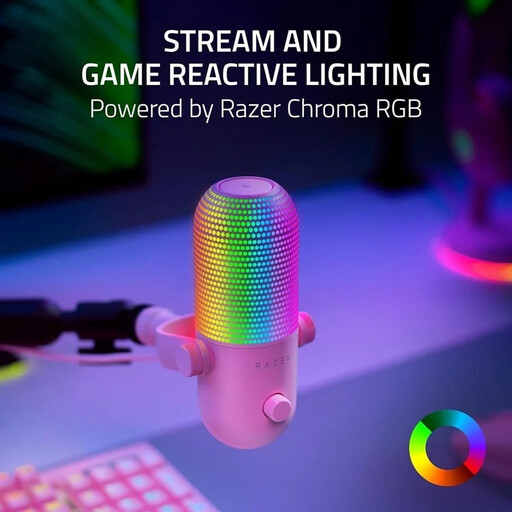
Seiren V3 Chroma – Quartz
This desktop USB microphone is described as being for directed voice recording; test it in the room before settling on a single microphone position.
Directional recording pattern, real-time headphone monitoring, mute function and built-in shock absorption.
Joybuy
 No image available
Dynamic USB/XLR microphone set with desk stand
The listed cardioid polar pattern and desk stand allow you to position the microphone for a main speaker.
USB-C and XLR; gain control, mute function and real-time headphone monitoring. According to the product description, the set includes a USB cable and desk stand.
Joybuy
 No image available
USB condenser microphone with scissor arm
The scissor arm lets you adjust the microphone’s position; check whether it can provide the distance you want from the speaker.
Cardioid polar pattern, gain control, mute function and headphone monitoring. According to the product description, the set includes an arm, shock mount and pop filter.
Joybuy
Frequently asked questions
Is one microphone enough for both the speaker and interviewer?
Only if a test recording captures both voices clearly from the seats they’ll be using. If one voice is too quiet, try a suitable two-person polar pattern or two separately positioned microphones.
What should I test before the interview?
Set up the microphone in the planned position and record quiet, normal and loud passages from everyone whose voice matters. Listen for distortion, questions that are too quiet, table noise and reflections; also check that your computer is recording from the USB input you want to use.
Is a USB microphone also a stand-alone audio recorder?
No. The USB microphones described here are used to record with a connected device. Before a long conversation, check its software, power supply and storage. The Oral History Society advises against unsuitable proprietary or lossy recording formats on recorders; this isn’t an automatic feature of the microphone.
What warranty applies when buying in the EU?
Your Europe explains that, under EU rules, faulty goods are covered by a legal guarantee: the seller must repair or replace them free of charge, and EU consumer information specifies a minimum period of two years. This is separate from a voluntary manufacturer’s guarantee.
Can I simply record and publish a private oral history interview in Germany?
Don’t record privately spoken words without authorisation: the Higher Administrative Court of North Rhine-Westphalia quotes § 201 (1) no. 1 of the German Criminal Code as covering unauthorised recording onto an audio medium. Check your authorisation to record separately from the right to use the recording later. The Federal Commissioner for Data Protection and Freedom of Information notes that consent is one possible, but not the only, legal basis under Article 6 of the GDPR. Whether a specific publication is permitted depends on its purpose and the agreements in place.


