For live teaching using a computer you already own, an adjustable downward-facing webcam is a natural place to start. For standalone recordings, consider a compact camera, while a mirrorless camera with a suitable lens can make it easier to switch between a full-sheet view and close-ups of the folds. Test the framing, focus and secure positioning together at your workspace: neither high resolution nor a stand or gimbal alone guarantees a suitable overhead view.
Which option suits you?
People demonstrating folding techniques
To keep the edges and hand movements clear in your recording, the paper size, camera distance and focus need to suit your planned camera position. Sony Germany states that the ZV-1F focuses from around 5 cm; Logitech notes that the MX Brio’s Show Mode is not designed for very fine text.
People filming in a shared bedroom
If you want to put your setup away after filming and keep the frame focused on your desk, consider the space it takes up, the mount and the frame edges together. Canon describes the PowerShot V10 as having a built-in stand, while Logitech says the MX Brio’s Show Mode tilts downwards. Neither guarantees a secure overhead position.
Crafters teaching live
A webcam is worth considering for a view of your worktable during a call, provided your computer and software fit the way you plan to work. Logitech describes the MX Brio’s Show Mode as suitable for showing objects on your desk; check how the smallest folds appear in the actual frame.
What should you look for when buying?
Webcam connected to a computer
A good fit if: you mainly want to teach live and plan to use your computer anyway.
The trade-off: Logitech says Show Mode is not designed for very fine text, so check how the smallest folds look.
Compact camera with a fixed lens
A good fit if: you want to record without relying on your computer being on and prefer a compact device.
The trade-off: Sony Germany says the Sony ZV-1F has no optical zoom; the Canon PowerShot V10’s built-in stand does not guarantee a secure overhead view.
Gimbal camera
A good fit if: you want to capture moving angles as well as a fixed view of your table.
The trade-off: a gimbal is no substitute for a suitable mount above your table; the DJI Osmo Pocket 3 also requires a microSD card.
Mirrorless camera with a suitable lens
A good fit if: you regularly want to switch between a view of the whole sheet and close-ups.
The trade-off: the framing and minimum focusing distance depend on the lens you choose.
| Priority |
What to check before buying |
Who is it important to? |
| Show folding steps clearly |
Test the paper size, smallest fold, focus and frame edges from the planned mounting height; don’t judge suitability on 4K alone. |
If the folding steps need to be clear on screen, close-up detail is your priority. Around 36% of consumers say visibility of the folding steps is their most important buying priority. |
| Keep the setup and frame within limits |
Check the space needed, mount and frame edges where you plan to film; aim the camera at your desk where possible. |
If you’re filming in a shared bedroom, you’ll want to put the setup away and keep other areas out of shot as much as possible. Around 29% of consumers prioritise a space-saving setup and a limited frame. |
| Record speech clearly |
Record a voice test where you plan to film and check whether an external microphone is compatible with the exact model. |
If you explain the folding steps as you go, your voice should be clear from the camera’s actual position. Around 21% of consumers prioritise speech clarity. |
| Plan for longer recordings |
Check that your preferred take length, power supply and storage are compatible with the exact model; for a webcam, your computer is part of the setup too. |
If you want to record your tutorial without frequent interruptions, recording time and a suitable storage and power plan will matter to you. Around 14% of consumers prioritise recording for as long as possible without interruption. |
Common misconceptions
-
4K doesn’t automatically make fold details visible
High resolution can’t compensate for unsuitable framing or a poorly chosen camera position.
Test the paper size, smallest fold, focus and frame edges together from the planned mounting height.
You may need an additional mount that’s compatible with your device to position it as intended.
-
A built-in microphone doesn’t guarantee clear speech where you’re filming
The microphone specification alone can’t tell you how audio will sound at your actual filming location.
Record a short voice test there and, if needed, check whether an external microphone is compatible with the exact model.
If the voice test isn’t clear enough, you may need a compatible external microphone.
-
Don’t choose a camera and accessories by model name alone
DJI says the Osmo Pocket 3 has no built-in storage; with an interchangeable-lens camera, your lens affects the framing and minimum focusing distance.
Check what’s included and list any parts you need, such as a memory card, lens and mount.
Depending on the device and setup, you may need to buy a memory card, lens or mount separately.
Useful brands to consider
Sony
The ZV-1F is a compact camera with a fixed lens, suited to a repeatable tabletop setup.
- Sony Germany states that it focuses from around 5 cm from the front of the lens.
- The ZV-1F has no optical zoom, so check the framing from the position you can actually use.
Logitech
The MX Brio is a webcam option if you want to show your desk during a call on your computer.
- Logitech describes Show Mode as suitable for showing your desk and notes that the webcam has an integrated privacy shutter.
- Logitech says Show Mode isn’t designed for reading very fine text, so it doesn’t confirm that every small fold will be clear.
Canon
The PowerShot V10 is a compact camera with a built-in stand for standalone recording.
- Canon lists 4K video, a stereo microphone and remote recording.
- The built-in stand doesn’t guarantee a secure position directly above your desk.
DJI
The Osmo Pocket 3 is a gimbal camera to consider if you’re planning moving angles as well as a view of your table.
- DJI lists a three-axis gimbal and a minimum focusing distance of 0.2 m.
- The camera has no built-in storage; for a fixed overhead view, you’ll still need to check the mount and framing separately.
Nikon
The Z 30 is an interchangeable-lens camera that lets you choose your framing with a suitable lens.
- Nikon lists a socket for an external microphone and enough space for up to 125 minutes of uninterrupted footage.
- The specific lens you choose is also important for capturing fold details.
Joybuy products for filming origami
This selection includes gimbal cameras for additional moving angles, as well as webcams for recording on a computer.
 No image available
Osmo Pocket 4P – Vlog Combo, Black
This gimbal camera is worth considering if you want moving angles as well as tabletop footage; for a tabletop view, check the framing and secure mounting separately.
Variant: Vlog Combo, Black.
According to the product description, the stated 4K recording at 240 fps is available only in slow-motion mode.
Joybuy
 No image available
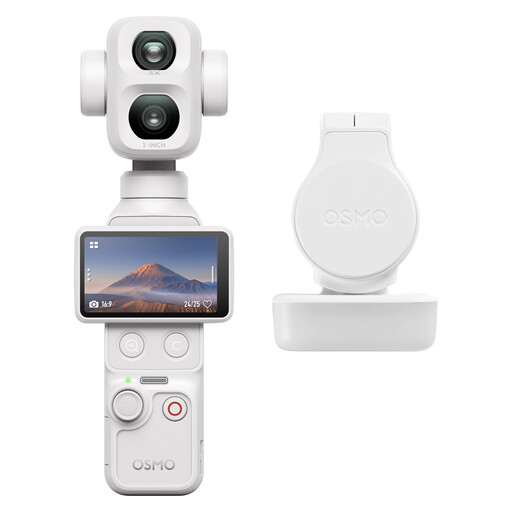
DJI Osmo Pocket 4P Standard Combo (White)
A gimbal camera may suit you if you want additional moving shots; plan the position and framing separately for a fixed view of your origami table.
Variant: Standard Combo (White).
Joybuy
 No image available
AOC Webcam for PC with Microphone
This webcam may suit you if you record on a computer or laptop; test the frame where you plan to film so that it stays focused on your desk.
Features listed in the product title: 4K, 99° field of view, microphone and privacy cover.
The product title also mentions plug-and-play operation.
Joybuy
 No image available
AOC 4K PRO Webcam
This webcam may suit you for recording on a computer; check that its field of view and the supplied stand work for your desk.
Features listed in the product title: Sony IMX363 sensor, PDAF autofocus, two microphones, lens cover, 75° viewing angle and USB-A/USB-C.
Joybuy
 No image available
Logitech C922 Pro Stream Webcam – USB
This webcam may suit you for streaming or recording on a computer; check that your planned position at the table gives you the framing you want and can be secured safely.
USB connection listed in the product name.
Joybuy
Frequently asked questions
Can I show the smallest folds with a tilting webcam?
Show Mode alone doesn’t guarantee this. Logitech describes it as a way to show objects on your desk, but not for reading very fine text. Check the smallest fold you need to show in a test image from your planned position.
Is the built-in stand on the Canon PowerShot V10 enough for an overhead view?
The built-in stand doesn’t guarantee a secure mount directly above the paper. Plan a suitable mount and check its stability separately from the camera.
What should I plan for longer origami recordings?
Match your preferred take length to the power supply and storage available for the specific model. Nikon says the Z 30 can store enough for up to 125 minutes of uninterrupted footage; DJI notes that the Osmo Pocket 3 uses microSD storage rather than built-in storage.
Who should I contact if there’s a fault after buying in Germany?
For statutory consumer rights, the seller is generally responsible; a voluntary guarantee is separate. Verbraucherzentrale explains that the statutory period is generally two years, and that for sales contracts from 31 July 2026 it can be extended once by twelve months if the legal requirements are met following a repair.
Can I show housemates who are recognisable in a published tutorial?
Under § 22 KunstUrhG, consent from the person shown is generally required to distribute or publicly display an image of them; § 23 sets out exceptions that should not automatically be assumed to apply to an origami tutorial. Keep housemates out of shot and off-mic where possible, and get consent before publishing footage in which people are recognisable. The Datenschutzkonferenz notes that recordings made exclusively for personal or family purposes are treated differently; this does not amount to blanket permission to publish them.


