What to consider when buying
Three monitors
Best suited to: Prioritising side-on visibility and having a fixed space for the monitors and setup.
The trade-off: It takes more space and configuration. For the AMD Eyefinity method described by iRacing, all three displays must have the same resolution. The same make and model are recommended, but not required.
A single 32:9 monitor
Best suited to: Wanting a very wide image without the joins between multiple monitors, provided the screen width and mount suit your rig.
The trade-off: A wide display does not automatically give you the same field of view as a correctly angled triple setup. Your seating distance and simulation settings still matter.
A single 21:9 monitor
Best suited to: Wanting a wide single-screen image and considering a 21:9 model rather than a 32:9 display or three monitors.
The trade-off: The usable field of view depends on your seating position and simulation settings. Also check which resolution and refresh rate your PC can output.
A single 16:9 monitor
Best suited to: Prioritising a smaller footprint and a straightforward setup over an especially wide single-screen image.
The trade-off: You still need to match the screen position to your seating distance for a correct field of view. A single model is not automatically the right choice if you plan to move to a triple setup later.
First, measure the distance from your eyes to the screen in your normal driving position. Then decide how much side-on visibility you need, and consider the space, connections and setup required by your chosen format.
| Priority |
What to check |
Especially important for |
| Side-on visibility in oval traffic |
Check the field of view from your usual seating position and the relevant settings in your simulation. |
If I want to judge the position of cars alongside me on an oval more easily, I can allow for the space and setup required. Around 33% of consumers put side-on visibility first. |
| Fit with your seating position |
Measure the distance between your eyes and the screen, and check whether the screen and mount can be positioned there. |
With a fixed rig, I want to match the screen and field of view to my usual eye position. Around 27% of consumers prioritise fit with their seating position. |
| Refresh rate and PC performance |
Compare the model’s resolution, supported refresh rate and connections with your PC and simulation. |
I want to choose a display whose resolution and refresh rate my PC can use in the simulation. Around 20% of consumers prioritise smooth performance in relation to their PC’s capabilities. |
| Space and setup |
Measure the available width and depth, and allow for the mount, cables and required connections. |
If space around my seat is limited, I want to keep the setup straightforward and weigh that against the side-on screen area I need. Around 20% of consumers prioritise footprint and setup effort. |
Joybuy products
Here you’ll find individual 21:9 and 16:9 monitors that can be positioned for a fixed seating setup.
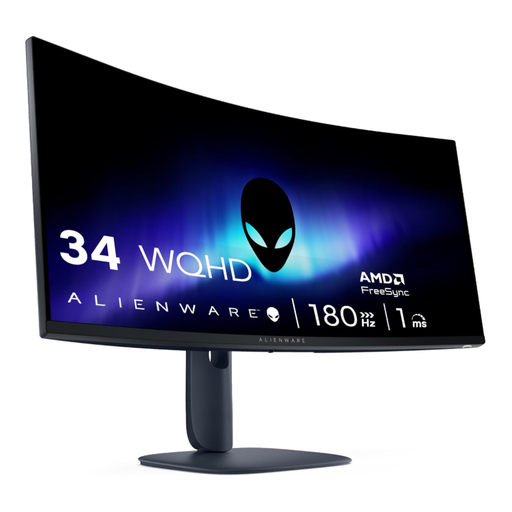 Image unavailable
Alienware AW3425DWM, 34 inches, 21:9
A single 21:9 monitor may suit you if you want a wide image and can take your seating distance into account when setting the field of view.
The product name lists a resolution of 3440 × 1440 pixels, a refresh rate of 180 Hz, 1500R curvature and 1 ms response time. The product description says the stand can be adjusted for height, tilt and swivel.
Joybuy
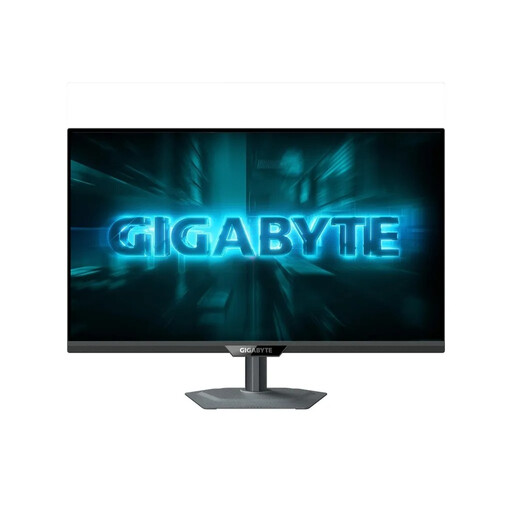 Image unavailable
GIGABYTE G27Q2, 27 inches, QHD
A single 16:9 monitor may suit you if you want to keep your seating setup compact and can adjust the simulation’s field of view to your position.
The product name lists a resolution of 2560 × 1440 pixels and a refresh rate of 200 Hz (overclocked to 210 Hz). The product description says the stand offers height adjustment, pivot, swivel and tilt.
Joybuy
 Image unavailable
ASUS ROG Strix WOLED XG27AQWMG, 27 inches, WQHD
A single 16:9 monitor is an option if you’re considering a 27-inch model for your fixed seating setup.
The product name lists a resolution of 2560 × 1440 pixels, a refresh rate of 280 Hz and a 0.03 ms GtG response time. The product description specifies a stand with height adjustment, tilt, swivel and pivot.
Joybuy
Frequently asked questions
How do I set up the field of view from a fixed seat?
For iRacing, measure the distance between your eyes and the screen, as well as the screen width, from your normal driving position. Enter these figures in the display settings. With three monitors, measure the angles too. For other simulations, check their individual settings.
Do all three monitors need to be the same model?
For the AMD Eyefinity setup described by iRacing, all three monitors must have the same resolution. The same make and model are recommended, but not required. Also check the connections and settings for your PC configuration.
What are my rights if a new monitor is faulty?
In Germany, consumers can generally exercise their statutory rights against the seller if newly purchased goods are faulty, within two years of delivery or receipt. A manufacturer’s guarantee is separate and subject to its own terms.
How can I compare monitors’ energy consumption?
Electronic displays in the EU, including computer monitors, carry an energy label with efficiency classes from A to G. Compare the label for the specific model; there is no requirement to choose a particular efficiency class.
Can I put an old monitor in household rubbish?
No. The German Environment Agency advises against disposing of old electrical equipment in household rubbish. Check what suitable take-back options are available where you live.


