What to look for when buying
For long oval-racing practice sessions, your choice depends on what matters most to you: a wider view to the sides, smooth visuals, an adjustable seating position or a simple setup.
Single 16:9 monitor
A good fit if: you’re prioritising desk space, a simple setup or the option to upgrade to three displays later.
The trade-off: the screen is narrower than the 21:9 and 32:9 examples mentioned here. Your viewing distance and screen width still matter when setting the field of view.
Single 21:9 monitor
A good fit if: you want a wider, uninterrupted view without setting up three displays.
The trade-off: whether the extra width gives you a useful view to the sides during a race depends on the simulation and its field-of-view settings. The connection you use can also affect the frame rate you achieve.
Single 32:9 monitor
A good fit if: you prefer an especially wide single-screen view and have considered the space, mounting and PC power you’ll need.
The trade-off: a wide panel alone doesn’t guarantee a particular view of nearby cars. Check how your simulation displays it and measure your rig.
Three monitors
A good fit if: you can position the side screens around your seat and have planned for the extra space and setup.
The trade-off: for the AMD Eyefinity setup described, iRacing requires all three displays to use the same resolution. Matching models are recommended, but not essential. Make sure the angles, bezels and connections work with your setup.
| Buying priority |
What to check |
Who it matters most to |
| View to the sides |
Measure screen width and viewing distance; check the game’s field-of-view options. |
If a wider view to the sides matters more to me than a compact setup, I’ll match the screen width and viewing distance to my space. Around 33 % of consumers prioritise a wider view to the sides. |
| Smooth visuals |
Check the frame rate supported by the input and resolution you’ll use; make sure your PC can handle the simulation. |
If smooth visuals matter more to me than extra width, I’ll compare the supported frame rate with what my PC can manage in the game. Around 27 % of consumers prioritise smooth visuals. |
| Comfort during long sessions |
Check for height adjustment or a suitable mount; with OLED, read the protection and warranty terms. |
If I want to position the screen comfortably for long sessions, I’ll check the adjustment options for my seating position. Around 20 % of consumers prioritise comfort during long sessions. |
| Space and setup effort |
Check the monitor and stand dimensions against your available space; with multiple displays, plan for the space and connections you’ll need. |
If space around my rig or the effort involved in mounting and setup is a deciding factor, I’ll compare the dimensions of the whole arrangement. Around 20 % of consumers prioritise desk space and setup effort. |
Joybuy monitors for oval racing
The models below are single 21:9 and 32:9 monitors. Before buying, check whether the simulation you use can deliver the field of view you’re looking for.
 No image available
CRUA 49-inch 32:9 DQHD curved gaming monitor
This wide single-screen view could suit you if you can fit a 32:9 monitor on your rig and adjust the field of view in your simulation to match.
49 inches, 5120 × 1440 pixels, 165 Hz and 1500R curvature. The product title lists HDMI 2.1, DisplayPort 1.4 and a height-adjustable stand.
For wall or rig mounting, the product description says the mount must be suitable for the monitor’s size and weight.
View at Joybuy
 No image available
INNOCN E34A1R 34-inch 21:9 curved gaming monitor
The 21:9 format could suit you if you want a wider single-screen view but aren’t planning a triple-screen setup.
3440 × 1440 pixels, 200 Hz, VA panel and FreeSync. The product description lists a stand with height, tilt and swivel adjustment.
View at Joybuy
 No image available
INNOCN 40C1U 40-inch 21:9 IPS monitor
This 21:9 model could suit you if you’re looking for a wide single-screen view at 5120 × 2160 pixels and have considered whether your PC can handle your simulation.
IPS panel and 100 Hz. The product details list up to 100 Hz for both HDMI 2.0 and DisplayPort 1.4, as well as a stand with height, tilt and swivel adjustment.
View at Joybuy
 No image available
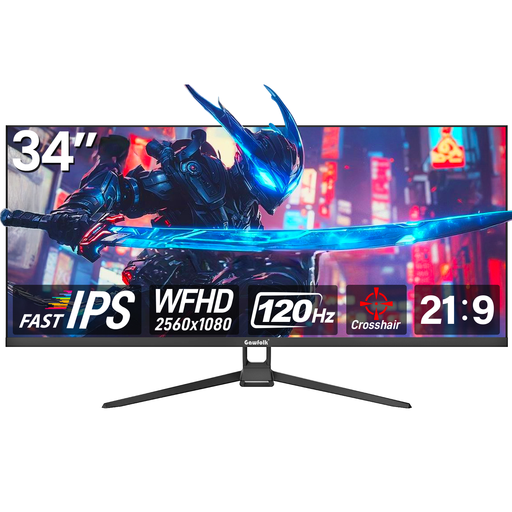
Gawfolk GF340H 34-inch 21:9 gaming monitor
The 21:9 format could be an option if you prefer a wider single-screen view without three displays.
WFHD at 2560 × 1080 pixels, 120 Hz and Fast IPS. The title and product description list AMD FreeSync, tilt adjustment and VESA mounting.
View at Joybuy
 No image available
Xiaomi G34WQi 34-inch 21:9 curved gaming monitor
This 21:9 monitor could suit you if you prefer a wider single-screen view and your simulation’s field-of-view settings work with it.
3440 × 1440 pixels and up to 180 Hz. Xiaomi lists a 1 ms MPRT response time for the G34WQi; the product description lists FreeSync and tilt adjustment.
View at Joybuy
Frequently asked questions
How do you set the field of view for your seating position?
For iRacing, measure the shortest distance between your eyes and the screen, as well as the screen width. With three monitors, you’ll also need the angle between them. Enter these measurements in the display settings to calculate the field of view. For other simulations, check their own settings.
Do all three monitors need to be identical?
No, not necessarily. For the AMD Eyefinity setup described by iRacing, all three monitors should have the same resolution. Matching models are recommended, but not required. It’s best to avoid different screen sizes with this setup.
What should you know about OLED and faults after purchase?
Check the protection features and warranty terms for the specific OLED model. A manufacturer’s warranty is voluntary and separate from your statutory consumer rights against the seller. If a product is faulty, the Verbraucherzentrale says that repair or replacement may be the first remedy to consider.
What energy labelling and cancellation rules apply when buying in Germany?
The EU energy label applies to computer monitors within its scope. The label and EPREL can help you compare specific models. When buying online as a consumer in Germany, you generally have a 14-day right to cancel after receiving the goods. Exceptions may apply, and you should check the information provided for the specific offer.


