For Overcooked! 2 on Nintendo Switch, Nintendo says each player can use a single Joy-Con. If you prefer a traditional controller, plan on one full controller per person instead. On PC or with a Switch 2, your controller, game and platform all need to be compatible. In a small living room, a wired controller is only a practical choice if the cable can reach your seat safely.
Which controller is right for you?
Switch cooking session
If you’re playing together on a Switch or Switch 2, the main things to consider are which Joy-Con you already own and whether they work with your console generation. For Overcooked! 2 on Switch, Nintendo specifies one Joy-Con per player.
PC gaming on the sofa
A full gamepad is an option for a Windows PC. What matters is whether you can use a suitable wireless connection or safely run a cable to your seat. Logitech says the F310 has a 1.8-metre USB cable.
A traditional controller instead of split Joy-Con
If you prefer each player to have a traditional gamepad, check that it works with your platform and game. Nintendo counts the Switch Pro Controller as one input device.
What should you consider when choosing?
First, check which platform you’re using and how many input devices you need for your game. Then you can work out the best cable route and power options for your room.
| What you’re buying |
What to check |
Who should pay particular attention? |
| Platform and game |
Check the console model, the controller’s full name and the inputs supported by the specific game. |
If I’m looking for a controller for my existing console or PC, I want to avoid buying one that won’t work with my game or platform. Around 36% of consumers say platform compatibility is their top concern. |
| Input devices for each player |
Count the left and right Joy-Con you already own, and check the controller requirements for the version of the game you’re playing. |
If several people are playing, I want to know whether individual Joy-Con will do or whether each person needs a full gamepad. Around 29% of consumers say the number of input devices that can be used at the same time is their top priority. |
| Space and cable routing |
Measure the route from your device to your seat, including a safe path for the cable. If you’re using a PC, check the available connection options too. |
If my seat is close to a walkway, I don’t want a cable running across it. For around 21% of consumers, room to move or cable routing is the most important buying consideration. |
| Power |
Check whether the controller uses a rechargeable battery or disposable batteries, what charging accessories you already have and what’s included with your chosen model. |
If I’m planning to use several controllers for longer gaming sessions, I also need to factor in charging or replacing batteries. Around 14% of consumers put power and the accessories they need first. |
How to avoid common buying mistakes
-
Confusing Joy-Con 2 with Joy-Con for the original Switch
Nintendo lists Joy-Con 2 as being for Switch 2 only. Similar product names don’t mean the controllers work with both console generations.
Before you buy, check your console model against the full product name.
-
Assuming a pair of Joy-Con is only one player’s worth of controllers
For Overcooked! 2 on Switch, Nintendo specifies one Joy-Con per player. A Switch Pro Controller, on the other hand, counts as one input device and can’t be split into two separate controllers.
Count the controllers you have and check the input requirements for the version of the game you’re playing.
-
Running a USB cable across the seating area
Logitech says the F310 has a 1.8-metre cable. The direct distance to your PC doesn’t necessarily tell you whether the cable can be routed safely through the room.
Measure the actual route to your seat. If the cable would cross a walkway, check whether a suitable wireless connection is available.
-
Assuming similarly named 8BitDo models are the same
8BitDo lists the Ultimate 2C Wireless for Windows and Android, and the Ultimate 2C Bluetooth for Switch and Switch 2, subject to the system requirements specified for each model.
Check the full model name, platform and connection type.
Brands to consider
Nintendo
Joy-Con for individual players on compatible Switch consoles; the Pro Controller is a traditional gamepad.
- For Overcooked! 2 on Switch, Nintendo specifies one Joy-Con per player.
- Joy-Con 2 don’t work with the original Switch. Older Joy-Con can be used wirelessly with Switch 2, but can’t be charged on the console.
- A Switch Pro Controller is a single input device, so it can’t replace two Joy-Con used separately.
Microsoft
The Xbox Wireless Controller is a traditional gamepad for Xbox and compatible Windows PC games.
- Microsoft lists USB, Bluetooth or Xbox Wireless as connection options for a Windows PC.
- You may need a suitable adapter to use Xbox Wireless with a PC. Don’t assume it will work with a Nintendo console.
Sony
As well as PS5, the DualSense may also work with supported games on compatible PCs.
- Sony lists Bluetooth and USB as connection options for supported PCs.
- Extra features depend on the game. Sony says a USB connection is required for haptic feedback on PC.
8BitDo
The Ultimate 2C models differ in their compatible platforms and connection options.
- The Ultimate 2C Wireless is listed for Windows and Android. For Windows, 8BitDo specifies 2.4 GHz or USB.
- The Ultimate 2C Bluetooth is listed for Switch and Switch 2, subject to the system requirements specified by the manufacturer. The two models aren’t interchangeable.
Logitech G
The F310 is a wired option for PC if you can reach your seat with a USB cable.
- Logitech specifies XInput/DirectInput and a 1.8-metre USB cable.
- The cable length limits where you can sit, so check it against the safe route to your seat.
Controllers at Joybuy
The selection includes Joy-Con for Switch and Switch 2, as well as gamepads for compatible Xbox and Windows gaming – with both wireless and wired options.
 No image available
Nintendo Switch 2 Joy-Con 2 two-pack, Blue/Light Yellow
For a Switch 2 gaming session where two players want to use one Joy-Con each.
Includes one left and one right Joy-Con 2, plus wrist straps. Designed for Nintendo Switch 2 only.
View at Joybuy
 No image available
Microsoft Xbox Wireless Controller, Pulse Red
For compatible Xbox or Windows PC games if you prefer a full wireless controller for each player.
Xbox Wireless and Bluetooth are listed as connection options. Requires two AA batteries.
View at Joybuy
 No image available
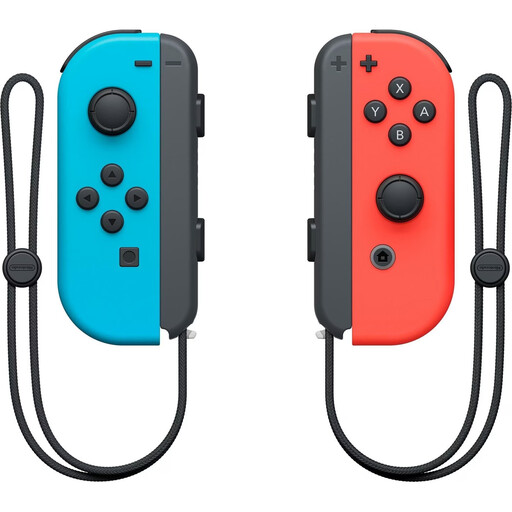
Nintendo Switch Joy-Con pair, Neon Red/Neon Blue
For a compatible Switch gaming session where players want to use Joy-Con separately rather than as a traditional gamepad.
The set includes one left and one right Joy-Con, which can be used separately or together. For Overcooked! 2 on Switch, Nintendo specifies one Joy-Con per player.
View at Joybuy
 No image available
GameSir G7 HE Wired Controller, Black
For compatible Xbox and Windows PC games if a wired controller works for your seating arrangement.
USB-C connection with a 3 m cable; listed as compatible with Xbox and Windows 10/11. Check that you can route the cable safely.
View at Joybuy
 No image available
Nintendo Switch Pro Controller, Black
For Switch players who prefer a traditional controller each instead of sharing Joy-Con.
Described as a wireless Pro Controller for Nintendo Switch. Nintendo counts it as one input device, so it can’t replace two Joy-Con used separately.
View at Joybuy
Frequently asked questions
Does everyone need a full gamepad to play Overcooked! 2 on Switch?
No. For this version of the game, Nintendo specifically says to use one Joy-Con per player. Check the requirements again if you’re using a different version of the game or platform.
Can I buy Joy-Con 2 for my original Nintendo Switch?
No. Nintendo lists Joy-Con 2 for Switch 2 only. Older Joy-Con can be used wirelessly with Switch 2, but can’t be attached to or charged on the console.
What should I check before using a PC controller for a gaming session?
First, check which connections your PC supports. Microsoft lists USB, Bluetooth or Xbox Wireless for the Xbox Wireless Controller; Logitech lists USB and XInput/DirectInput for the F310. Then test whether the game recognises the inputs you plan to use.
What should I know about charging and batteries?
It depends on the controller and the accessories you already have. To charge older Joy-Con when using Switch 2, you’ll need a Switch console or suitable charging accessories. The Xbox Wireless Controller described here requires two AA batteries. For other models, check the battery type and what’s included.


