Choose a controller based first on the platform, the specific game version and how many people will be playing at once – not on the daylight by the window. In Overcooked! 2 on Nintendo Switch, each player can use a single Joy-Con; Team17 also says that two people can share a keyboard for local play on PC, Mac and Linux. If glare is an issue, adjust the screen position and brightness rather than switching gamepads.
Which controller matters to whom
For anyone checking the platform first
If you want to add a controller to a Switch, Switch 2, Xbox or PC you already own, check that the specific controller is compatible with your system. Nintendo, Microsoft and 8BitDo each set out specific compatibility requirements.
For anyone kitting out several players
Count the inputs you can use at the same time, not just the number of controllers in the box. Nintendo says that each person can use one Joy-Con in Overcooked! 2 on Switch; Team17 says that two people can share a keyboard for local play on PC, Mac and Linux.
For anyone playing by a bright window
Consider how clearly everyone can see the shared screen separately from your choice of controller. Nintendo explains how to adjust the brightness settings on the Switch screen.
What to look for when buying
First check that the controls work with your platform and game version, then count how many player slots your group actually needs.
| What matters when buying |
What to check |
Who is it important to? |
| Platform and game |
Check the manufacturer’s information for your exact console or PC system, and confirm that the specific game supports the connection and controls. |
If I want to keep using my existing system, I’ll check the console, game version and connection first. Around 36% of consumers are likely to prioritise platform compatibility. |
| Controls for the group |
Check whether the specific game supports individual Joy-Con or a shared keyboard, and count the controls you already have. |
If we’re playing as a group, I’ll count how many people can play at once with the controls we have before buying another gamepad. Around 29% of consumers are likely to prioritise having extra player slots. |
| Grip and power |
Check that the shape and button layout suit the way you like to hold a controller, and whether it uses batteries, needs charging or is wired. |
If I’m playing for longer, I want to know whether I’ll need to charge it, change the batteries or route a cable. Around 21% of consumers are likely to prioritise grip and power. |
| Visibility in daylight |
Consider the screen and game mode, and check the available brightness settings and screen position. |
If the window makes it hard to see, I’ll position the screen so everyone can follow the game rather than relying on a different controller. Around 14% of consumers are likely to prioritise readability in daylight. |
Common buying mistakes
-
Buying more controllers before counting the controls you already have
In Overcooked! 2 on Switch, each person can use one Joy-Con. For local play on PC, Mac and Linux, Team17 says that two people can share a keyboard.
Before you buy, check how many people can play using the controls you have, on your platform and game version.
-
Assuming the 8BitDo Ultimate 2C Wireless and Bluetooth versions are the same
8BitDo lists Windows and Android for the Wireless version, while the Bluetooth version is listed for Switch. Using the Bluetooth version with Switch 2 is subject to firmware and version requirements.
Check the full variant name and the manufacturer’s platform information against your system.
-
Choosing a wired controller for tabletop mode
According to PowerA, the PowerA Enhanced Wired Controller reviewed here can only be used with the Switch docked.
Before choosing, decide whether your Switch will be docked and whether the cable will reach your seat.
-
Trying to fix a daylight visibility problem with a new gamepad
Brightness settings affect the screen; they are not a controller feature.
First try moving the screen and adjusting the brightness settings available for your Switch mode.
Key brands at a glance
Nintendo
In Overcooked! 2 on Switch, Joy-Con can be used as individual controls. The Switch Pro Controller is an alternative with a traditional gamepad design.
- Nintendo says that each person can use one Joy-Con in Overcooked! 2. The Switch Pro Controller has a built-in battery.
- According to Nintendo, older Joy-Con can be used wirelessly with Switch 2, but cannot be charged while attached to the console.
Microsoft Xbox
The Xbox Wireless Controller is an option for a compatible Xbox or Windows PC if you want a gamepad with a full grip.
- Microsoft lists Xbox and Windows as compatible platforms and AA batteries as the power source.
- A platform being listed as compatible doesn’t confirm that every PC cooking game supports the controls you want to use.
8BitDo
The Ultimate 2C models differ in their connection type and the platforms they support.
- 8BitDo lists Windows and Android for the Wireless version, and Switch for the Bluetooth version.
- For the Bluetooth version to work with Switch 2, 8BitDo specifies firmware and version requirements.
PowerA
The Enhanced Wired Controller reviewed here is a wired option for a docked Switch.
- PowerA lists a 3 m cable for this model, which doesn’t need batteries.
- According to PowerA, it only works when the Switch is docked. This model doesn’t have HD Rumble, motion controls or amiibo NFC.
PlayStation
The DualSense may be an option if you already own a PS5, or for compatible PC games and devices.
- PlayStation describes Bluetooth and USB connections to supported devices.
- A connection doesn’t guarantee that every cooking game will use all the DualSense features.
Joybuy controllers for different gaming sessions
This selection includes wireless gamepads for Switch and Switch 2, a pair of Joy-Con for extra players, and controllers for other specifically listed platforms.
 No image available
Nintendo Switch Pro Controller – Black
For one player who prefers a full wireless gamepad for Nintendo Switch.
The product details specify a wireless connection and a built-in rechargeable battery.
View at Joybuy
 No image available
BEITONG KP70 Elite Wireless Gaming Controller
For players looking for a gamepad for one of the platforms listed in the product details.
The product description lists PC, Nintendo Switch and Switch 2, along with wired, wireless and Bluetooth connections. The battery capacity is listed as 1500 mAh.
View at Joybuy
 No image available
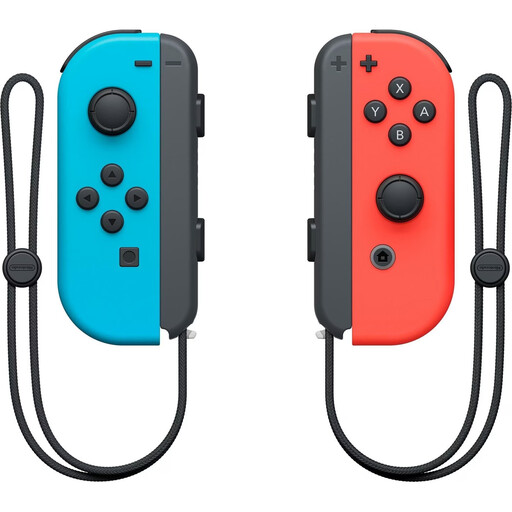
Nintendo Switch Joy-Con Controller Pair – Neon Red/Neon Blue
For extra players in Overcooked! 2 on Switch: Nintendo says that each person can use one Joy-Con.
The set includes one left and one right Joy-Con; the product details specify a wireless Bluetooth connection.
View at Joybuy
 No image available
Microsoft Xbox Wireless Controller – Shock Blue
For a session on a compatible Xbox or Windows PC. Check that the specific game supports the controls you want to use, too.
The product details list Xbox One, Xbox Series X/S and PC, and specify two AA batteries.
View at Joybuy
 No image available
Nintendo Switch 2 Pro Controller
For Nintendo Switch 2 players looking for a wireless gamepad for their system.
The product details list Bluetooth, HD Rumble, motion controls, amiibo functionality and customisable GL/GR buttons.
View at Joybuy
Frequently asked questions
Do four people need four full gamepads to play Overcooked! 2?
Not necessarily. Nintendo says that each person can use one Joy-Con on Switch; Team17 says that two people can share a keyboard for local play on PC, Mac and Linux. Check the controls for your specific platform and game version.
Will a different controller help if the game is hard to see by the window?
There’s no evidence that changing controllers will solve a visibility problem. First check the screen position and available brightness settings; Nintendo explains how to adjust these for the Switch screen.
Can I use older Joy-Con with Switch 2, and charge them there?
Nintendo says older Joy-Con can be used wirelessly with Switch 2, but cannot be charged while attached to the Switch 2 console. Nintendo recommends using a Switch or suitable charging accessories to charge them.
Does a wireless controller need batteries or a rechargeable battery?
It depends on the model. Nintendo lists a built-in battery for the Switch Pro Controller, while Microsoft specifies AA batteries for the Xbox Wireless Controller. Check the power requirements for the exact model before buying.
What should I check when buying a wireless controller in Germany?
Check the relevant labelling and conformity information for the specific product. For radio and electronic products, the Bundesnetzagentur lists CE marking, product identification, instructions in German and a declaration of conformity among the points to check. CE marking is only required when the relevant EU rules apply to the product.


