Embroiderers who need a fixed overhead view
You usually film at the same small workspace and want to show your embroidery hoop and hands without leaving your computer-based workflow.


For a fixed overhead view at your computer, an adjustable USB document camera is a sensible starting point. If you only need to show your work on the desk occasionally during a video call, a tilting webcam may be enough. If you want to film without a computer running or in different locations, consider a camera that records independently. Before you buy, measure the mounting height and distance from the fabric, then check that the embroidery hoop and your hands fit in the frame without blocking the light or restricting your movement.
You usually film at the same small workspace and want to show your embroidery hoop and hands without leaving your computer-based workflow.
You’d like to switch from showing your face to your work on the desk from time to time during a conversation.
You want to record embroidery videos without a computer running or in different locations, and can arrange a separate mount if needed.
A good fit if: You usually want to show or record your embroidery from above at a fixed computer workstation. IPEVO gives the V4K PRO a focus range starting at 10 cm and a maximum capture area of 34,2 × 25,5 cm.
Consider: You’ll need a computer as part of your recording setup. Also check that the camera arm and cable will fit on your desk.
A good fit if: You already use a computer and want to show your desktop during a video call when needed. Logitech describes the MX Brio’s Show Mode as tilting down towards the desk.
Consider: Presentation mode doesn’t guarantee that your subject will focus at close range from your chosen mounting height. Test the focus and framing with your embroidery hoop.
A good fit if: You want to record without a computer permanently connected, or use the camera when you’re out and about. Sony gives the ZV-1 II a focus range starting at around 5 cm, while DJI gives the Osmo Pocket 3 a focus range starting at 0,2 m.
Consider: You’ll need a stable mount for a fixed overhead view. Compare the distance between your subject and lens with the focus range of the specific model.
| What you need | What to check before buying | Who should consider this? |
|---|---|---|
| Show fine stitches clearly | Check the focus range of the specific model and test the framing at your planned distance. | If individual stitches matter more to me than a wide view, I want to choose a focus distance and subject size that suit my setup. Around 36% of consumers prioritise being able to make out fine stitches. |
| A clear overhead view in a small space | Check the desk edge, mounting height and room for your hoop, hands and lighting. | If I embroider at a small desk, the camera shouldn’t get in the way of my hands or cast a shadow over my work. Around 29% of consumers prioritise an unobstructed overhead view. |
| Recording at a computer | Check the connection, operating system, recording software and the file quality you need. | If I’m already working at my computer while filming, I want to be able to record the feed with my existing setup. Around 21% of consumers prioritise a computer-based workflow. |
| Recording without a fixed desk | Check for standalone recording, storage media and a secure mount for an overhead view. | If I want to film in different locations, I need to be able to record without a fixed computer workstation; I’ll arrange a separate mount for an overhead view. Around 14% of consumers prioritise recording without a fixed desk. |
IPEVO gives the V4K PRO a maximum resolution of 3264 × 2448 pixels at 30 frames per second; its recommended computer requirements for video recording specify 1920 × 1080. The recorded file also depends on how you capture the video.
Use your computer and software to create a test file at your preferred resolution and frame rate. Your recording setup may require compatible software and sufficient computer power.
Canon’s built-in stand and Logitech’s downward-tilting Show Mode offer different ways to position a camera, but neither guarantees that your embroidery hoop will be fully in focus while leaving your hands free to work.
Position your hoop and hands as you would while working, then check the mounting, framing and lighting. You may need a suitable, stable mount for a clear overhead view.
DJI gives the Osmo Pocket 3 a focus range starting at 0,2 m. Image stabilisation doesn’t change this stated minimum distance.
First compare the planned distance between the lens and fabric with the model’s focus range, then check the mount and framing.
USB document cameras for an adjustable view of your desk. The specifications given here are for the V4K PRO Ultra HD, model CDVU-10IP.
Tilting computer webcams. The MX Brio is worth considering if you want to switch between video calls and showing work on your desk.
The compact ZV-1 II for standalone recording and other video uses.
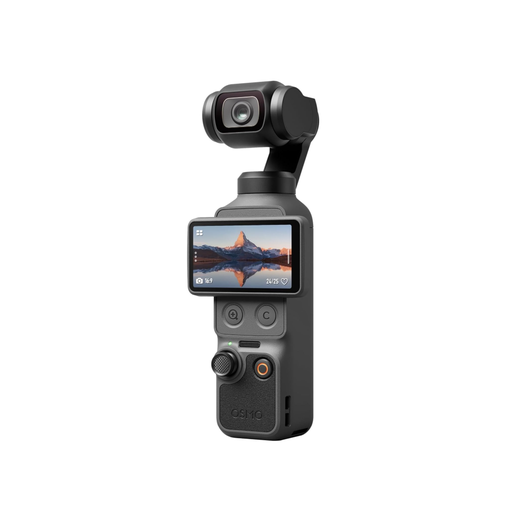
The compact Osmo Pocket 3 for standalone recording, including away from your desk.
The PowerShot V10, with standalone recording and webcam functionality.
This selection includes USB webcams for computer-based recording and compact cameras for standalone video. To film embroidery from above, check the distance, framing and freedom to move your hands with your own setup.
 No image available
An option for computer-based recording if you’re looking for a USB webcam rather than a camera that records independently.
Features listed in the product name: Full HD 1080P and USB Plug & Play for PC and laptop.
 No image available
For computer-based recording if you’re considering a webcam with a USB-A or USB-C connection. Check the focus and framing at your planned distance.
Features listed in the product name: Sony IMX363 sensor, PDAF autofocus and a 75° field of view.
 No image available
An option for a computer-based workflow if you’re looking for a USB webcam to record videos at your desk.
USB is specified in the model name. Before buying, check that the framing and focus suit the distance to your embroidery hoop.
 No image available
For standalone video recording if you want to film without a fixed computer workstation.
Features listed in the product name: 4K/240fps, built-in storage and a rotating 2-inch screen. Check that the mounting and framing suit your embroidery work.
 No image available
For standalone recording if you’re looking for a compact gimbal camera rather than a webcam.
Features listed in the product name: 4K/120fps and a 1-inch sensor. DJI gives the Osmo Pocket 3 a focus range starting at 0,2 m; check this distance, especially if you plan to mount the camera low above the fabric.
Measure the distance from where you plan to position the lens to the fabric, then compare it with the focus range of the specific model. Sony gives the ZV-1 II a focus range starting at around 5 cm from the front of the lens, IPEVO gives the V4K PRO a focus range starting at 10 cm, and DJI gives the Osmo Pocket 3 a range starting at 0,2 m. These model-specific figures don’t guarantee the same framing.
The IPEVO V4K PRO is specified as USB-UVC, and IPEVO Visualizer can record the camera feed on a computer. Check that the connection, computer and recording software support the workflow you want.
The seller is generally responsible for your statutory consumer rights; any voluntary warranty is subject to the provider’s terms. The Verbraucherzentrale generally states that the statutory warranty period is two years. For sales contracts from 31 July 2026, the period may be extended once by twelve months if you choose repair when a fault occurs.
There isn’t a straightforward yes-or-no answer. If other people are recognisable in a recording or you publish images of them, clarify their rights before publication. The Federal Commissioner for Data Protection and Freedom of Information lists consent as one possible legal basis under data protection law; whether another basis or exception applies in a particular case needs to be assessed separately.