
Lieferung heute & morgen

Qualitätsgarantie

Willkommens-Angebote freischalten: KOSTENLOSE Lieferung | Bis zu 80 % RABATT | Kostenlose 30-Tage-JoyPlus-Testphase
App herunterladen
Today, a PC is more than just a work tool or a gaming machine; for many, it's a centrepiece of their setup that needs to impress visually. A panorama PC case, often called an aquarium-style PC case, puts your carefully selected components in the spotlight. With a seamless glass front panel that flows directly into a side panel, it creates an unobstructed view of the internals.
However, choosing the right case can be complex. It's a matter of balancing aesthetics with functionality, such as cooling performance and compatibility. This article serves as a guide, presenting objective criteria and a selection of models to help you make an informed decision.
Before you decide on a model, several technical aspects should be considered to ensure your build runs smoothly and performance isn't sacrificed for aesthetics.
The most crucial requirement is that all your components fit inside the case. Pay close attention to the supported motherboard form factors (e.g., ATX, Micro-ATX, E-ATX). Additionally, check the maximum supported length for the graphics card (GPU), the maximum height for the CPU cooler, and the installation length for the power supply unit (PSU). A showcase PC case is designed to display hardware—make sure your desired components physically fit.
Large glass surfaces can potentially restrict airflow. Modern panorama cases address this challenge with thoughtful cooling designs. Look for generous ventilation openings on the top, bottom, and rear, as well as the option to mount fans on the side (next to the motherboard). The number of fan slots and compatibility with radiators for water cooling are key indicators of the case's thermal performance.
A clean interior is the goal of every aesthetic PC build. A new standard that revolutionises this is back-connect motherboards (e.g., MSI Project Zero or ASUS BTF). On these boards, the connectors for power, fans, and data are located on the back. To use this technology, you need a back-connect compatible case that features the necessary cutouts in the motherboard tray. The result is a virtually cable-free look in the main chamber.
Based on the criteria mentioned, we have compiled a selection of cases that cater to different needs and form factors.
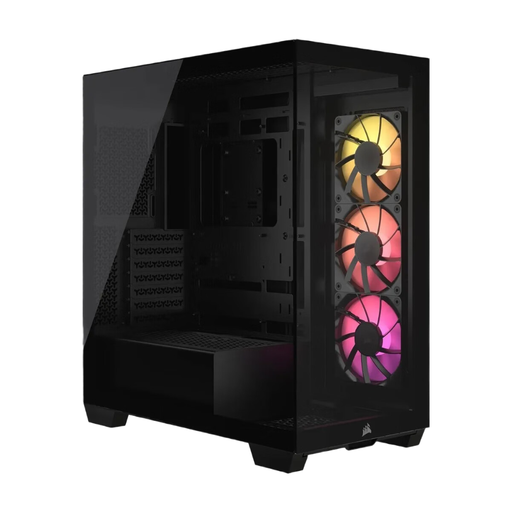
What sets it apart: The Corsair 3500X ARGB combines a pillarless design (case without an A-pillar) with future-proof functionality. The continuous tempered glass front and side panels offer a pristine view. A standout feature is its compatibility with reverse-connection motherboards, enabling exceptionally clean cable management. Three pre-installed ARGB fans provide out-of-the-box cooling and lighting.
Advantages:
Who it's for: Users who want to build a modern ATX system with maximum visibility and minimal cable clutter. It's an excellent choice for anyone who values a clean aesthetic and wants to leverage the benefits of back-connect motherboards.
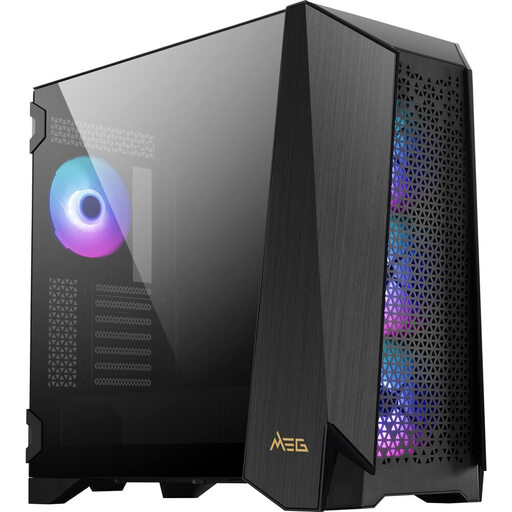
What sets it apart: The MSI MEG PROSPECT 700R is an enthusiast-grade case that sets itself apart from the crowd with its unique 4.3-inch IPS touchscreen. This display allows you to control fan speeds, ARGB effects, and view system information without additional software. Its modular design also offers high flexibility for complex builds, including support for large E-ATX motherboards.
Advantages:
Who it's for: PC builders looking to create a high-end system with maximum control and unique features. The combination of a touchscreen, modularity, and generous space makes it ideal for complex custom water-cooling loops and demanding gaming setups.
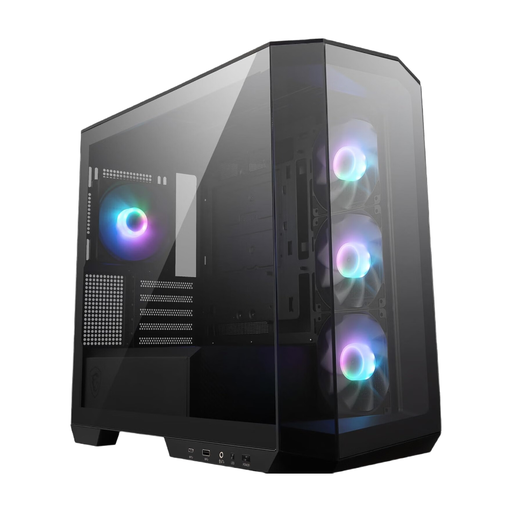
MSI MAG PANO M100R PZ Micro Tower PC Case Black
What sets it apart: The MSI MAG PANO M100R PZ brings the panorama experience to the more compact Micro-ATX form factor. It is specifically designed for the MSI Project Zero (PZ) motherboard series, enabling an extremely tidy interior. Despite its smaller size, it offers a 270-degree panoramic view and comes with four pre-installed ARGB fans, making it a turnkey solution for aesthetic builds.
Advantages:
Who it's for: Users who prefer a visually appealing and clean system in a space-saving Micro-ATX form factor. It is the ideal choice for builds based on an MSI Project Zero motherboard to fully exploit the potential of the back-connect design.
The models presented cover a range of use cases. However, if the right option for your specific project isn't here, you may find a suitable alternative in our broader selection. Every system is unique, and the choice of case is a very personal decision.
Browse our full category of PC Tower Cases to discover more models.
A panorama PC case, also known as a showcase PC case, is distinguished by at least two adjacent glass panels (usually the front and side) that are joined without an obstructive corner pillar (case without an A-pillar). This creates an uninterrupted, aquarium-like view of the PC components and is ideal for showcasing elaborate RGB lighting and high-end hardware.
This is a common concern, but it's often unfounded in modern designs. Manufacturers integrate targeted ventilation options to compensate for the potentially reduced airflow from the glass panels. These include perforated top and bottom panels, side air intakes, and numerous fan mounting locations. A correct fan configuration (intake/exhaust) is crucial to ensure effective cooling.
A back-connect motherboard (like ASUS BTF or MSI Project Zero) moves most of the connectors (e.g., 24-pin ATX, 8-pin CPU, SATA, USB headers) to the rear of the board. This makes cables in the main chamber of the PC almost completely invisible. Yes, you do need a compatible back-connect compatible case for these motherboards, as it requires special cutouts in the motherboard tray to allow access to these rear-facing connectors. Models like the Corsair 3500X and the MSI MAG PANO M100R PZ are designed for this purpose.