What should you look for when buying?
Adobe explains how to create panoramas and HDR panoramas in Lightroom Classic, while PTGui says its software supports Windows, macOS and Linux. So check your software and the kind of image sets you typically work with before deciding on your computer’s specification.
| Buying priority |
What to check |
Who should pay particular attention? |
| Panorama workflow |
Typical image set and software; installed memory and processor in the exact configuration. |
If I regularly edit lots of individual images or multi-row panoramas, I’ll choose a specification that suits my actual workflow. Around 33% of consumers prioritise processing requirements. |
| Desk space |
Case, monitor stand, power supply and cable routing; VESA compatibility if you plan to mount the PC. |
If my desk is short on space, I’ll plan for my whole workspace, not just the computer case. Around 27% of consumers prioritise footprint. |
| Image files and backups |
Installed SSD, available drive bays and ports for a separate backup device. |
If I want to keep source files, projects and finished images, I’ll plan for separate storage for my working files and backups. Around 20% of consumers prioritise archiving and data backups; the Federal Office for Information Security recommends regular backups. |
| Software and connections |
Supported operating system and suitable monitor, USB and, where applicable, card reader connections. |
If my existing software or monitor requires a particular platform or connection, I’ll check that it’s compatible with the exact PC configuration. Around 20% of consumers prioritise software and device compatibility. |
Ready-configured Windows mini PC
A good fit if: your panorama software runs on Windows and you want the memory and SSD already installed.
Consider: specifications and upgrade options vary by model and configuration. For the A5 Pro version with Ryzen 5 7530U, GEEKOM lists 16 GB RAM and a 1 TB SSD.
Mac mini
A good fit if: your software and existing devices are compatible with macOS and you want to connect your monitor separately.
Consider: Apple offers different storage configurations. Check the specification of the exact device rather than assuming figures from another configuration apply.
Upgradeable Tiny or mini desktop
A good fit if: you might want to upgrade the memory or drives later and can check what’s included in your exact configuration.
Consider: the maximum capacities and drive bays quoted by MSI and Lenovo apply to model ranges, not necessarily to the configuration supplied with every device.
Joybuy products for a compact panorama workspace
The products below include compact mini PCs and Mac mini configurations. Before choosing, check that the operating system, connections and specification are right for your panorama software and monitor.
 No image available
SOYO Y5Pro Mini PC, Intel Core i5 8250U/8350U
This compact Windows version could suit a workspace with limited room. Check which of the two listed processor options is on offer and whether it’s compatible with your software.
8 GB DDR4, 256 GB SATA SSD, Windows 11, Bluetooth 5.2 and Wi-Fi 5. The product description lists two HDMI outputs and USB-C; the stated case dimensions are 105 × 113 × 45 mm.
Joybuy
 No image available
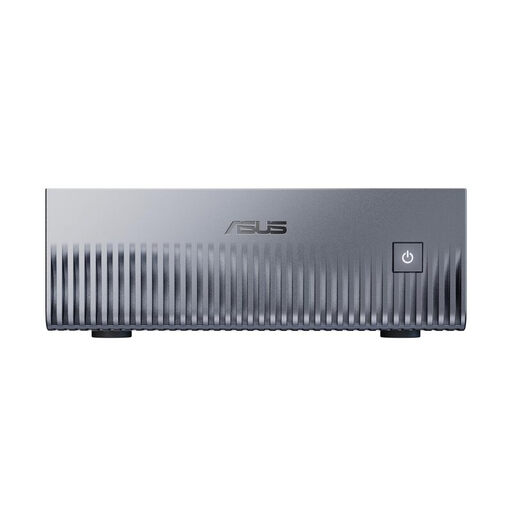
ASUS Ascent GX10 Mini AI Supercomputer, 128 GB Unified Memory, 2 TB SSD
This compact Linux version could suit your workspace if your particular panorama software and devices are compatible with Linux. The product description requires at least 5 cm of clearance for ventilation and warns against using it in enclosed, unventilated cabinets or drawers.
NVIDIA Grace Blackwell GB10, 128 GB Unified Memory, 2 TB SSD and Linux (DGX™ OS). The stated dimensions are 150,11 × 150,11 × 51,05 mm.
Joybuy
 No image available
Apple Mac mini M6, 16 GB Unified Memory, 256 GB SSD
This configuration could suit you if your panorama software is compatible with macOS and you’re looking for a compact desktop to use with a suitable monitor. You’ll need a display, keyboard and mouse to set it up; the product description states that the keyboard and mouse are sold separately.
12-core CPU, 12-core GPU, Thunderbolt 4, HDMI, 2.5GbE, Wi-Fi 7 and Bluetooth 6. The stated dimensions are 14,06 × 14,06 × 12,61 cm.
Joybuy
 No image available
Apple Mac mini M6, 16 GB Unified Memory, 512 GB SSD
This configuration could suit you if your panorama software is compatible with macOS and you’re looking for a compact desktop to use with a suitable monitor. You’ll need a display, keyboard and mouse to set it up; the product description states that the keyboard and mouse are sold separately.
12-core CPU, 12-core GPU, Thunderbolt 4, HDMI, 2.5GbE, Wi-Fi 7 and Bluetooth 6. The stated dimensions are 14,06 × 14,06 × 12,61 cm.
Joybuy
 No image available
Apple Mac mini M6, 24 GB Unified Memory, 512 GB SSD
This configuration could suit you if your panorama software is compatible with macOS and you’re looking for a compact desktop to use with a suitable monitor. You’ll need a display, keyboard and mouse to set it up; the product description states that the keyboard and mouse are sold separately.
12-core CPU, 12-core GPU, Thunderbolt 4, HDMI, 2.5GbE, Wi-Fi 7 and Bluetooth 6. The stated dimensions are 14,06 × 14,06 × 12,61 cm.
Joybuy
Frequently asked questions
Is a small case enough to make your choice?
No. Remember to allow for your monitor, power supply and cables, and check the connections on the exact version. If you plan to mount the computer behind your monitor, make sure the computer, bracket and monitor are all compatible.
How should I back up my panoramas and source files?
The Federal Office for Information Security recommends regularly backing up files you’ve created. Keep your backups separate from your working drive and check that you can restore files from them.
What are my rights if I buy a PC online and need to return it or report a fault?
For a qualifying consumer contract made at a distance, you generally have a 14-day right to cancel; exceptions and specific terms apply. If goods are faulty, the seller is legally responsible for a minimum of two years from the date you receive them. This is separate from any voluntary guarantee.
How should I dispose of an old desktop PC in Germany?
Electrical waste must be collected separately and must not go in household rubbish. The Federal Environment Agency explains return options and the take-back obligations that apply to retailers in different circumstances; check the appropriate return option when you buy.


