
Lieferung heute & morgen

Qualitätsgarantie

Willkommens-Angebote freischalten: KOSTENLOSE Lieferung | Bis zu 80 % RABATT | Kostenlose 30-Tage-JoyPlus-Testphase
App herunterladen
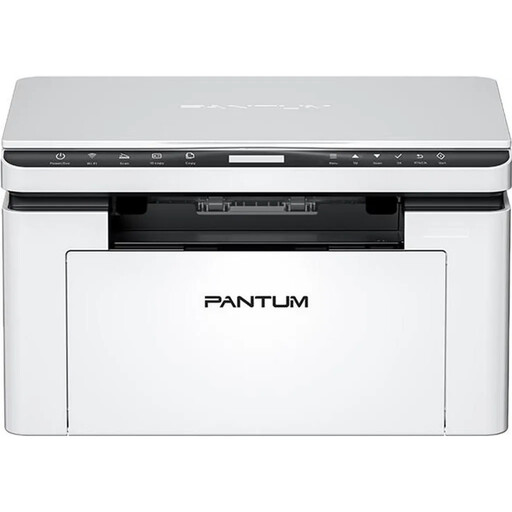
A compact printer needs to do more than simply print the occasional page. For many home users, freelancers and small businesses, printing, copying and scanning, a reliable Wi-Fi connection and manageable running costs are key considerations. The PANTUM BM2300NW multifunction printer combines these features in an A4 monochrome device.
However, there are often misunderstandings when buying a monochrome laser multifunction printer. Not every speed figure describes the entire process, and not every wireless feature is automatically compatible with every smartphone or network. The points below will help you assess the specifications objectively.
The “pages per minute” figure generally refers to printing multiple pages continuously. For individual documents, the time to the first print is also relevant. According to the product specifications, the PANTUM BM2300NW can print up to 22 pages per minute, with the first page taking around 7.8 seconds. Copying speeds are up to 23 copies per minute.
So, when printing a single invoice or form, the warm-up and processing time may matter more than the maximum continuous print speed.
A multifunction printer with Wi-Fi can connect wirelessly to computers and mobile devices. Even so, it’s worth checking which standards are supported and whether the printer has a conventional network port. According to the technical specifications, the BM2300NW supports 2.4 GHz and 5 GHz Wi-Fi, Bluetooth, Wi-Fi Direct, AirPrint and Mopria. However, no Ethernet LAN port is listed in the specifications.
If you want to connect the printer to an existing office network using a cable, check this before buying.
Print and scan resolution refer to different functions. According to the product specifications, the PANTUM BM2300NW has an optical scanner resolution of 1,200 × 1,200 dpi, while its maximum copy resolution is listed as 600 × 600 dpi. Consider these figures in the context of typical documents, forms and receipts before drawing conclusions about the level of detail you can expect.
The printer supports A4, A5 and A6 paper sizes, as well as B5, B6, C5 and C6. According to the manufacturer, the paper tray holds up to 150 sheets, while the output tray holds up to 100 sheets. Supported media include plain paper, thick paper, card, envelopes and labels, with a paper weight of 60 to 163 g/m².
Pantum recommends a monthly print volume of 250 to 2,000 pages. The maximum monthly print volume is listed as 10,000 pages. These figures aren’t a recommendation to print at the maximum every month. Instead, they help you assess whether the printer is suitable for occasional use, a home office or a small business.
The BM2300NW is an A4 monochrome laser printer with a flatbed scanner. It supports:
An automatic duplex unit isn’t listed in the technical specifications. If you regularly produce double-sided documents, you’ll need to turn the sheets over manually.
Measuring approximately 396 × 297.5 × 249 millimetres and weighing 7.5 kilograms, the printer should fit comfortably into smaller workspaces. Even so, this compact printer for the home office needs enough space around it for ventilation, paper loading and opening the scanner.
Alongside USB 2.0, it offers Wi-Fi, Bluetooth and Wi-Fi Direct. For mobile printing, it supports AirPrint, Mopria and the Pantum app. According to the product information, it is compatible with Windows, macOS Ventura, selected Ubuntu versions, Android and iOS. Before setting it up, check that your operating system and the version of the app you want to use are supported.
The following guide looks at different use cases. The technical information is taken from the product description provided and should be checked against the current listing before you buy.
Why this product suits this user: One device handles printing, copying and scanning. Wi-Fi, Bluetooth and mobile printing options mean you won’t need extra adapters for everyday use.
The product specifications list print, copy and scan speeds separately. The lack of an Ethernet connection is also clearly worth bearing in mind.
22 pages per minute, a flatbed scanner, a 150-sheet paper tray, and support for AirPrint and Mopria.
Why this product suits this user: The 800 MHz processor and 256 MB of memory are designed for regular document jobs at home or in a work setting.
Manual duplex printing isn’t mistaken for automatic double-sided printing. Toner costs should also be checked separately as an ongoing expense.
1,200 × 1,200 dpi optical scan resolution, an LCD control panel, and scan-to-email, FTP, PC and SMB.
Why this product suits this user: The combination of a 150-sheet paper tray, 22 pages per minute and several mobile connections is well suited to regular document jobs from a range of devices.
The recommended monthly volume of 250 to 2,000 pages helps define the printer’s intended use. For consistently higher volumes, compare it with an office model designed for the job.
Dual-band Wi-Fi, Bluetooth, Wi-Fi Direct and mobile printing options for Android and iOS.
Yes. Its design, speed of 22 pages per minute, and print, copy and scan functions make it suitable for home use and small businesses. Before setting it up, check its dimensions, the clearance needed for ventilation and your monthly print volume.
According to the product information, the device supports AirPrint, Mopria, Wi-Fi Direct and the Pantum app. AirPrint is designed for compatible Apple devices, while Mopria is for supported Android devices. The exact set-up depends on your Wi-Fi network and the operating system you use.
As well as the purchase price, running costs include toner, paper and, where needed, replacement parts. The printer uses a black toner cartridge. As cartridge yield and cost per page depend on the cartridge used and the actual page coverage, compare these figures separately before buying.