
Lieferung heute & morgen

Qualitätsgarantie

Willkommens-Angebote freischalten: KOSTENLOSE Lieferung | Bis zu 80 % RABATT | Kostenlose 30-Tage-JoyPlus-Testphase
App herunterladen
If you are looking for a PANTUM BP2300W laser printer for working from home, studying or a small office, you will usually not need a full-scale production solution. The key considerations are a manageable footprint, low running costs and straightforward connection to your computer and smartphone. At the same time, technical claims such as “fast printing”, “mobile printing” or “compact design” may leave out important details.
The stated speed of 23 pages per minute refers to black-and-white printing in A4 format under normal conditions. The actual wait time may vary when printing the first page, complex PDF files, transferring documents wirelessly or using heavier paper. For occasional document printing, the time to the first print is often more important than the maximum continuous print speed.
A Wi-Fi printer may support different protocols depending on the model. The PANTUM BP2300W is specified as supporting Wi-Fi Direct, AirPrint, Mopria, Bluetooth configuration and the Pantum app. Before buying, you should check whether your smartphone and operating system are compatible. The product information lists iOS 11.0 to 16.0 and Android 6.0 to 12.0 for certain mobile functions.
A compact laser printer fits neatly on a desk, but it still needs sufficient clearance for ventilation and paper feeding. The BP2300W has a footprint of approximately 220 × 337 mm, while its height is 179 mm. The paper tray holds up to 150 sheets, and the output area holds up to 100 sheets. This may be sufficient for a small office, but if you regularly print large volumes, you should allow for frequent refilling and manual sorting.
The PANTUM BP2300W is a monochrome laser printer for A4 format. It prints exclusively in black and white, making it particularly suitable for text, invoices, worksheets, forms and simple graphics. According to the product data, it supports standard, thin and thick paper, card, envelopes, labels and transparencies in the range of 60 to 163 g/m².
An A4 laser printer is not automatically designed for photo printing or colour presentations. If you regularly need colour documents, scanning or copying, you should consider a colour laser multifunction printer instead.
As a USB printer, the BP2300W can be connected directly to a computer via USB 2.0. It also offers 802.11b/g/n Wi-Fi and Bluetooth for specific setup scenarios. AirPrint and Mopria make it easier to print from compatible Apple and Android devices, while Wi-Fi Direct can enable a connection without a traditional Wi-Fi network.
For Windows 8.1, 10 and 11, automatic driver installation on first connection is specified. If you use an older or different operating system, check the manufacturer’s compatibility list before buying.
The stated print speed is up to 23 pages per minute for A4 black-and-white printing. According to the technical data, the first page should be produced after approximately 7.8 seconds. An 800-MHz processor and 256 MB of memory are suitably equipped for more extensive documents in a home environment or small office.
The maximum monthly duty cycle is stated as 10,000 pages. This is not a target for everyday operation, but a technical workload limit. When deciding whether to buy, you should therefore consider your average monthly print volume separately from the cost of suitable toner cartridges.
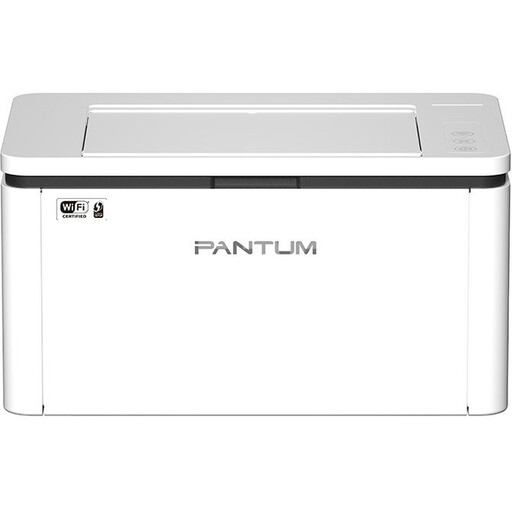
Why this product suits this profile: For text printing while studying, in a home study or in a small home office, this model combines a compact housing with USB, Wi-Fi and mobile printing options.
The technical specifications state specific connection types, paper capacities and a print speed of up to 23 pages per minute, rather than relying solely on vague speed claims.
220 × 337 × 179 mm, 4.8 kg, a 150-sheet input capacity, plus AirPrint, Mopria and Wi-Fi Direct according to the product data.
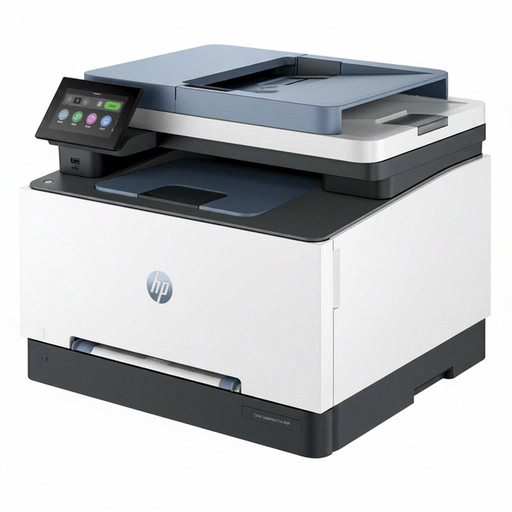
Why this product suits this profile: This multifunction device is designed for users who need colour pages, scanning and copying as well as printing.
If you regularly need colour printing, copies or scans, you will not accidentally choose a black-and-white-only device. Check the features carefully against your requirements before buying.
Colour printing, automatic duplex printing, flatbed scanner, copying, plus Wi-Fi, Ethernet and USB according to the product description.
Why this product suits this profile: Small teams and frequent users who mainly print monochrome documents get Wi-Fi, Bluetooth and USB connectivity in a space-saving device.
The stated monthly limit of 10,000 pages helps put the printer’s capacity into perspective. For higher regular volumes, you should factor in paper refilling, toner costs and the lack of automatic duplex printing.
256 MB of memory, an 800-MHz processor, up to 23 pages per minute and support for paper weights up to 163 g/m² according to the product data.
We have put together a complete, regularly updated list of products that fully meet these strict selection criteria and the safety regulations applicable in the EU.
The printer is well suited to a home office that mainly handles black text documents. It offers A4 printing, USB, Wi-Fi and mobile printing options. However, you should bear in mind that it does not offer automatic duplex printing, uses a monochrome printing process and has a maximum paper capacity of 150 sheets.
Yes. According to the product data, the printer supports AirPrint, Mopria, Wi-Fi Direct, Bluetooth configuration and the Pantum app. The exact functionality depends on the smartphone, operating system and network being used. If you encounter problems, connecting the printer to a computer via USB is an alternative setup option.
Running costs mainly consist of toner, paper and electricity. The BP2300W uses a toner cartridge. Before buying, you should compare the page yield of the compatible cartridge, the price per replacement cartridge and the expected monthly page count. The stated standby power consumption of 2 W can help you assess the cost of leaving the device switched on continuously.