Teachers who need an overhead view
If you want the paper and both hands to stay in shot throughout every folding step, you’ll need a suitable field of view and a camera stand that fits on your small table.


If you’re recording on a computer, a document camera with an adjustable overhead view could be a good choice. If you don’t want to keep a computer connected, a compact camera that records independently is a suitable alternative. What matters is having a clear view of the paper, room for both hands and sharp fold lines from your planned camera height – the resolution figure alone won’t tell you whether a camera is right for the job.
If you want the paper and both hands to stay in shot throughout every folding step, you’ll need a suitable field of view and a camera stand that fits on your small table.
If you’re demonstrating small folds, make sure the focus and camera height suit the way you’ll actually be working with the paper.
If you don’t want to use a computer at the table while recording, you could consider a camera that works with a compatible memory card.
Suitable if: you’re recording with a compatible computer and want to show the paper and your hands from above.
The trade-off: Recording runs through the computer, and you may need to refocus if you change the camera height.
Suitable if: you already film on a computer and want to point the camera towards the table occasionally.
The trade-off: A tilting function alone doesn’t guarantee a straight-down view or an unobstructed view of the paper and your hands.
Suitable if: you want to record without a computer permanently connected and can use a compatible memory card.
The trade-off: For an unobstructed overhead view, the camera position and secure mounting need to work with your table.
| What to consider | What to check before buying | Who will find this most important? |
|---|---|---|
| Clear overhead view | From the height you plan to use, check that the paper, both hands and the camera stand are in shot. IPEVO lists a maximum capture area of 34,2 × 25,5 cm for the V4K PRO. | If I want to show the paper and my hands on a small table, I need the whole area in shot. Around 36 % of consumers are likely to make an unobstructed overhead view their top buying priority. |
| Sharp fold lines | Test the focus on an actual fold from the working height you have in mind. Decide whether autofocus or manual adjustment better suits the way you move. | If I want to show small folds, the image needs to be sharp at the actual camera distance. Around 29 % of consumers are likely to make detail sharpness their top buying priority. |
| Recording without a dedicated computer | Choose between recording via USB on a computer and recording to a memory card. If you choose a card, check that it’s compatible, as well as the power supply and mounting options. | If I don’t want a computer taking up space on the table all the time, I need another way to record. Around 21 % of consumers are likely to make recording without a computer their top buying priority. |
| Sound and lighting | Make a test recording using your usual speaking position and lighting. Check that your speech is clear and that your hands don’t cast shadows over the paper. | If I want to explain the folding steps as I demonstrate them, my voice and the paper need to remain clear and visible in my actual set-up. Around 14 % of consumers are likely to make sound and lighting their top buying priority. |
Even a high resolution won’t prevent the image from cutting off part of the paper, hiding fold lines or leaving you with an unsuitable focusing distance.
Lay out the paper and check the sheet, your hands and the folds from the camera position you plan to use.
An integrated stand or a downward-tilting camera doesn’t, by itself, guarantee a clear, straight-down view of the paper.
Plan how you’ll mount the camera and check that you can use both hands without obscuring the camera or its support.
You may need an additional, securely fitted mount to get a clear overhead view.
A document camera’s USB video feed requires a compatible recording device; a camera with a memory card works differently.
Before buying, decide whether you want to record on a computer or to a memory card. Check the required connections or card compatibility, as appropriate.
You’ll need a compatible computer to record with a USB document camera.
The examples below refer to specific product ranges and features. The right choice depends on how you plan to record, the field of view and the camera position.
The V4K PRO is a USB document camera for demonstrations on a computer.
The HD Pro is a USB document camera with a flexible camera neck, designed for teaching and learning videos.
The MX Brio is a webcam for recording on a computer; Logitech describes a Show Mode that tilts the camera towards your desk.
The PowerShot V10 is a compact camera for recording video independently and, according to Canon, can also be used as a webcam.
The ZV-1 II, also known as the ZV-1M2, is a compact camera with a fixed 18–50-mm lens and a memory card slot.
This selection includes webcams for recording on a computer and compact cameras with the video or storage features listed. For each model, check that the field of view and mounting options will work for an overhead view of your table.
 Image unavailable
For recording on a computer; check whether you can position the mount as needed in relation to the paper.
The title lists a 99° field of view and an integrated microphone. According to the product description, the mount tilts by 180° and rotates by 360°.
 Image unavailable
For recording video on a computer; check the field of view from the height you plan to use before settling on the webcam mount.
The product details list a Sony IMX363 sensor, PDAF autofocus, two microphones, a 75° field of view, and USB-A and USB-C.
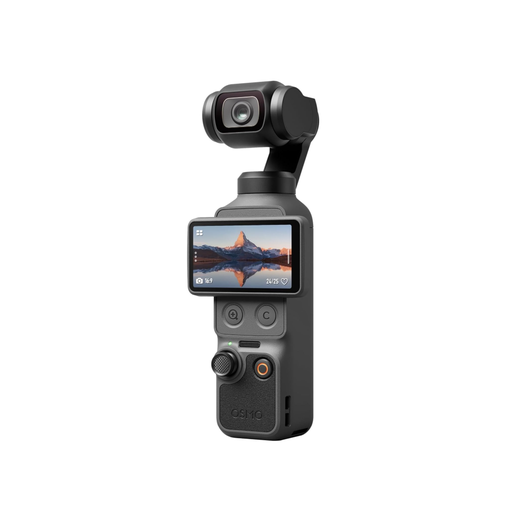 Image unavailable
A compact camera for recording video; check whether you can set it up securely to get the view of the paper you want.
The product title lists a 1-inch CMOS sensor, 107 GB of built-in storage, 3-axis stabilisation and a rotating 2-inch screen.
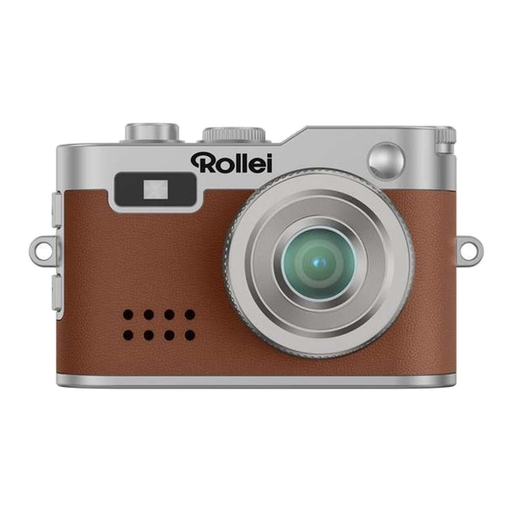 Image unavailable
A small camera with a listed microSD slot for recording video without a computer permanently connected; check card compatibility and positioning.
The product details list Full HD video, LED lighting, support for microSD cards up to 64 GB, a weight of 18 g and USB-C for charging and transferring files.
 Image unavailable
For recording on a computer; check that the clip mount suits your table and screen position and captures the whole paper area.
The product description lists QHD at 2560 × 1440 and 30 frames per second, plus a microphone with noise reduction.
Lay out your sheet and check from the camera height you plan to use that the paper and both hands stay in shot. IPEVO lists a maximum capture area of 34,2 × 25,5 cm for the V4K PRO; whether that’s enough for your hand movements depends on your set-up.
For the IPEVO V4K PRO, the manufacturer specifies USB-UVC and a compatible computer. If you want to film without a computer permanently connected, look for a camera that records to a compatible memory card.
Make a test recording and check the field of view, focus, shadows and speech from your usual working position. For a USB camera, make sure your computer is compatible; for a memory card camera, check card compatibility and that the power supply will last for your planned recording time.
Your statutory rights are separate from any voluntary guarantee. The Verbraucherzentrale explains that if a product is faulty, repair or replacement may be the first step. Online purchases usually come with a 14-day right to cancel, although the conditions should be checked for each individual case.