What to look for when buying
Start with the games you actually want to play together. You can then more easily assess the controller requirements, game format and suitability of your current TV.
Nintendo Switch 2
A good fit if: you want to play on the TV and occasionally at the table, and would like to use Switch 2-specific party game modes such as Jamboree TV.
Keep in mind: According to Nintendo, the standard bundle includes two Joy-Con 2 controllers. The number of additional controllers you’ll need for a larger group depends on the game.
Nintendo Switch OLED
A good fit if: TV and tabletop modes, along with party games available for the original Switch, are all you need.
Keep in mind: The OLED screen affects handheld and tabletop play, not the picture on your TV. Jamboree TV is part of the Switch 2 Edition.
PlayStation 5
A good fit if: your favourite local co-op, sports or competitive games are available on PlayStation.
Keep in mind: The Digital Edition has no disc drive. Check the local modes and controller requirements for each game individually.
Xbox Series X or Series S
A good fit if: the Xbox games you want suit your group. The Series X with a disc drive is an option if you want to use discs.
Keep in mind: Microsoft distinguishes between the Series X with a disc drive and the all-digital Series S. The Xbox Store lists Pummel Party as supporting four local players and carrying an age rating of 16+.
| What matters |
What to check before buying |
Who it matters most to |
| Local player count and controllers |
Check the local mode, player count and controller requirements for every game you’re considering. |
If several guests will be playing on the same screen at once, the local player count is key; around 36% of consumers put this first. |
| Visibility in daylight |
Consider your TV’s position, glare and available brightness settings. |
If you play during the day, you’ll want to see the picture clearly despite incoming light; around 29% of consumers prioritise visibility in a bright room. |
| Games to suit your group |
Choose specific games first, then check the age ratings for any children playing. |
If children or guests with different preferences are joining in, the gameplay and age ratings should suit them; around 21% of consumers focus mainly on finding the right games. |
| Total cost and game format |
Check whether you own discs and how many controllers your group will need. |
If you want to keep using games you already own and plan for the controllers you need, consider the console’s format; around 14% of consumers prioritise this overall calculation. |
Joybuy products for TV and party gaming
This selection includes a Nintendo Switch 2 for TV mode, as well as retro games consoles with HDMI output. Before buying a retro model, check which games and local modes will actually suit your group.
 No image available
Nintendo Switch 2 console (EU)
An option for gaming on the TV if you want to use Switch 2 TV mode and compatible games. The local player count depends on the game.
Nintendo lists two Joy-Con 2 controllers and a TV dock in the Switch 2 bundle. In TV mode, the picture is output via HDMI.
View at Joybuy
 No image available
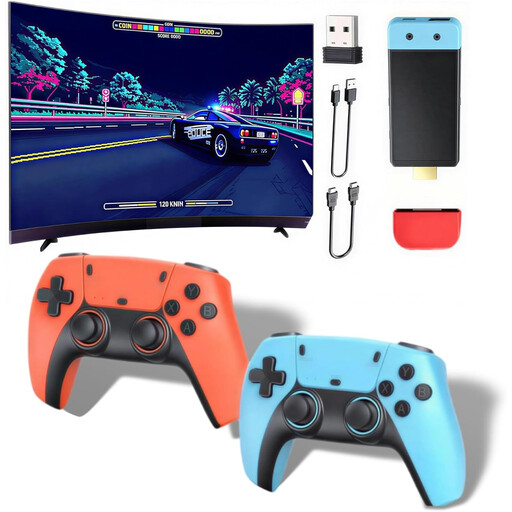
Retro games console, 20,000+ games, 1080P/720P
This could suit a TV gaming session if you’re looking for a console with HDMI output and wireless controllers. Before buying, check which games and local player counts will work for your group.
The product description lists 20,000+ games, HDMI output at 1080P/720P and wireless controllers.
View at Joybuy
 No image available
Retro games console, 20,000+ games, 23 emulators, 4K HDMI
This TV games console could be a good fit if you’re looking for HDMI output and two wireless controllers. Check whether the listed games and modes are right for your group.
The product description lists 20,000+ games, 23 emulators, 4K HDMI output and two wireless 2.4G controllers.
View at Joybuy
Frequently asked questions
Do I need a console with the highest possible resolution for a bright room?
Not as the only solution. First check for glare, your TV’s position and its settings. The brightness or ambient light features available will depend on your TV model.
How do I set up Switch 2 for gaming on a TV?
Nintendo lists a TV dock in the Switch 2 bundle; in TV mode, the picture is output via HDMI. Then check which controllers and how many local players your chosen game supports.
Can I use my existing Switch Joy-Con controllers with Switch 2?
According to Nintendo, original Switch Joy-Con controllers can connect wirelessly, but can’t be charged on Switch 2. Also check the control requirements for the specific game.
What warranty cover applies if a console is faulty?
When you buy from a business seller in the EU, you have a legal guarantee of at least two years from the date you receive the goods. Your Europe explains that this is separate from a manufacturer’s voluntary guarantee; the seller is generally responsible for the legal guarantee.
What should I look for in game age ratings?
Check the rating for the specific game and make sure it’s suitable for the ages of any children playing. The Federal Government’s family portal explains age ratings for games on physical media, while the USK also provides information about possible purchase and communication features.


