What should you look for when buying?
First check compatibility with your device and game, then decide how you want to connect headphones and chat. Finally, consider the number of players and whether everything will be ready to use.
PS5 and DualSense
A good fit if: you want to play on PS5 and use a DualSense.
Bear in mind: On PC or Mac, Sony says the headset jack only works when the controller is connected by cable. Features also depend on the game.
Xbox console
A good fit if: you want to connect a compatible wired headset directly to the Xbox Wireless Controller paired with your Xbox.
Bear in mind: If you’re using a Windows PC, check the specific connection and audio setup separately.
Nintendo Switch 2
A good fit if: you want to connect headphones to the Switch 2 Pro Controller.
Bear in mind: The controller doesn’t work with the original Switch. GameChat also requires a Nintendo Switch Online membership and a stable internet connection, among other things.
Original Nintendo Switch
A good fit if: you plan to use Bluetooth headphones independently of the controller for a Switch gaming session.
Bear in mind: When using Bluetooth audio, you can connect no more than two wireless controllers; Bluetooth audio is disabled in local mode.
Windows PC or Xbox with a wired controller
A good fit if: you’re considering a wired controller such as the GameSir G7 SE for one of the platforms listed by the manufacturer.
Bear in mind: GameSir lists a detachable 3 m USB-C cable, so check that it will reach your seat.
When choosing a controller for party games with headphones, consumers tend to have four main priorities:
| Priority |
What to look for when buying |
Who is it especially relevant to? |
| Platform and game |
Check the full model name, console or PC, game version and the inputs needed by each player. |
If I’m looking for a controller for a specific device and party game, I want to avoid choosing the wrong generation or a model that the game doesn’t support. That’s why around 36% of consumers put platform and game compatibility first. |
| Headphones and chat |
Check the connection, how it links to the platform and the audio settings; test the sound and microphone separately. |
I want to hear game audio and, if needed, chat through the headphones I plan to use. That’s why around 29% of consumers prioritise the headphone and chat audio setup. |
| Multiplayer setup |
Consider the number of players, game mode, Bluetooth audio and cable length. |
If several people are playing, I want to be sure there are enough usable inputs and that the connection will reach my seat. Around 21% of consumers put the multiplayer setup first. |
| Requirements and power |
For Switch 2 GameChat, check the membership and internet requirements; factor in charging or battery needs. |
I want to know what’s required for the chat setup I’m planning and whether the controllers will be ready for the session. Around 14% of consumers put these ongoing requirements and power needs first. |
Joybuy product selection
The selection below includes controllers for Nintendo Switch 2, as well as several models listed in the product titles for PC, PS4 and Switch platforms. Before buying, check compatibility with your device and game, along with your preferred way to connect headphones.
 No image available
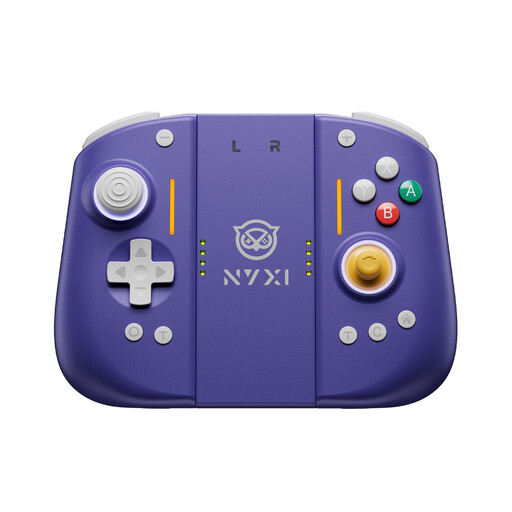
NYXI Hyperion 3 Wireless Controller for Switch 2, lilac
Listed for gaming on Nintendo Switch 2; check how to connect a headset with your particular setup.
The product title lists Hall effect joysticks and fully mechanical buttons.
Joybuy
 No image available
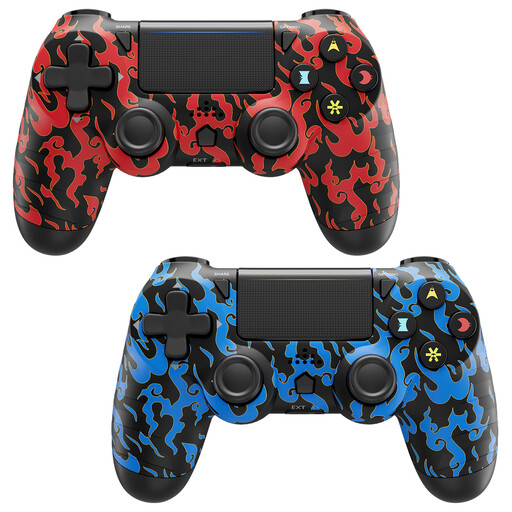
CHENGDAO 2-pack wireless controllers for PS4, PS4 Pro and PC, blue and red
This two-controller pack is worth considering if two people each need a controller; check compatibility with your particular device and game.
According to the product description, features include a 3.5 mm headset jack, an 800 mAh battery, dual vibration and 6-axis motion control. The description excludes Turtle Beach headsets.
Joybuy
 No image available
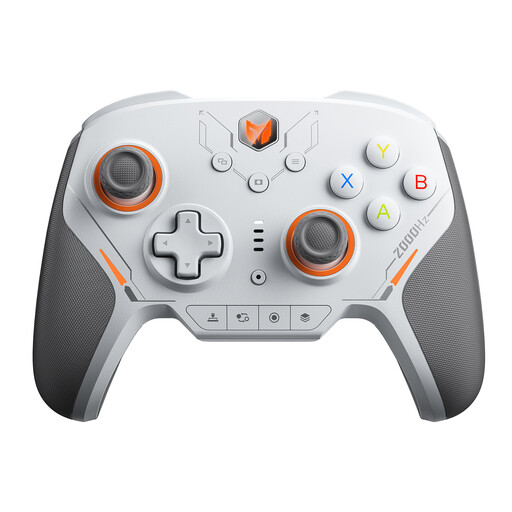
BIGBIG WON BLITZ2 Wireless Controller
The product title lists PC, Nintendo Switch, iOS and Android as platforms; check compatibility with your particular game.
The title lists 16 fully mechanical micro-switches, a 2000 Hz polling rate and TMR electromagnetic joysticks. Check your preferred headphone connection separately.
Joybuy
 No image available
BIGBIG WON Rainbow 3 Wireless Controller
The product title lists PC, Switch 2, iOS and Android, plus a 3.5 mm audio jack; check which audio connection works with your platform.
Other features listed in the title include a 2000 Hz polling rate, capacitive joysticks, 16 mechanical buttons and a 6-axis gyroscope.
Joybuy
 No image available
BIGBIG WON Rainbow 2 Pro Wired Controller
Listed as a wired controller for PC, Switch Lite and PS4; check compatibility with your game and preferred headphone connection.
The description lists a 6-axis gyroscope, macro and turbo functions, and customisable buttons.
Joybuy
Frequently asked questions
Can I use a headset with a DualSense connected to a PC via Bluetooth?
Not through the DualSense headset jack: Sony requires a wired controller connection on PC and Mac. Also check whether the specific game supports the audio output you want.
How do I check game audio and chat on Switch 2?
Connect your headphones to the intended output, then use the sound and microphone test in the Switch 2 system settings. If you connect headphones to a wireless Switch 2 Pro Controller, Nintendo says you can set the audio mode to ‘Stable’ or ‘Low Latency’.
Can I still use GameChat for free on Switch 2 after March 2026?
Nintendo’s free welcome offer ended at the end of March 2026. GameChat requires a Nintendo Switch Online membership and a stable internet connection; a telephone number must also be registered to the Nintendo Account.
What should parents know if their child uses GameChat?
For users under 16, Nintendo requires parents or guardians to complete certain setup steps, including settings in the Nintendo Switch Parental Controls app. These requirements apply to Nintendo’s service.
What are my rights in Germany if a controller bought online is faulty?
Your statutory rights for faulty goods are against the seller and are separate from any voluntary guarantee. According to the consumer advice centre, online purchases also generally come with a 14-day right to cancel; the requirements and exceptions depend on the specific purchase.


