Start by choosing a controller for your console or PC, then check the control options and player count supported by the game itself. With compatible Switch games, individual Joy-Con can provide two separate inputs; full gamepads must be compatible with the device and game you’re using. In a study, you’ll also need to consider available ports, wireless connectivity and a safe place for any cables.
Who are these options for?
Party gamers with a console already
If you need extra inputs for your Switch, Switch 2, Xbox or PlayStation, check the controller format and whether the specific game supports it. Nintendo notes that using a Joy-Con on its own depends on the software and play style.
PC hosts with several players
For multiplayer gaming on a Windows PC, the game needs to recognise enough inputs and the controller’s connection method needs to be suitable. Microsoft lists the Xbox Wireless Controller for Xbox and Windows PCs, while Sony lists USB and Bluetooth for DualSense on supported Windows systems.
Gamers with a crowded desk
If you want to avoid cables or route them neatly, check the exact model’s wireless connection method and make sure you have free USB ports. PowerA specifies a 3-m USB-C cable for the Symmetric Wired Controller; whether it works at your desk depends on how you route it.
What should you look for when buying?
First decide which gaming device you’ll use, then check which controllers the game supports for local multiplayer. The figures group consumers by their top priority when buying a controller for party games in a study.
| What to consider |
What to check before buying |
Who cares most about this? |
| Platform and game |
First check your console or operating system, then look at the controller information for the specific game. |
If I’m buying a controller that needs to work with my existing device and chosen party game, compatibility is key. Around 36% of consumers put compatibility first. |
| Player slots and controls per person |
Check the local player count and the controls allowed for each player, and count the controllers you already have. |
If several guests will be playing, I want to know how many separate inputs the game actually supports. Around 29% of consumers put extra player slots first. |
| Connection and room to move |
Measure the cable route or check Bluetooth, 2.4 GHz and available USB ports for the exact model. |
If my desk is short on space, I want to route a cable safely or use the right wireless connection. Around 21% of consumers put space and connectivity first. |
| Power and extra hassle |
Check how many controllers you can actually use and what charging or power supply they need. |
If I’m planning several extra inputs, I also want to keep an eye on how they’re powered. Around 14% of consumers put this first. |
Common misconceptions
-
Two connected controllers don’t automatically mean two players
A single Joy-Con only works as a separate input if the game supports that control option. The number of connected controllers alone doesn’t tell you how many people can play.
Before buying, check the local player count and the control options supported by the specific game.
-
“Wireless” doesn’t always mean Bluetooth on a Windows PC
For the 8BitDo Ultimate 2C Wireless, the manufacturer lists 2.4 GHz or a wired connection for Windows; Bluetooth is specified for Android.
Check the platform, connection mode and exact model name before deciding how to connect.
-
A wired controller won’t necessarily suit every desk
Depending on your setup, the 3-m cable on the PowerA Symmetric Wired Controller mentioned here could cross a seating area or walkway.
Plan the route between your device and seat, and check that you can reach a suitable USB port.
Key brands at a glance
Nintendo
Joy-Con and Joy-Con 2 are options for compatible party games on the relevant Switch console.
- According to Nintendo, each Joy-Con can be used sideways as a single controller when supported by the software and play style.
- Joy-Con 2 are designed for Switch 2. Original Joy-Con can only connect to Switch 2 wirelessly. Nintendo recommends using wrist straps when Joy-Con 2 are used separately and wirelessly.
Microsoft Xbox
The Xbox Wireless Controller is a full gamepad option for Xbox consoles and Windows PCs.
- Microsoft lists Bluetooth and customisable button mapping for this model.
- The platform information doesn’t guarantee that every PC game supports the controller or all its features.
Sony PlayStation
DualSense is an option for PS5 and, with supported games, compatible Windows PCs.
- Sony lists USB and Bluetooth for connecting to a PC.
- According to Sony, haptic feedback on PC requires a supported game and a USB connection; not every game offers all features.
8BitDo
The Ultimate 2C Wireless is an option for Windows PCs where a 2.4 GHz or wired connection can be set up.
- The manufacturer lists 2.4 GHz or a cable for Windows, and Bluetooth for Android.
- The stated polling rates are manufacturer specifications and don’t prove an advantage for party games.
PowerA
The Symmetric Wired Controller is a wired option for the Xbox consoles and Windows 10/11 listed by PowerA.
- PowerA specifies a 3-m USB-C cable for this model.
- Whether you can route the cable safely around your desk depends on your setup and the position of the port.
Joybuy products for party games
These product options include split Joy-Con, as well as full-size and alternative controllers for console and PC gamers. For each option, check that it’s supported by the specific game and device you’ll be using.
 No image available
BIGBIG WON Fight Master Leverless Controller
The all-button design is an alternative to a standard gamepad layout, if it suits the game you play.
The product title lists Switch 2, Switch, PC, iOS and Android, along with Bluetooth, 2.4 GHz and wired connectivity. The buttons are described as hot-swappable mechanical fast-trigger switches.
View at Joybuy
 No image available
Nintendo Switch 2 Joy-Con 2, two-piece set (blue/light yellow)
This set could suit a compatible Switch 2 game that supports separate Joy-Con inputs.
The product description says the set includes one left and one right Joy-Con 2. Designed for Switch 2; whether they can be used as individual controllers depends on the game.
View at Joybuy
 No image available
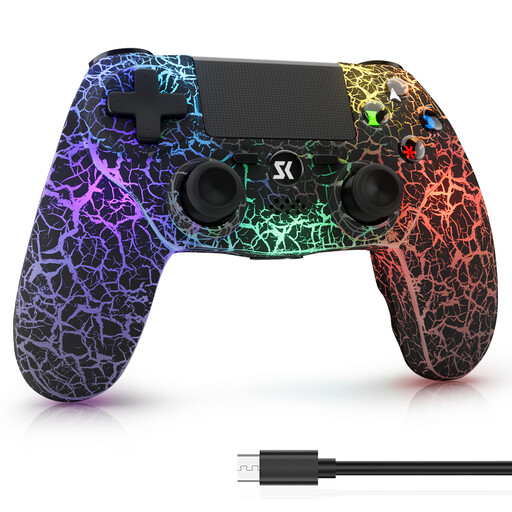
Wireless controller for PS4/Pro/PC (Windows), black
The wireless connection described could suit you if you’re looking for a full gamepad for a compatible PS4 or Windows PC game.
The product description lists a 1000-mAh battery, dual vibration and motion controls, and PS4, PS4 Pro, PS4 Slim and Windows PC as compatible devices.
View at Joybuy
 No image available
Microsoft Xbox Wireless Controller, Deep Pink
A full gamepad option if you’re looking for a compatible controller for Xbox or PC.
The product description lists Xbox One, Xbox Series X/S and PC as platforms, with Xbox Wireless and Bluetooth as connection options.
View at Joybuy
 No image available
BIGBIG WON GALE HALL Wireless Controller
This could suit a supported PC game if you’re looking for a wireless controller with extra rear buttons.
The product description lists PC as a supported platform and Bluetooth as the connection method. It also specifies four programmable rear buttons, Hall Effect sticks and triggers, and motion controls.
View at Joybuy
Frequently asked questions
Are two Joy-Con enough for two people?
Only if the specific Switch game supports separate, sideways controls. Nintendo notes that using a Joy-Con on its own depends on the software and play style; Joy-Con 2 are designed for Switch 2.
How do I set up a PC controller for a gaming night?
Use the connection method intended for your model and Windows, then check the inputs in the specific game. For the 8BitDo Ultimate 2C Wireless, the manufacturer lists 2.4 GHz or a cable for Windows; Sony lists USB or Bluetooth for DualSense on supported Windows systems.
What should I bear in mind when playing motion games with Joy-Con 2?
Nintendo recommends attaching the wrist straps when using Joy-Con 2 separately and wirelessly. Make sure there’s also enough room to move around your desk.
What rights do I have if a controller is faulty or bought online?
If a controller is faulty, your statutory rights against the seller are separate from any voluntary manufacturer’s warranty. According to consumer information from the European Union, purchases from a trader are generally covered by a minimum two-year period from the date you receive the goods. For online orders, the Verbraucherzentrale says you generally have 14 days from delivery to cancel.


