Switch party group
If you want to share your existing Joy-Con between several players, check whether the game supports using a single Joy-Con as the input. Nintendo lists this as an option for offline play in games such as Super Mario Party.


Start by choosing a controller that works with your console and the input method your specific party game allows each player to use. In supported Switch games, one Joy-Con may be enough, while other modes require a full gamepad or specific motion features. A bright room doesn’t automatically mean you need a different controller: check that you can see the screen clearly and, if you’re using Joy-Con 2 mouse controls, make sure the tabletop isn’t highly reflective.
If you want to share your existing Joy-Con between several players, check whether the game supports using a single Joy-Con as the input. Nintendo lists this as an option for offline play in games such as Super Mario Party.
If a supported game uses Joy-Con 2 mouse mode, the playing surface matters as well as having the right console. Nintendo notes that glass or highly reflective surfaces can interfere with mouse controls.
If you want to add full controllers, check that they’re compatible with your platform and supported by the game, and remember to plan for power too. Sony and Microsoft set out different usage and connection requirements for different devices.
First, check that your console and game mode are compatible. Then count how many usable inputs your group actually needs, and finally check the viewing conditions and power requirements.
| What matters | What to check before buying | Who is this important to? |
|---|---|---|
| Console and game | Check your console model against the input method required by the specific game. | If I own a Switch or Switch 2, I want to be sure the controller generation and input method are right for the game. Around 36% of consumers put compatibility with their console and game first. |
| Inputs for everyone | Consider the maximum number of local players and which controllers you already have. | For our group, it’s important that everyone has a usable input in the chosen mode. Around 29% of consumers say having enough usable inputs is their top priority. |
| Bright room | Check that you can see the screen clearly and, for mouse controls, check the tabletop surface. | If I’m playing in a bright room, I want to see the screen clearly and avoid distracting reflections on the table when using mouse controls. Around 21% of consumers prioritise ease of use in bright light. |
| Power | Plan how you’ll charge the extra controllers or power them with suitable batteries. | I want to be able to charge the extra controllers or fit them with suitable batteries before playing. Reliable power is the main concern for around 14% of consumers. |
Joy-Con 2 are designed for use with Nintendo Switch 2, not the original Switch. Original Joy-Con can’t be charged directly on Switch 2.
Before buying, check which console generation you own and how the controller is meant to be charged.
To charge original Joy-Con when using Switch 2, you’ll need a Nintendo Switch or compatible charging accessory.
Screen brightness is a display setting, whereas a reflective surface can specifically interfere with Joy-Con 2 mouse controls. These are two separate issues.
Check the screen from where you plan to sit, and try the actual tabletop surface for mouse-controlled mini-games. Nintendo explains how to adjust brightness in Handheld and Tabletop modes.
Microsoft notes that rechargeable AA batteries can’t be charged inside the Xbox Wireless Controller.
Get the power sorted for all your extra controllers, and charge AA batteries with a suitable external charger.
If needed, allow for a separate charger or a suitable rechargeable battery pack.
Joy-Con and Joy-Con 2 are worth considering when a Switch game requires individual controllers or specific motion or mouse features.
The DualSense is an option for local PS5 games that support gamepads. Sony also says it can be used with certain other devices.
Xbox Wireless Controllers are an option for Xbox and compatible Windows games.
The Enhanced Wireless Controller Rechargeable is a full gamepad for supported Switch games. PowerA also says it can be used with Switch 2.
The similarly named Ultimate 2C models differ in the platforms they support, according to the manufacturer.
This selection includes individual Joy-Con for Nintendo Switch, Joy-Con 2 for Switch 2 and a wired gamepad for Xbox and Windows.
 No image available
This set of two Joy-Con 2 is suitable for Switch 2 games that need two separate inputs. Joy-Con 2 can’t be used with the original Switch, and mouse mode may be affected by glass or highly reflective surfaces.
 No image available
This full gamepad is worth considering if your party game supports gamepad controls and you’re using it with one of the listed systems: Windows or Xbox. This model is wired.
 No image available
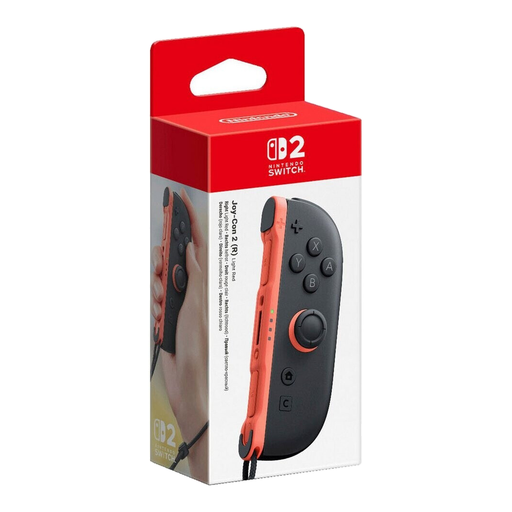
This single right Joy-Con 2 provides an extra input for compatible Switch 2 games; it isn’t a pair of controllers. Nintendo designed Joy-Con 2 for Switch 2, and a highly reflective tabletop can interfere with mouse controls.
 No image available
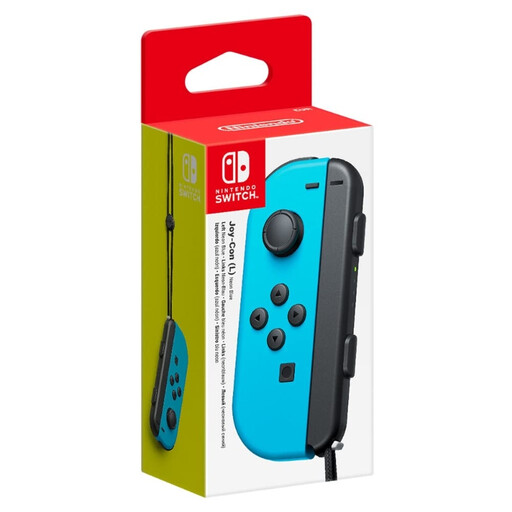
This single left Joy-Con can provide an extra input if the specific Switch game supports this controller setup. Nintendo lists individual Joy-Con as an input option for supported multiplayer games; this listing includes one controller.
 No image available
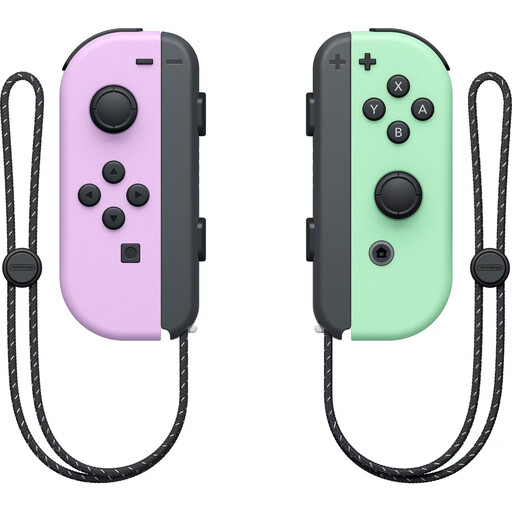
This pair, with one left and one right Joy-Con, is suitable for Switch games that support separate Joy-Con inputs. Nintendo says original Joy-Con can’t be attached directly to or charged directly on Switch 2; you’ll need a Switch or compatible charging accessory to charge them.
No, it depends on the game and the mode you choose. Nintendo lists individual Joy-Con as an option for offline play in games such as Super Mario Party on Switch; check the required controller setup for other games.
On Switch in Handheld or Tabletop mode, you can adjust the screen brightness. If a Switch 2 game uses Joy-Con 2 mouse controls, also try a flat, non-reflective surface rather than glass.
Not directly on Switch 2. Nintendo lists an original Switch or compatible charging accessories as charging options; the Joy-Con connect to Switch 2 wirelessly.
For a consumer purchase, the seller is generally responsible for the statutory warranty. The Verbraucherzentrale states that the period is two years from delivery; this is separate from any voluntary manufacturer’s warranty.
For affected electrical and electronic equipment, the Bundesnetzagentur lists requirements including correct CE marking, product and manufacturer details, and any required information in German. According to the Bundesnetzagentur, the CE mark is the manufacturer’s declaration, not an independent quality seal.