What should you look for when buying?
Check the game and platform first, so everyone can use the intended controls. Then choose based on visibility, how far you’ll be sitting from the screen and the grip style you need.
| What matters |
What to check before buying |
Who should prioritise it? |
| Platform, game and number of players |
Check the supported platform, local multiplayer mode and grip style required for the specific game. |
If I want to make sure everyone in our gaming group has the right controls, I check the game and controller type first. Around 33% of consumers put platform and player compatibility first. |
| Finding your way in the dark |
Check RGB lighting, player indicators and illuminated button symbols separately for the exact model. |
If I want to identify the controller or see who’s playing more easily in a dark room, the specific type of lighting matters. For around 27% of consumers, visibility in the dark is the top priority. |
| Freedom to sit where you like and power supply |
Check the cable length and route, or the power supply for a wireless model. |
If I want to sit wherever I like during a gaming session, I compare the cable route with the power supply of a wireless controller. For around 20% of consumers, seating flexibility or a reliable power supply is the main concern. |
| Grip style and controls |
Check the supported grip, motion controls and any accessories needed for the game. |
If a game requires a particular grip or motion controls, I want to know in advance which inputs will actually work. Around 20% of consumers prioritise the right grip style and type of controls. |
Joybuy controllers for different gaming sessions
The controllers below are described for different uses, including Switch 2, Switch, PC and selected PlayStation platforms. Before buying, check compatibility with your specific game and the type of lighting you want.
 No image available
Nintendo Switch 2 Joy-Con 2 set, blue/pale yellow
For compatible Switch 2 games where you want to use each Joy-Con 2 as a separate input. The grip style supported depends on the game.
Set includes a left and right Joy-Con 2, two wrist straps and motion controls, according to the product description. Nintendo says Joy-Con 2 are designed for use with Switch 2 only.
View at Joybuy
 No image available
EasySMX D10 wireless controller
For gaming sessions with a wireless gamepad and RGB lighting on PC or Switch. Check compatibility with your specific game.
The product title lists a TMR joystick, dual-mode triggers and mechanical buttons. The description also mentions motion controls and rumble. RGB lighting alone doesn’t confirm that the button symbols are illuminated.
View at Joybuy
 No image available
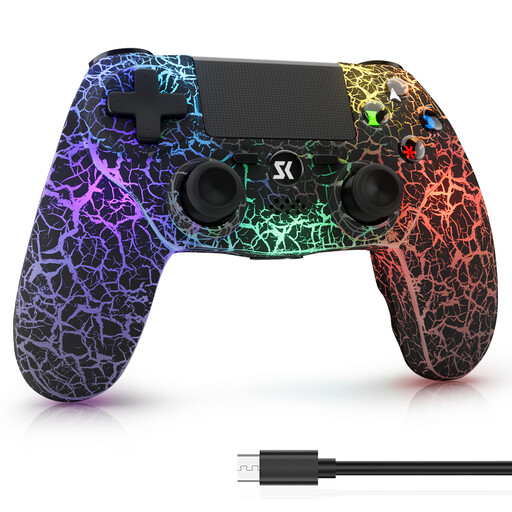
Wireless RGB controller for PS4/Pro and PC
For wireless gaming on the platforms listed in the product title: PS4/Pro and Windows PC. Check that the controller is supported by your specific game.
The description lists a 1,000-mAh battery, dual vibration, a 6-axis motion sensor and five RGB lighting modes. Battery capacity alone doesn’t tell you how long the charge will last.
View at Joybuy
 No image available
VIELLAN wireless controller for PC, PS5 button layout
For PC gaming sessions when you want a wireless controller with RGB lighting. A PS5 button layout doesn’t confirm PS5 compatibility.
The description lists Hall Effect joysticks, Hall triggers, programmable rear buttons and motion controls. Before buying, check that the specific features work with your game and platform.
View at Joybuy
 No image available
BIGBIG WON Rainbow 3 controller
For PC or Switch gaming sessions when you want RGB lighting and motion controls. Check compatibility with your specific platform and game.
The product specifications list RGB lighting, a 6-axis gyroscope, macros, turbo and button mapping. Plan the cable route to your seat and check the exact connection type before buying.
View at Joybuy
Frequently asked questions
Are two Joy-Con 2 enough for two people?
Only if the specific Switch 2 game supports using each Joy-Con 2 horizontally as an individual controller. When the pair is used together, the left and right Joy-Con 2 work as a single controller. The number of usable controllers also depends on the game and its features.
How do I assign extra controllers before starting a game?
For Joy-Con 2, select “Change Grip/Order” in the Switch 2 menu, synchronise the controllers and confirm the grip style you want. For additional DualSense controllers, Sony explains how to pair them via the PS5 menu for Bluetooth accessories.
Does RGB lighting automatically make every button easy to read in the dark?
No. RGB zones and player indicator lights aren’t the same as illuminated button symbols. Check this feature specifically for the exact model.
What ongoing costs or service terms should I check?
Check the power supply, what’s included and the warranty terms for the specific offer. Turtle Beach lists a rechargeable battery for the wireless model mentioned here; snakebyte advertises a five-year warranty for the GAMEPAD RGB X. These details don’t automatically apply to other models or offers.
What are the rules on labelling and disposal in Germany?
The German Federal Network Agency describes CE marking on products that require it as a declaration made by the manufacturer under its own responsibility, not a mark of origin. The German Environment Agency advises that used batteries and rechargeable batteries must not be put in household waste. Easily removable batteries should be taken out and disposed of separately when you dispose of an old appliance.


