Who’s playing?

Switch session with motion-controlled mini-games

If you want to play local mini-games, check the game’s control method and the number of players before buying extra Joy-Con. Nintendo notes that the number of players in Super Mario Party Jamboree depends on the mode.

PC gaming session on a shared screen

The PC game, supported controls, seating distance and number of players all need to work together. For Windows, Xbox Support lists USB, Bluetooth and an Xbox Wireless Adapter as possible connection options, depending on the controller.

Group using phones and multiple video sources

Jackbox players can use an internet-connected device to enter their answers, while the host runs the game separately. Jackbox Games Support describes this as an input method, not a general feature for importing different video sources.

What should you look for when buying?

Joy-Con for compatible Switch games

A good fit if: The specific mini-game or mode requires Joy-Con or motion controls.

Bear in mind: A Switch Pro Controller isn’t automatically a substitute for motion controls; Joy-Con 2 are designed for Switch 2.

Gamepad for supported PC or console games

A good fit if: The game and platform support gamepad controls, and you need a suitable controller for every player.

Bear in mind: Connection options and compatibility vary by model; PC support doesn’t mean it’s compatible with Switch.

Browser-based input for Jackbox

A good fit if: You’re playing a Jackbox game and guests are joining on an internet-connected device with a browser.

Bear in mind: Guests need their own internet-connected devices. If the host is playing too, they’ll need a second device to enter their answers.

Buying priority What to check Who is this important to?
Game and platform compatibility Check the game, console generation, mode and supported control method together. If I want to play a particular mini-game, the input method needs to match the game and platform exactly. Around 36% of consumers say compatibility is their top priority.
Inputs for other players Check the player limit for the mode you want and compare it with the input devices you already have. For a local gaming session, I first want to know how many people can play at once and what devices are already available. Around 29% of consumers prioritise having enough player slots.
Keep controllers and video sources separate Check in advance which device hosts the game and whether it can display the sources you want. If I want to include different images in my setup, I first need to work out what the game and screen do—a gamepad won’t solve that. Around 21% of consumers haven’t yet worked out their video-source setup.
Connection and seating position Check the connection options for the exact model and consider cable routing or wireless range from the seating position. At a shared screen, I want the controller and seating position to work together, without a cable that’s the wrong length or a poor wireless connection. Around 14% of consumers prioritise connection and placement.

Avoid common buying mistakes

  • Buying a gamepad when the game uses browser-based input

    According to Jackbox Games Support, players can use an internet-connected device with a browser as a controller. An extra gamepad isn’t necessarily the input device you need.

    Before buying, check the input method for the specific game and work out which device will act as the host.

  • Assuming Switch Pro Controllers and Joy-Con work for every mini-game

    Nintendo confirms that Mario Party Superstars supports button controls with Joy-Con or a Switch Pro Controller. That doesn’t mean those controllers are interchangeable in other games or motion-controlled modes.

    Choose your controller based on the game and mode. For Joy-Con 2, also check which console generation they’re designed for.

  • Assuming Bluetooth will work with Windows

    For the 8BitDo Ultimate 2C Wireless, the manufacturer lists Bluetooth for Android, but 2.4 GHz or a cable for Windows.

    Before choosing how to connect it, compare the details for the exact model variant with the ports available on the host device.

  • Treating old offer details as proof of current availability

    An earlier product listing doesn’t mean the same variant is still available today.

    Check the current product page and the variant listed there before buying.

Key brands at a glance

Nintendo

Joy-Con and Switch Pro Controllers need to be considered differently, depending on the Switch game and console generation.

  • Nintendo confirms that Mario Party Superstars supports button controls with Joy-Con or a Switch Pro Controller.
  • This doesn’t automatically apply to other games and modes. Joy-Con 2 are designed for Switch 2.

Microsoft Xbox

Xbox Wireless Controllers may suit gaming sessions on Windows, as long as the game supports controller input.

  • Xbox Support lists USB, Bluetooth and an Xbox Wireless Adapter as possible ways to connect to Windows.
  • The right option depends on the controller and PC; this doesn’t mean it’s compatible with Switch.

8BitDo

The Ultimate 2C Wireless is an option for PC or Android, but connection methods depend on the exact variant.

  • 8BitDo lists 2.4 GHz or a cable for Windows, and Bluetooth for Android.
  • These details don’t confirm Switch compatibility or guarantee a particular level of input lag in your setup.

Logitech G

The wired F310 may be suitable for PC games if you don’t need a wireless connection.

  • Logitech lists XInput and DirectInput as supported input standards.
  • Logitech says the DirectInput mode requires a software installation. The cable needs to reach the player’s seat.

PowerA

The Enhanced Wired Controller for Nintendo Switch is a wired option for supported Switch games that use button controls.

  • PowerA lists a 3-m cable for variant NSGP0091-01 and says it can be used with Switch 2.
  • According to PowerA, this variant doesn’t offer motion controls and isn’t designed for games that require Joy-Con.

Joybuy products

The following Joybuy options are gamepads for party games where the specific game supports a compatible controller. Check the platform details for each model separately from the game’s input requirements.

EasySMX D10 wireless gamepad for PC and Switch

EasySMX D10 wireless gamepad

For gaming without a controller cable, provided the game supports this input method on your platform.

The product details list PC and Switch, Bluetooth and rumble.

View at Joybuy

NAXSIR Bluetooth gamepad with smartphone holder

NAXSIR Bluetooth gamepad with smartphone holder

May suit a gaming session using a smartphone holder, provided the device and game support the input method.

The product title lists Bluetooth 5.2, 2.4 GHz wireless and compatibility with Android, iOS, PC, Smart TV, PS3 and Switch. Check which connection works with your host device.

View at Joybuy
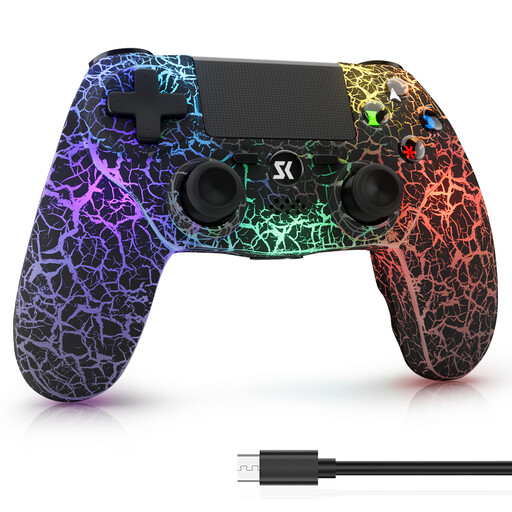
Wireless controller for PC with PS4 and PS4 Pro compatibility listed

Wireless controller for PC, PS4 and PS4 Pro

For gaming without a controller cable, provided the game supports the controller on your chosen platform.

The product title lists PC with Windows, a 1,000 mAh battery, dual vibration and 6-axis motion control. Check compatibility with the specific game separately.

View at Joybuy

VIELLAN wireless gaming controller with Hall Effect joysticks

VIELLAN wireless gaming controller

For PC gaming sessions, if the specific game supports controller input and you want to play wirelessly.

The product title lists Hall Effect joysticks, 255-step Hall triggers, programmable rear buttons, USB-C and a 1,000 mAh battery. PC is listed as the platform.

View at Joybuy
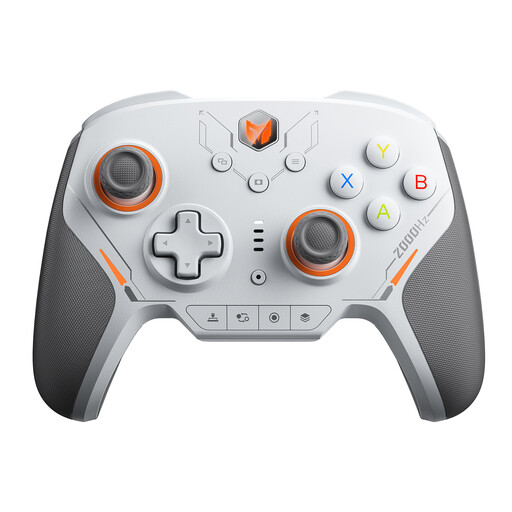
BIGBIG WON BLITZ2 wireless controller

BIGBIG WON BLITZ2 wireless controller

For gaming without a cable, provided the game and platform support the controller.

The product title lists 16 fully mechanical microswitches, TMR joysticks and a 2000 Hz polling rate. PC, Switch, iOS and Android are listed as platforms.

View at Joybuy

Frequently asked questions

Can a gamepad switch between different video sources?

Gamepad compatibility doesn’t mean you can switch between or play different video sources. Check which device hosts the game and which screen is meant to display the images. For example, Jackbox Games Support describes a separate host display and browser-based input, not the import of external video files.

How do guests enter their answers in Jackbox?

Guests can open jackbox.tv on an internet-connected device and enter the room code shown on screen. According to Jackbox Games Support, hosts who want to play as well need a second device to enter their answers.

How many extra controllers do I need?

First check the player limit for the specific local game mode and count the input devices you already have. Nintendo notes that the supported player count for Super Mario Party Jamboree depends on the mode. Online play requirements should be considered separately.

What should I know about labelling and complaints in Germany?

As the Verbraucherzentrale explains, statutory consumer rights against the seller are separate from a voluntary manufacturer’s warranty. The Bundesnetzagentur lists CE marking, product identification and manufacturer details among the points it checks when monitoring the market. The European Union explains that, by using the CE marking, the manufacturer declares that the product meets the relevant EU requirements; the mark isn’t an independent quality certification.