Which setup is right for your group?

A group sitting to the side

You want to play local mini-games without relying on every guest sitting in the middle of the camera’s view. The key is how the specific game is controlled; there’s no confirmed capture angle that guarantees coverage of seats at the side. Nintendo UK, Microsoft Xbox and PlayStation describe different local play and input options.

A group keen on motion or camera games

You want to try motion-controlled mini-games or Jamboree TV, and can check the camera, its field of view and the space available to move around. Not every mode needs a camera, but CameraPlay does. Nintendo UK and Nintendo Support explain how the modes differ.

A host with a changing number of guests

You want to check how many people can play at once and whether you’ll need extra controllers or compatible smartphones. It depends on the game: Microsoft Xbox and PlayStation list local multiplayer options, while Nintendo Support explains the extra requirements for certain online modes.

What should you look for when buying?

Nintendo Switch or OLED model

A good fit if: You want to play Super Mario Party Jamboree with Joy-Con and its supported motion-controlled modes.

Worth considering: The exclusive Jamboree TV features aren’t part of the Switch version, and Switch Lite doesn’t support TV mode.

Nintendo Switch 2

A good fit if: You also want to use the mouse, microphone or CameraPlay modes in the Switch 2 Edition.

Worth considering: CameraPlay needs a compatible USB camera. Camera-based mini-games won’t be shown without one.

PlayStation 5

A good fit if: You already own a PS5, or want to use it for other PS5 games as well as local party games.

Worth considering: Make sure you have enough compatible controllers for local multiplayer. The available game information doesn’t confirm camera games or performance from particular seating angles.

Xbox Series S

A good fit if: You want to play local games such as LEGO Party! or compatible Jackbox titles using a smartphone or tablet.

Worth considering: The Series S doesn’t play discs. Smartphone controls and language support depend on the game.

What you’re looking for What to check before buying Who should consider this?
Controls for guests sitting to the side Check whether the mini-game uses a controller, smartphone or camera, then test the view and controls from the actual seat. If guests are sitting to the side, I don’t want to rely on a camera capturing everyone. Around 36% of consumers say suitable controls for this seating arrangement are their top priority.
Local mini-games and player numbers Check the local mode, how many people can play at once and what input devices the specific game requires. Microsoft Xbox and PlayStation list local couch multiplayer for up to four people in LEGO Party! I want a game that suits my guests and their numbers, rather than choosing a console on its own. Around 29% of consumers say this is their top priority.
Camera and motion modes Check the game version, camera compatibility and field of view. Nintendo Support lists a USB camera as a requirement for CameraPlay in supported modes. If I specifically want to play camera or motion mini-games, I want to check what they require in advance. Around 21% of consumers say these modes are their top priority.
Extra devices and game versions For your group size, make a separate list of the game version, controllers, compatible smartphones, camera and any online requirements. Nintendo, PlayStation and Microsoft Xbox list extra requirements depending on the game. I want to know what I’ll need in addition to the equipment I already own. Around 14% of consumers say extra equipment is their top priority.

Avoiding buying mistakes

  • Assuming camera controls and motion controls are the same

    Joy-Con motion mini-games and CameraPlay have different requirements. In Jamboree TV, camera-based mini-games won’t be shown if you don’t have a camera.

    First decide which modes you want to play. Only check camera compatibility and field of view if you plan to use CameraPlay.

    CameraPlay requires a compatible USB camera; Nintendo says the camera is sold separately.

  • Choosing the OLED display for a better TV experience

    Nintendo highlights the benefits of the OLED screen in Handheld and Tabletop modes. In TV mode, you play on your television.

    Choose the OLED model for its portability if that matters to you, not solely for the picture on your TV.

  • Comparing consoles without considering the whole setup

    Games vary in the input devices they use and the features included in each edition. Depending on what you choose, you may need extra controllers, a particular game version or a camera.

    Make a list for your group size that includes the console, game version and required input devices, and take into account what you already own.

    Controllers, cameras and additional game or upgrade versions may need to be bought separately.

  • Buying an Xbox Series S for your existing game discs

    Microsoft Xbox describes the Series S as a digital console that doesn’t support game discs.

    Before buying, check that your chosen party games are available digitally and that you have the right digital licences.

    If you need to use a disc you already own, you may have to get a digital version of the game instead.

Brands to help you choose

Nintendo

Worth considering for Super Mario Party Jamboree on Nintendo Switch, and for the additional Jamboree TV modes on Nintendo Switch 2.

  • Nintendo UK describes motion-controlled modes in the base game, as well as mouse, microphone and camera modes in the Switch 2 Edition.
  • CameraPlay requires a compatible camera, but this doesn’t guarantee everyone will be captured from every seat at the side. Switch Lite doesn’t support TV mode.

Sony PlayStation

A possible platform for local party mini-games such as LEGO Party!, especially if you also want to use a PS5 for other games.

  • PlayStation lists local couch multiplayer for LEGO Party! and notes that couch multiplayer games need additional DualSense controllers.
  • This information doesn’t confirm CameraPlay features or performance at particular seating angles.

Microsoft Xbox

A digital console option for local mini-games and compatible party games that use a smartphone or tablet for controls.

  • Microsoft Xbox lists local couch multiplayer for LEGO Party! and smartphone or tablet controls for The Jackbox Party Pack 10.
  • Xbox Series S doesn’t support discs. Check the controls and language support for each game individually.

Joybuy products

This selection includes HDMI game sticks for playing together on your TV, as well as Nintendo Switch consoles for party games such as Super Mario Party Jamboree. Before buying a game stick, check that its included titles and multiplayer features are right for your group.

Retro games console with 20,000+ games and 23 emulators

Retro games console, 20,000+ games, 23 emulators

Could be suitable for playing together on your TV, if the included games and multiplayer features are right for your group.

Features listed in the product name: 23 emulators, 4K HDMI output, plug and play, and two wireless 2.4 GHz controllers.

View at Joybuy
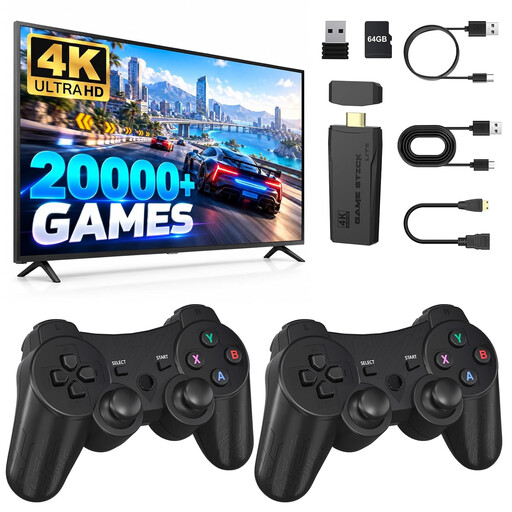
Retro gaming console in the form of a 4K HDMI game stick with two wireless controllers

Retro gaming console, 4K HDMI game stick

Could suit a games night on your TV, provided the supported games and their multiplayer features offer the mini-games you’re looking for.

Features listed in the product name: HDMI plug and play and two wireless 2.4 GHz controllers.

View at Joybuy
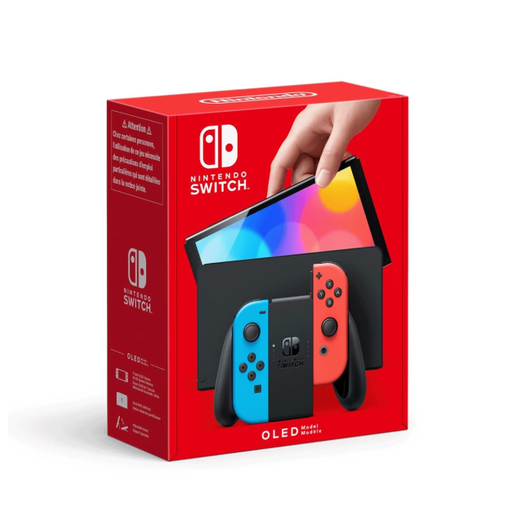
Nintendo Switch OLED Neon-Red/Neon-Blue

Nintendo Switch OLED Neon-Red/Neon-Blue

A good fit if you want to play Super Mario Party Jamboree on your TV using its supported Joy-Con motion modes.

Supports TV, Tabletop and Handheld modes and has detachable Joy-Con. The Jamboree TV modes are part of the Switch 2 Edition, not the Switch version.

View at Joybuy

Nintendo Switch 2, EU console

Nintendo Switch 2 (EU)

A good fit if you want to use the Jamboree TV modes in the Switch 2 Edition and can check the requirements for each mini-game.

Supports TV, Tabletop and Handheld modes and comes with detachable Joy-Con 2 controllers with motion controls. CameraPlay also requires a compatible USB camera.

View at Joybuy

Frequently asked questions

Do I always need a camera for Jamboree TV?

No. According to Nintendo Support, the relevant modes can still be played without a camera, but camera-based mini-games won’t be shown. CameraPlay in supported modes requires a compatible USB camera.

How should I position guests sitting to the side for camera mini-games?

Position the camera so that everyone taking part appears in the actual camera view, and check this before you start playing. Nintendo describes a repositionable camera with an adjustable wide-angle lens, but doesn’t guarantee a particular capture angle from the side.

What should I bear in mind when getting extra controllers?

Check how many people can play locally at once in the specific game, and which controllers or other input devices it requires. PlayStation notes that couch multiplayer needs additional DualSense controllers; in compatible Jackbox games, players may be able to use smartphones or tablets instead.

Do I need an online subscription for a games night?

Not just because several people are playing together in person. To play Super Mario Party Jamboree online, Nintendo requires each participating console to have a Nintendo Switch Online membership and a copy of the game. Check the online requirements for other titles individually.

What age rating does Super Mario Party Jamboree have in Germany?

The USK rates the Nintendo Switch version as suitable for ages 6 and over under § 14 JuSchG. German retailers must observe age ratings when selling games to minors. Also check that the game’s content and features are suitable for your child.