Fans of local Mario Party sessions
If playing mini-games together is what matters most, choose a console based on the game you want and its local modes. Nintendo says the number of players supported depends on the mode.


If you want to play local party mini-games and your own media from USB, the Xbox Series X|S and PS5 are both options: Microsoft and Sony document playback for supported files. Then choose based on the games you want, the file formats you use and the devices your guests can play with. For Mario Party mini-games, the Switch 2 is another option; however, its game capture features do not prove that it can play back your own media files in general.
If playing mini-games together is what matters most, choose a console based on the game you want and its local modes. Nintendo says the number of players supported depends on the mode.
If you want to play your own videos, photos or music from a USB drive, check that media playback is explicitly supported and that your files are compatible. Microsoft and Sony document these features for Xbox and PS5 respectively.
In some party games, guests can join in using their own phone or tablet. Check the language and internet requirements for the specific game too; these features are not available in every party game.
A good fit if: You specifically want to play Super Mario Party Jamboree – Nintendo Switch 2 Edition + Jamboree TV and local mini-games.
Things to consider: Camera-based additional modes require a compatible USB-C camera, sold separately; the storage features mentioned do not prove that it can play back media in general.
A good fit if: Playing your own videos, photos or music from USB matters to you, and the group games you want are available on Xbox.
Things to consider: The Media Player does not support every file; if you want to play discs, make sure the specific Series X model has a disc drive.
A good fit if: You want to play supported USB media and games such as The Jackbox Party Pack 8 using phones or tablets.
Things to consider: According to Sony, The Jackbox Party Pack 8 is only available in English and requires online play.
First, decide what matters most to you: the right mini-games, media playback, how easy it is to set up for your group, or the equipment you need.
| What matters | What to check when buying | Who it matters to |
|---|---|---|
| Local mini-games | Game version, local mode and supported player numbers | If I want to play a particular mini-game with guests, I need the right edition and local mode. Around 36% of consumers put suitable mini-games first. |
| Your own media | Supported file formats and actual playback features | If I want to play my own videos, photos or music, I check that my files are supported rather than just looking for a port. Around 29% of consumers prioritise playing their own media. |
| Setting up for guests | Players, controllers or phones, and internet requirements | If I want my group to join in using devices they already have, what the specific game and mode require is key. Around 21% of consumers focus on having the right set-up for their group. |
| Equipment and extra costs | Game version, accessories required and whether you need a disc drive | If I’m planning to buy a console, game and accessories together, I want to know about any extras I’ll need in advance. Around 14% of consumers prioritise equipment and potential extra costs. |
A port or extra storage does not prove that a console can play any videos, photos or music you own. Microsoft and Sony describe media features for supported content; Nintendo documents storage and game capture features.
Decide which files you want to play, then check that playback is explicitly supported and that your content is compatible.
Playing files from USB and having an optical disc drive are two different things. Microsoft distinguishes between Series X models with and without a disc player, as well as the disc-free Series S.
Check the exact console model and consider your need for USB files separately from your need to play game or film discs.
The number of local players depends on the game mode. Phone controls, internet requirements and accessories vary by title; they are not automatically available in every party game.
Plan around your group size and the specific game. For Jamboree, camera-based additional modes require a compatible USB-C camera, sold separately.
An obvious choice if you’re specifically looking for local Jamboree mini-games.
For buyers who want to combine Xbox games with documented playback of supported media from USB.
An option for supported USB media and suitable party games such as The Jackbox Party Pack 8.
This selection includes consoles for local Nintendo party games and a PS5 option for supported USB media. Before buying, check the game mode and whether your file formats are supported.
 No image available
For local sessions, as long as you choose the right Jamboree edition; Nintendo lists one to four players depending on the offline mode.
TV, Tabletop and Handheld modes; Joy-Con 2.
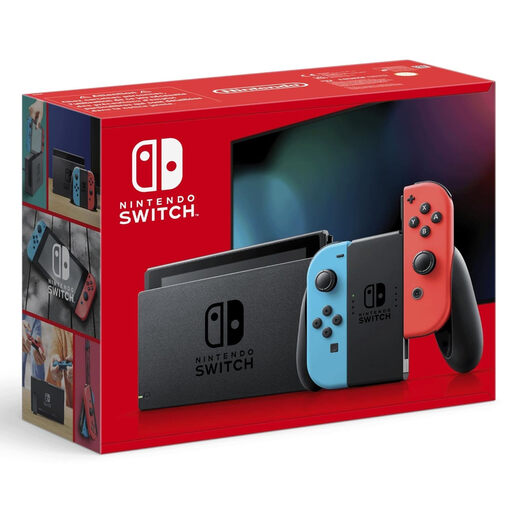 No image available
For local gaming sessions, provided the game and mode you want support your group size.
TV, Tabletop and Handheld modes; according to the product description, the Joy-Con can be used together or separately as controllers.
 No image available
For supported USB media and suitable party games; Sony documents media playback on PS5.
Digital Edition, 825GB. According to Sony, guests can use a phone or tablet for The Jackbox Party Pack 8; the game is only available in English and requires online play.
No, a USB port alone is not enough to confirm that you can. Microsoft documents playback through the Media Player app and notes that some files are not supported; Sony documents playback of supported videos and music from USB on PS5. Check the actual files and formats you want to use.
It depends on the game mode you choose. According to Nintendo, the number of players supported in Super Mario Party Jamboree varies by mode, so check the details for the exact edition and way of playing you have in mind.
According to Sony, guests can use their phone or tablet to play The Jackbox Party Pack 8. The game requires online play and is only available in English; these conditions do not automatically apply to other party games.
Retailers in Germany must observe the age rating when supplying games that carry one. Check the rating for the specific title, as a console’s name does not indicate that every game is suitable for all ages.
Contact the seller. According to Your Europe, the European Union’s information portal, purchases of goods come with a statutory guarantee of at least two years from the date you receive them. An additional manufacturer’s warranty does not replace this right.