Choose extra controllers based first on the system you already own and the controls required by the specific mini-game. Individual Joy-Con can provide extra player slots in compatible Switch games; for PS5, Xbox or Windows, the game itself must support the controller. Check the player count, motion controls, connection and charging requirements: a standard gamepad won’t automatically replace a Joy-Con when one is required.
Which controllers are right for you?
Shared house with a Switch and a changing line-up of players
If you want to add more player slots, check whether the game in question supports individual Joy-Con and how many people can play locally. Nintendo notes that the ways you can hold the Joy-Con depend on the software’s multiplayer options.
Fans of motion-control mini-games
If you want to play gesture-based or supported mouse-controlled mini-games, check the input requirements for the mode before buying. Nintendo notes that Joy-Con 2 mouse controls may be affected by the surface you use.
Shared house with a PS5, Xbox or PC
If you already own one of these platforms, start by checking system compatibility and whether the game supports the controller. Sony and Microsoft each list compatibility with additional devices for certain controllers, but that doesn’t automatically tell you how many people can play a particular game locally.
What to look for when buying
Switch with individual Joy-Con
A good fit if: Your mini-games support individual Joy-Con or motion controls.
Bear in mind: The permitted way to hold them depends on the game, so check the multiplayer mode beforehand.
Switch 2 with Joy-Con 2
A good fit if: You want to play compatible local multiplayer games or use supported Switch 2 mouse modes.
Bear in mind: Nintendo says Joy-Con 2 are designed for Switch 2; mouse mode depends on the software and the surface you use.
PS5 with DualSense
A good fit if: Your house already plays on PS5 and the game supports extra local controllers.
Bear in mind: Haptic feedback and adaptive triggers require support from the game in question.
Xbox or Windows PC
A good fit if: Your games run on Xbox or Windows and support controller input.
Bear in mind: On Windows, you may be able to connect via USB, Bluetooth or an Xbox Wireless Adapter, depending on your setup. The game determines the number of local players.
Third-party controllers for Switch
A good fit if: The game supports a standard gamepad and the specific model has all the features you need.
Bear in mind: The tested PowerA wired model only works with a docked Switch and doesn’t support motion controls or games that require Joy-Con only.
| Buying criterion |
What to check |
Who will find this especially important? |
| System and game compatibility |
Check that the controller works with both the system and the specific game mode. “Switch compatible” doesn’t automatically mean a game supports individual Joy-Con. |
If I want to play on the system I already own, the controller needs to work with both that system and the mini-game. Around 33% of consumers put compatibility first. |
| Player slots and special controls |
Count the controllers you can actually use, and check the player count and any motion or mouse-control requirements for each game you’re planning to play. |
If everyone’s joining in on game night, or a mini-game calls for specific gestures, I need enough suitable controls for everyone. Around 27% of consumers prioritise extra player slots or the special controls they need. |
| Connection and seating arrangement |
For Windows, check the connection method required for your setup. With wired models, also consider cable routing and how far away you can sit. |
If we move around the shared room, I want to connect controllers without awkward cables getting in the way. Around 20% of consumers focus mainly on connection and space requirements. |
| Overall setup |
Factor in charging and any accessories you’ll need. Original Joy-Con can’t be charged on a Switch 2; the tested Sony DualSense model is supplied without a USB cable. |
If we need several extra player slots, I want to factor in the accessories and charging setup too. Around 20% of consumers put overall setup first. |
Avoid common buying mistakes
-
Buying a standard Switch gamepad as a replacement for every Joy-Con
The tested wired PowerA model doesn’t support motion controls or games that require Joy-Con only, so it may not be suitable for those mini-games.
Before you buy, check the controller requirements for the specific mini-games, not just the platform listing.
-
Assuming Joy-Con and Joy-Con 2 are interchangeable generations
Nintendo says Joy-Con 2 are designed for Switch 2. Original Joy-Con can’t be attached to or charged on a Switch 2, but they do work with it wirelessly.
Before buying, check the console generation, the game features you need and how you’ll charge the controllers.
-
Assuming a similar product name identifies the exact version
Similar names can refer to different colours or versions, making it harder to identify the version you want and what comes in the box.
Check the full model name, colour and product details for the version actually on offer.
Key brands to consider
Nintendo
Joy-Con are designed for compatible Switch games; Joy-Con 2 are for compatible Switch 2 games.
- Nintendo says Joy-Con can be used individually with compatible games.
- Nintendo says Joy-Con 2 are designed for Switch 2 only. Original Joy-Con can’t be attached to or charged on it.
PlayStation
DualSense is an option as an extra controller for supported local PS5 games; Sony also lists compatibility with other devices.
- Sony lists a motion sensor, haptic feedback and adaptive triggers.
- Haptics and adaptive triggers depend on support from the game in question. The tested version doesn’t include a USB cable.
Xbox
Xbox Wireless Controllers are a possible addition for Xbox and Windows games that support controller input.
- For Windows, Microsoft lists USB, Bluetooth and, where appropriate, an Xbox Wireless Adapter as connection options.
- Platform compatibility doesn’t tell you whether a particular party game supports multiple controllers.
PowerA
The tested Enhanced-Wired model is a wired option for suitable Switch games in docked mode.
- PowerA lists a 3-m cable and no controller battery requirement for this model.
- This model doesn’t support motion controls or games that require Joy-Con only. This limitation doesn’t apply to all PowerA controllers.
8BitDo
According to the manufacturer, the Ultimate 2C Bluetooth Controller is a wireless alternative for Switch.
- 8BitDo lists six-axis motion control.
- For Switch 2, the manufacturer lists support after a firmware update. This Bluetooth model shouldn’t be confused with the Ultimate 2C Wireless Controller for Windows and Android.
Joybuy controllers for the systems covered
The following Joybuy options include extra controllers for Switch, Switch 2, PS5, Xbox and Windows PC. The right choice for your game night depends on the game itself and the controls it requires.
 No image available
Nintendo Switch 2 Joy-Con 2 pair (Blue/Light Yellow)
For Switch 2 games that support individual Joy-Con as controllers; check the requirements for the mode in question.
Pair for Nintendo Switch 2.
View at Joybuy
 No image available
Microsoft Xbox Wireless Controller Deep Pink (Xbox One/Xbox Series X/S/PC)
For Xbox or PC games, provided the game in question supports controller input.
Wireless Xbox controller; Bluetooth is listed as a connection type in the product details.
View at Joybuy
 No image available
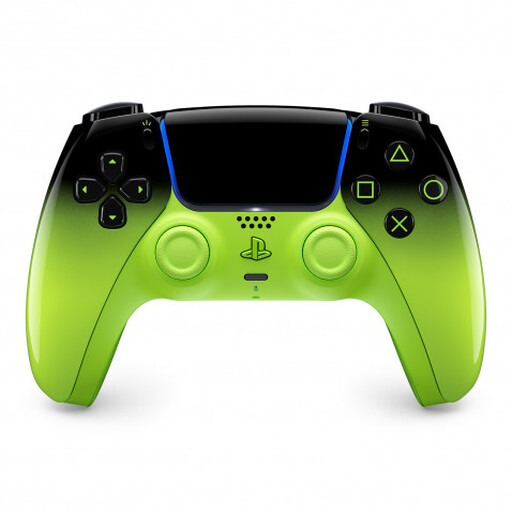
PlayStation DualSense Wireless Controller V3, Remix Green (PS5, Mac, Android, iOS, PC)
For supported PS5 or PC games that allow additional local controllers.
According to Sony, haptic feedback and adaptive triggers depend on support from the game in question.
View at Joybuy
 No image available
Nintendo Switch Joy-Con pair (Neon Blue/Neon Yellow)
For compatible Switch games that allow individual Joy-Con to be used as controllers.
Joy-Con pair for Nintendo Switch; how you can hold them depends on the game in question.
View at Joybuy
 No image available
GameSir G7 HE Wired Controller with Hall Effect sticks (Xbox Series X|S, Xbox One, Windows 10/11, PC)
For Xbox and Windows PC games, provided the game supports the controller.
Wired model; check that the cable routing works with your seating arrangement in the shared room.
View at Joybuy
Frequently asked questions
Is one Joy-Con enough for each guest?
Only if the specific game or mode supports using it that way. Nintendo notes that the available Joy-Con controls depend on the software’s multiplayer options.
How do I set up individual Joy-Con for a multiplayer game?
In the HOME Menu, select “Controllers”, then “Change Grip/Order”. To hold Joy-Con horizontally, press SL and SR on each one. Also check that the game you’re about to play supports this control setup.
Can I charge original Joy-Con directly on a Switch 2?
No. Nintendo says you’ll need an original Switch or suitable charging accessories. Original Joy-Con work with a Switch 2 wirelessly only.
What are the rules in Germany for faults and online returns?
The statutory consumer rights you have against the seller are separate from any voluntary manufacturer’s warranty. For a standard online purchase of goods from a business seller, you generally have a 14-day right to cancel from the date of delivery. Exceptions and any return postage costs should be checked on a case-by-case basis.
Can used controller batteries go in household rubbish?
No. Germany’s Federal Ministry for the Environment says that waste portable batteries can be returned free of charge to retailers or municipal collection points.


