For a local Switch gaming session, individual Joy-Con controllers may be suitable, provided the specific mini-game supports this control setup. In supported Jackbox games, viewers can join in on their smartphones, so you don’t need an extra gamepad for every guest. Before buying, check the game version, how many people can play at once and which controllers are supported: Nintendo Germany notes that player numbers depend on the game mode.
Who are these options for?
Streamers with viewers
If more people are joining in than can play at once, it’s worth distinguishing between audience participation on smartphones and extra gamepads. Jackbox Games says that players can join supported games using an internet-connected device.
Hosts of a Switch gaming session
For mini-games played together on one screen, it’s important to check whether the specific game supports using individual Joy-Con controllers. Nintendo Germany notes that player numbers vary by game mode.
PC or Xbox hosts
If you’re planning to play a supported local multiplayer game on PC or Xbox, make sure the controller model, connection and game support all match. Xbox Support lists USB, Bluetooth and the Xbox Wireless Adapter as connection options for Windows.
What should you look for when buying?
| What you need |
What to check before buying |
Who is this important to? |
| Getting viewers involved |
Audience features, active player limit and how to join in the specific game version |
If I want to involve viewers in a stream, I check whether the game supports audience participation and the joining method I need. Around 36% of consumers focus on getting viewers involved. |
| Local Switch player slots |
Console model, game version and the local player limit for the mode you want to play |
For a game session on the same screen, I want to know how many guests can use controllers at once in the specific mode. Around 29% of consumers focus mainly on adding local player slots on Switch. |
| PC or Xbox connection |
Exact model variant, operating system, connection and gamepad support for the game |
When I play on PC or Xbox, I want to know whether the controller and connection will work with my device and the game. Around 21% of consumers focus on platform compatibility. |
| Power and set-up |
Charging method, available ports and cable routing around your gaming area |
For longer gaming sessions, I want to know how controllers are charged or connected, and whether a cable will reach the seat. Around 14% of consumers prioritise power and a practical set-up. |
Avoid common buying mistakes
-
Confusing the number of controllers with the number of players
Extra controllers won’t create more player slots if the chosen game mode allows fewer people. Nintendo Germany gives different player limits for different modes.
First, check the specific game mode, then count how many supported controllers you still need.
-
Assuming Joy-Con and Joy-Con 2 are interchangeable
Joy-Con 2 are designed for Nintendo Switch 2 and won’t work with the original Switch. Older Joy-Con can be used wirelessly with Switch 2, but they can’t be attached to it for charging.
Check your console model and charging method before choosing a pair of controllers.
To charge older Joy-Con with Switch 2, you’ll need an original Switch or suitable charging accessories.
-
Assuming Bluetooth in the model name means it’s supported on Windows
The 8BitDo Ultimate 2C Bluetooth and Wireless variants have different connection options, according to the manufacturer. For Windows, 8BitDo lists 2.4 GHz or USB for the Wireless variant; the Bluetooth variant is described as being for Switch.
Check the full model name and the connection specified for your device.
-
Buying gamepads too soon for audience participation alone
An extra gamepad can’t replace an audience mode. According to Jackbox Games, players can join supported Jackbox games using an internet-connected device.
First, check whether the specific game supports audience participation and who you want to play actively.
A guide to relevant brands
Nintendo
Joy-Con are relevant for local Switch mini-games; Joy-Con 2 are designed for Nintendo Switch 2. Whether you can use an individual Joy-Con depends on the game.
- Nintendo confirms that individual Joy-Con can be used for supported play styles. Older Joy-Con can be used wirelessly with Switch 2.
- Joy-Con 2 won’t work with the original Switch. The maximum number of players depends on the game mode.
Microsoft Xbox
Xbox Wireless Controllers are an option for supported Xbox and Windows games.
- Xbox Support lists USB, Bluetooth and the Xbox Wireless Adapter as possible ways to connect to Windows.
- Check which connection and features your PC supports. This doesn’t mean every party game supports gamepads.
8BitDo
The Ultimate 2C variants are designed for different devices and connection types.
- 8BitDo describes the Ultimate 2C Bluetooth as being for Switch and lists motion controls. For Switch 2, the manufacturer recommends a firmware update.
- For the Ultimate 2C Wireless, 8BitDo lists 2.4 GHz or USB on Windows. Similar model names don’t necessarily mean the same compatibility.
GameSir
According to the manufacturer, the GameSir G7 SE is a wired option for supported Xbox and Windows games.
- GameSir lists the G7 SE as compatible with Xbox Series X|S, Xbox One and Windows 10/11, and includes a detachable 3-m USB-C cable.
- The cable may limit where you can sit in front of the screen. Manufacturer specifications aren’t an independent test of comfort or durability.
Joybuy products for party mini-games
This selection includes Joy-Con pairs for local Switch gaming sessions, wireless controllers for several listed platforms and a wired option for supported Xbox and Windows games.
 No image available
BIGBIG WON Rainbow 3 Wireless Controller
Worth considering if you’re looking for a wireless controller for one of the platforms listed in the product title.
Platforms listed in the title: PC, Switch, Switch 2, iOS and Android.
The title also mentions a 6-axis gyroscope and 16 mechanical buttons.
View on Joybuy
 No image available
BEITONG PanGu Modular Wireless Gaming Controller
Worth considering if you’re looking for a controller for one of the platforms listed in the product title.
Platforms listed in the title: PC, Nintendo Switch, Switch 2, Steam and Android.
The product description lists tool-free interchangeable joysticks, buttons, D-pads and vibration motors, as well as wired and wireless connections.
View on Joybuy
 No image available
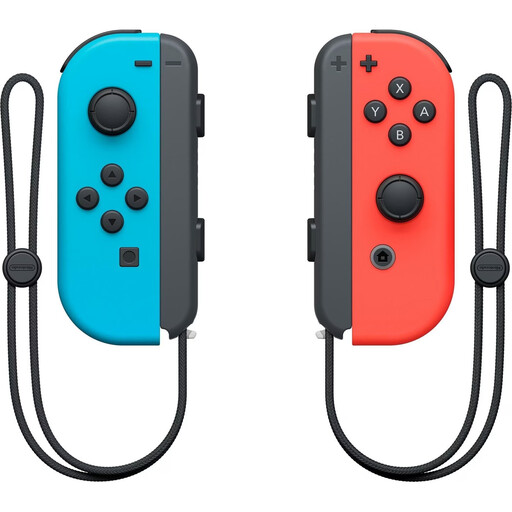
Nintendo Switch Joy-Con Pair, Neon Red/Neon Blue
An option for local Switch gaming sessions if the specific game supports using the two Joy-Con separately.
Listed as a controller pair for Nintendo Switch; the description mentions wireless connectivity and motion controls.
Joy-Con and Joy-Con 2 are different variants for different console models.
View on Joybuy
 No image available
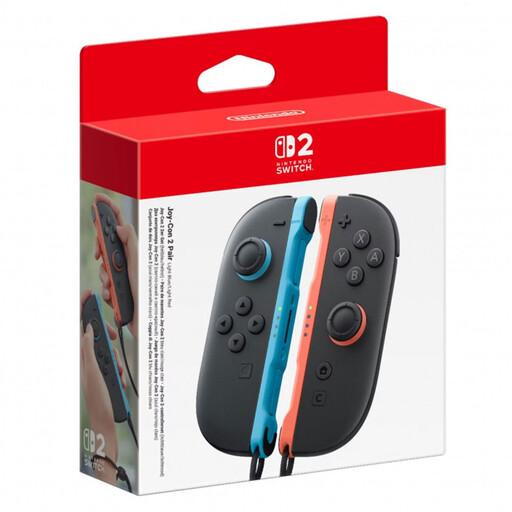
Nintendo Switch 2 Joy-Con 2 Pair, Light Blue/Light Red
Suitable for local Switch 2 gaming sessions if the game supports the controller set-up you want to use.
The set includes one left and one right Joy-Con 2, plus two wrist straps.
Listed for Nintendo Switch 2 only; the description mentions motion controls and HD Rumble 2.
View on Joybuy
 No image available
GameSir G7 HE Wired Controller, Black
A wired option for supported PC or Xbox games, as long as the cable can reach your gaming area.
The product title lists Xbox Series X|S, Xbox One and Windows 10/11.
The product description mentions Hall Effect sticks, a 3.5-mm audio jack and a 3-m USB-C cable.
View on Joybuy
Frequently asked questions
Can all viewers play Mario Party Jamboree at the same time if you add more controllers?
No. Adding controllers alone won’t increase the player limit for the mode you’ve chosen. Nintendo Germany lists a limit of one to four players for local Mario Party mode; check the mode you want to play and its limits before buying.
How can remote viewers join a supported Jackbox game?
They can visit jackbox.tv on an internet-connected device and enter the room code shown by the host. According to Jackbox Games, whether additional people can join in as the audience depends on the game you choose.
How do I use and charge older Joy-Con with a Switch 2?
Nintendo confirms that older Joy-Con can be used wirelessly with Switch 2. They can’t be attached to this console; Nintendo recommends using an original Switch or suitable charging accessories to charge them.
What should I know about faults or buying online in Germany?
Your statutory rights for faulty goods apply against the seller and are separate from any voluntary guarantee. The Verbraucherzentrale says that distance purchases generally come with a 14-day right to cancel; Your Europe states that consumer goods must have a legal guarantee of at least two years against defects.
What should I look for in a wireless controller sold in Germany?
The Bundesnetzagentur lists the CE marking and identifiable manufacturer details among the things to check. This doesn’t tell you whether a controller is compatible with your specific game or device.


