Groups playing Joy-Con mini-games
If a game requires separate controllers or specific motion inputs, check the requirements for each mini-game before you buy. Nintendo describes this type of play for titles including 1-2-Switch.


First, check which controllers and inputs your specific game supports on your console. Lighting is no substitute for required motion controls or a single Joy-Con, if one is needed. If the game accepts a standard gamepad, you can then weigh up lighting, freedom of movement and power options.
If a game requires separate controllers or specific motion inputs, check the requirements for each mini-game before you buy. Nintendo describes this type of play for titles including 1-2-Switch.
If your game supports a standard gamepad, controller lighting may be useful. Also check that it’s compatible with your Switch generation and find out exactly which parts light up; PowerA offers different Lumectra models for Switch and Switch 2.
If you’re looking for extra controllers for PS5, Xbox, Windows PC or Switch, check the platform listing and local multiplayer mode for the specific game. Sony, Microsoft and Nintendo each list the platforms their controllers are designed for.
A good fit if: Your mini-game requires separate original Joy-Con or their specific inputs.
Keep in mind: Original Joy-Con can’t be attached to or charged directly by Switch 2. Nintendo says you’ll need an original Switch or suitable charging accessories.
A good fit if: Your Switch 2 game supports using Joy-Con 2 separately and you need extra controllers.
Keep in mind: Joy-Con 2 don’t work with the original Switch and don’t have the IR Motion Camera found on the original right Joy-Con.
A good fit if: The game accepts a standard gamepad and you want controller lighting in a dark room.
Keep in mind: PowerA lists some features as unavailable on the Lumectra models mentioned here. According to the manufacturer, the wired Switch 2 model has no motion controls and is designed for use with the console docked.
A good fit if: Your local multiplayer game supports extra gamepads on the platform you already own.
Keep in mind: Check the player limit and game compatibility separately. If you want specific buttons to light up, check the details for the exact controller model.
| What matters when buying | What to check | Who it matters most to |
|---|---|---|
| Platform and game compatibility | Check the console generation, supported controller types and local multiplayer mode. | If I’m looking for extra controllers for my console or PC, I want to make sure my game supports them. Around 36% of consumers put compatibility first. |
| Separate controllers and motion controls | For each mini-game, check the number of controllers needed and whether it requires motion, vibration or IR inputs. | If my mini-game requires individual controllers or specific motion inputs, I need exactly that type of control—not just any gamepad. Around 29% of consumers prioritise separate controllers and motion features. |
| Visibility in low light | Check which parts light up and whether you can adjust the colour or lighting mode. | If I want to see the controls more easily in a dark room, I need to know exactly what lights up on the controller. Around 21% of consumers put visibility first. |
| Power and set-up | Check the charging options or batteries, and for wired models, the cable route between the dock and seating area. | If several people are playing, I want to know in advance whether charging or a cable will get in the way. Around 14% of consumers prioritise power and set-up. |
An illuminated gamepad won’t necessarily support inputs exclusive to Joy-Con games. Nintendo says certain IR mini-games in 1-2-Switch on Switch 2 require an original right Joy-Con connected wirelessly.
Check the input requirements for your specific game first, then decide whether you want lighting.
Joy-Con 2 don’t work with the original Switch. Original Joy-Con can connect wirelessly to Switch 2, but they can’t be attached to or charged directly by it, as Nintendo explains.
Make sure the controller generation, game requirements and charging set-up all work together.
According to PowerA, the wired Lumectra model for Switch 2 doesn’t support motion controls and is designed for use with the console docked.
If your game requires motion inputs, choose a suitable controller. Otherwise, check the cable route before you start playing.
The features listed relate to the relevant product ranges and models. You should still check the requirements for each game and platform individually.
Joy-Con and Joy-Con 2 are suitable for games that support their respective controller generations and inputs.
Lumectra gamepads are available for different Switch generations, in both wired and wireless models.
The DualSense is an option for party games on PS5, provided the game supports extra controllers and local multiplayer.
The Xbox Wireless Controller is designed for compatible Xbox systems and Windows PC games that support gamepads.
The Ultimate 2 Bluetooth is another full-size option for the Switch and Windows use listed by the manufacturer.
This selection includes extra Joy-Con 2 for compatible Switch 2 games, as well as illuminated gamepads for compatible Switch, Switch 2, Xbox and PC games.
 No image available
If your Switch 2 game supports separate Joy-Con 2, this set includes one left and one right controller for two-player local gaming.
Wrist straps are included. Joy-Con 2 don’t have the IR Motion Camera found on the original right Joy-Con.
 No image available
If your Switch game supports a standard gamepad, this wireless model gives you a lighting option for playing in a dark room.
Bluetooth, 7-colour LED, vibration feedback and a stated range of 10 m.
 No image available
This wireless gamepad is an option for compatible PC or Switch games if you’re looking for RGB lighting.
The product name lists TMR joysticks and RGB backlighting. Compatible platforms include PC, Switch, Android and iOS.
 No image available
If your game supports a gamepad, this wireless model is a lighting option for compatible Switch 2 and PC games.
The product name lists 14 customisable RGB lights and a 6-axis gyroscope. Platforms listed include Switch 2, PC, iOS and Android.
 No image available
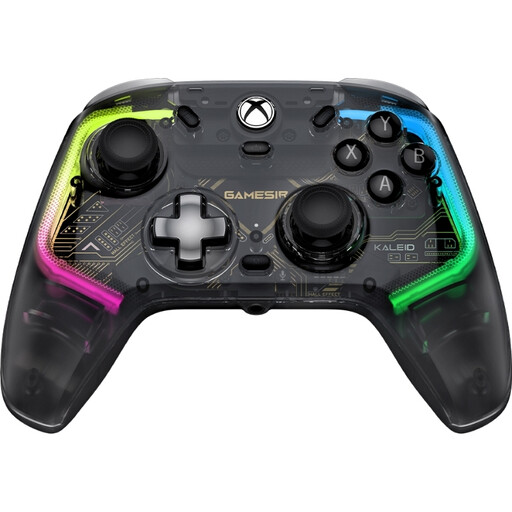
This wired model is an option for compatible Xbox or Windows games if you’re looking for an RGB controller.
Platforms listed include Xbox Series X/S, Xbox One and Windows 10/11. Make sure the cable can reach comfortably in your set-up.
Not necessarily. First, check which inputs the game requires. RGB descriptions for Lumectra and 8BitDo refer to controller lighting, but don’t necessarily mean the individual buttons are illuminated and easy to read in the dark.
No, it depends on the game’s requirements. Nintendo says IR mini-games in 1-2-Switch on Switch 2 require an original right Joy-Con connected wirelessly, as Joy-Con 2 don’t have an IR Motion Camera.
Check whether the game expects separate controllers or controllers held together. When using Joy-Con or Joy-Con 2 separately, attach the correct wrist straps as instructed by Nintendo; straps for the two generations aren’t interchangeable.
Original Joy-Con can’t be charged directly by Switch 2; you’ll need an original Switch or suitable charging accessories. With a wired model, consider the distance between the console and your seats.
No. Nintendo says Joy-Con 2 don’t work with the original Switch. When buying, check your console generation and which controllers your game supports.