The right controller depends first on the game, console and mode. Motion-controlled mini-games may require Joy-Con, while some button-based games support a compatible gamepad and certain party games use smartphones as controllers. If you’re playing mouse mini-games on a Switch 2, also check the surface by the window, as glass or highly reflective surfaces can affect mouse control. The number of controllers you need also depends on the specific game mode.
The right control option for you
A round of motion-controlled mini-games on Switch
If you’re planning a few quick motion-based games, check how many controllers you need for the mode you’ll be playing. Nintendo lists different requirements for WarioWare: Move It!: the motion-based microgames require one pair of Joy-Con per player, while the local Party mode requires one Joy-Con per player.
A Switch 2 session by the window
If you want to play mouse mini-games or use camera-enabled modes, check both the playing surface and the game’s requirements. Nintendo notes that Joy-Con 2 mouse control may be affected by glass or highly reflective surfaces. CameraPlay in supported Jamboree TV modes also requires a compatible USB camera.
Button-based games or party games with smartphones
A full gamepad is an option if the specific game supports it. In party games designed for mobile devices, such as The Jackbox Party Pack 10, smartphones or tablets can be used as controllers, so you won’t need an extra gamepad for every player.
What to consider when buying
Original Joy-Con
A good fit if: Your Switch game requires individual Joy-Con or motion controls.
Bear in mind: They can only be used wirelessly with Switch 2; you’ll need a compatible way to charge them.
Joy-Con 2
A good fit if: You want to play compatible motion-controlled or mouse mini-games on Switch 2.
Bear in mind: They aren’t compatible with the original Switch, and the surface matters for mouse control.
Full gamepad
A good fit if: The game on your platform explicitly supports gamepad controls.
Bear in mind: A gamepad won’t replace Joy-Con when they’re required, and some models don’t support motion controls.
Smartphone or tablet
A good fit if: The party game you’ve chosen supports mobile devices as controllers and your fellow players have suitable devices.
Bear in mind: This is a feature of specific games, not a general alternative for Switch or PC games.
| Consideration |
What to check before buying |
Who it matters most to |
| Game and platform compatibility |
Check the console model, exact game version, mode and supported controls. |
If I want to avoid buying the wrong controller for my game or console, I check these details first. Around 31% of consumers say compatibility is their main concern. |
| Motion controls and player numbers |
Check how many controllers you need for your chosen mode and take any Joy-Con you already own into account. |
For a motion-based session, I want to know how many compatible controllers everyone needs. Around 25% of consumers focus on this. |
| Window light and playing surface |
For mouse mini-games, try the intended flat surface, especially if it’s glass or highly reflective. |
If I want to play mouse mini-games by a bright window, the surface is something I need to check separately. Around 19% of consumers prioritise how well controls work in these conditions. |
| Connection and charging |
Check charging options, the dock, USB port and safe cable routing for your setup. |
Before we start playing, I want to know whether my controller can be charged and connected where I plan to use it. This is the main concern for around 13% of consumers. |
| Do you need an extra controller? |
Check whether guests can join using a smartphone and what devices the host needs for the specific game. |
If I already have suitable phones or tablets, I don’t want to buy gamepads for a game that uses mobile devices as controllers. Around 12% of consumers prioritise avoiding unnecessary extra controllers. |
Avoid common buying mistakes
-
Assuming one pair of Joy-Con automatically means two player slots
For WarioWare: Move It!, Nintendo distinguishes between motion-based microgames, which need one pair of Joy-Con per player, and a local Party mode, which needs one Joy-Con per player.
Decide on the game mode and number of players before counting the controllers you already have or buying more.
Key brands at a glance
Nintendo
Joy-Con and Joy-Con 2 are options for compatible motion-controlled and single-controller modes. Joy-Con 2 also offers mouse control in supported software.
- Nintendo describes individual Joy-Con use and motion controls for compatible games and modes.
- Joy-Con 2 aren’t compatible with the original Switch. Original Joy-Con can only be used wirelessly with Switch 2, so you’ll need a compatible way to charge them. Mouse control may be affected by glass or highly reflective surfaces.
PowerA
The Heroic Link Enhanced Wired Controller is a wired option for supported button-based modes on a docked Switch.
- According to PowerA, the Heroic Link has a 3 m USB cable and doesn’t need controller batteries.
- This model is designed for use with a docked Switch and doesn’t support motion controls or Joy-Con-exclusive games.
8BitDo
According to the manufacturer, the Ultimate 2C Bluetooth is designed for Switch systems and compatible games.
- 8BitDo lists six-axis motion control for this model.
- For Switch 2, the manufacturer specifies a firmware or system version requirement. Ultimate 2C Bluetooth and Ultimate 2C Wireless are different models; specifications for one don’t guarantee it will work with every mini-game.
Microsoft Xbox
The Xbox Wireless Controller is an option for compatible Windows or Xbox party games that support gamepad controls.
- Microsoft lists USB, Bluetooth and the Xbox Wireless Adapter as connection options for Windows 10 and 11.
- According to Microsoft, certain controller audio and accessory features aren’t available over Bluetooth. Windows compatibility doesn’t mean a controller will work with Nintendo mini-games.
Joybuy products
This selection includes Joy-Con for Switch and Switch 2 sessions, as well as full gamepads for games that support gamepad controls.
 No image available
Nintendo Switch 2 Joy-Con 2 2-Piece Set (Blue/Light Yellow)
For motion-based sessions and compatible mouse mini-games on Nintendo Switch 2. Joy-Con 2 aren’t compatible with the original Nintendo Switch; mouse control requires compatible software and a suitable surface.
Set of two Joy-Con 2 controllers.
View at Joybuy
 No image available
NAXSIR Wireless Gamepad for Switch, T4-14707098
For Switch games that support a full gamepad; check which controls the specific game supports before buying.
Features listed in the product name: Bluetooth, 7-Color LED, Vibration Feedback and 10m Range. The description also mentions a 6-axis gyroscope. According to the description, the controller should be reset before pairing and charging for the first time.
View at Joybuy
 No image available
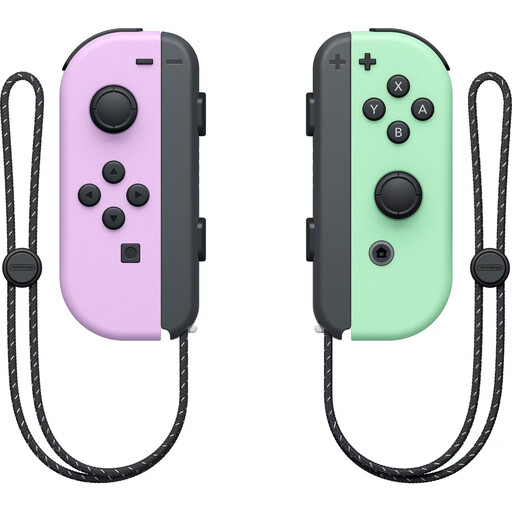
Nintendo Switch Joy-Con Controller Pair (Pastel Purple/Pastel Green)
For Switch games that support Joy-Con or motion controls. The number of controllers needed per player depends on the game mode.
Set with one left and one right Joy-Con. Original Joy-Con can only be used wirelessly with Switch 2; make sure you have a suitable way to charge them.
View at Joybuy
 No image available
Microsoft Official Xbox Series X/S Wireless Controller (Pulse Red)
For Xbox or Windows PC games that support gamepad controls; this doesn’t mean it’s compatible with Nintendo mini-games.
Platforms listed in the product name: Xbox One, Xbox Series X/S and PC. According to the product details, two AA batteries are required.
View at Joybuy
 No image available
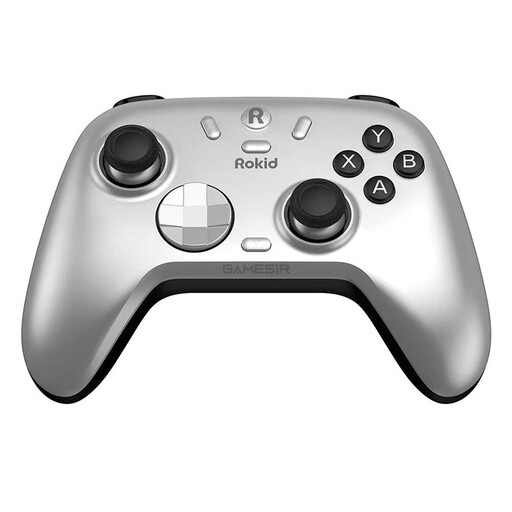
Rokid × GameSir Co-Branded Controller
For games that support gamepad controls on Switch or PC. Check compatibility with the specific game and the device you plan to use.
View at Joybuy
Frequently asked questions
Is one Joy-Con per player enough for WarioWare: Move It!?
It depends on the mode: Nintendo says the motion-based microgames require one pair of Joy-Con per player, while the local Party mode supports up to four players, each with one Joy-Con. Decide which mode you’ll be playing before planning to buy extra controllers.
Does bright light from a window make Joy-Con motion controls unusable?
Window light doesn’t automatically make motion controls unusable. Nintendo specifically warns that Joy-Con 2 mouse control may not work on glass or highly reflective tables. A compatible USB camera is also required for CameraPlay in supported Jamboree TV modes.
What can I do if motion controls aren’t responding properly?
Nintendo explains how to calibrate Joy-Con motion controls in the system settings. Also check the battery level, that you’re using the right console and how the game asks you to hold the controller. Calibration won’t make an incompatible game compatible.
What extra requirements might there be when playing together?
Original Joy-Con need a compatible way to charge them when used with Switch 2. According to Nintendo, if you play Super Mario Party Jamboree online rather than locally, each console needs a copy of the game and a Nintendo Switch Online membership. These online requirements don’t automatically apply to a local session.
Is the manufacturer’s guarantee the same as the statutory warranty in Germany?
No. The Verbraucherzentrale (German Consumer Advice Centre) distinguishes between your statutory rights against the seller and a voluntary guarantee. It says that, when you buy goods, the retailer is responsible for ensuring they are free from defects at the time of delivery for two years. Check the guarantee terms separately.


