Switch group with guests coming and going
If you want to add local mini-games, check whether each game supports individual Joy-Con as controllers. Nintendo describes this use for Joy-Con 2, but the number of players depends on the game.


Start by checking the platform you own and the controls required by the specific mini-game. Individual Joy-Con work with supported single-controller or motion-control modes, while a full gamepad suits games with a compatible gamepad mode. Nintendo notes that Joy-Con 2 do not work with the original Switch, and some games rule out certain controllers. So, count the players you need to accommodate and the controllers you already own before buying anything else. A bright room alone won’t determine which controller is right for you. For CameraPlay modes in Super Mario Party Jamboree, Nintendo specifies a compatible USB-C camera, sold separately; you’ll also need to consider where to position it in the room.
If you want to add local mini-games, check whether each game supports individual Joy-Con as controllers. Nintendo describes this use for Joy-Con 2, but the number of players depends on the game.
If a mini-game requires a particular Joy-Con setup or motion controls, check the requirements for that mode against the controller you’re considering. Nintendo notes, for example, that Nintendo Switch Sports is not compatible with Switch or Switch 2 Pro Controllers.
If the games already run on your platform, check that they support the controller you have in mind. Sony says up to four PS5 controllers can be used at the same time; Microsoft lists Xbox consoles and Windows PCs as supported platforms for the Xbox Wireless Controller.
First check the platform and the specific game, then the controls it requires and how many guests need to play. Next, count the controllers you already own and find out whether you’ll need charging facilities or extra accessories.
| What matters | What to check before buying | Who it matters most to |
|---|---|---|
| Compatibility | Check the console, game version and controller mode together. | If I want to avoid buying a controller that won’t work in my chosen game mode, I check the game’s control requirements first. For around 33% of consumers, compatibility with their platform and game is the top priority. |
| Player slots for guests | Check the player limit and how many controllers each person needs. | For a local multiplayer session, I want to know whether the controllers I already own will count as individual inputs for everyone. Around 27% of consumers are mainly concerned with having enough compatible player slots. |
| Motion controls | Check whether the specific mode requires Joy-Con or another type of controller. | If I want to play motion-controlled mini-games, what matters is the required control method, not simply whether the controller has a motion sensor. For around 27% of consumers, the right controls for motion-based mini-games are the main concern. |
| Charging and setup | Check the power source, charging method and accessories already included. | Before starting a game, I want all the controllers we need to be ready to use, without adding unnecessarily to the sets I already own. Around 13% of consumers focus on power and setup. |
A controller can have motion sensors and still be unsuitable for a particular mini-game mode. Nintendo rules out Pro Controllers for Nintendo Switch Sports; PowerA notes that its Wireless Controller for Nintendo Switch 2 is not designed for games that require Joy-Con.
Before buying, check the controller requirements for the specific game and mode you want to play.
Joy-Con 2 don’t work with the original Switch. Older Joy-Con can connect wirelessly to Switch 2, but you can’t attach them to the console to charge them.
Check the console generation and how the specific set charges. If you’re using older Joy-Con with Switch 2, you may need an original Switch or suitable charging accessories.
If you don’t have a compatible way to charge them, you may need extra charging accessories.
With supported software, Joy-Con 2 can be used individually; a left and a right Joy-Con 2 are already included with Switch 2.
First, count the players you need to accommodate and the controllers you already own.
Nintendo specifies a compatible USB-C camera for certain Super Mario Party Jamboree modes. It’s a separate requirement, not a controller feature.
Check whether the mode you want to play needs a camera, and plan where you’ll position it in the room.
CameraPlay may also require a compatible USB-C camera.
Joy-Con for Switch, Joy-Con 2 and Pro Controllers for Switch 2 may suit different games and controller modes.
The Wireless Controller for Nintendo Switch 2 is a single-piece gamepad option for games with a compatible gamepad mode.
The DualSense is a gamepad option for supported PS5 party games and compatible PC applications.
The Xbox Wireless Controller is a potential gamepad option for supported Xbox and Windows PC games.
The Ultimate 2 Bluetooth Controller is a gamepad option for compatible Switch and Windows games.
This selection includes Joy-Con and full gamepads for supported Switch, Switch 2, PS5 or PC games. The key thing is whether the specific game mode supports the controller you choose.
 No image available
For Switch 2 games that support separate Joy-Con or motion controls.
The set includes two Joy-Con 2 and two wrist straps. According to the product description, the controllers can be used separately for multiplayer and motion-controlled games.
For Nintendo Switch 2 only; not compatible with the original Nintendo Switch.
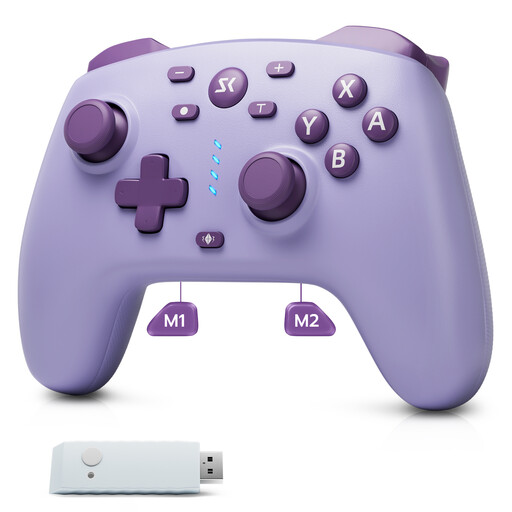 No image available
For supported games on the platforms listed in the product title, if you’d prefer a single-piece gamepad to individual Joy-Con.
The product details list Bluetooth, a 2.4 GHz receiver and a wired connection, as well as a 6-axis gyroscope.
Also listed are Hall Effect joysticks and triggers, programmable rear buttons and dual vibration. Check support for the specific game and mode.
 No image available
For supported PS5 party games or compatible PC applications, if you’re looking for a full gamepad.
The product details list a motion sensor, haptic feedback, adaptive triggers and Bluetooth. Sony notes that some features depend on the game and the connected device.
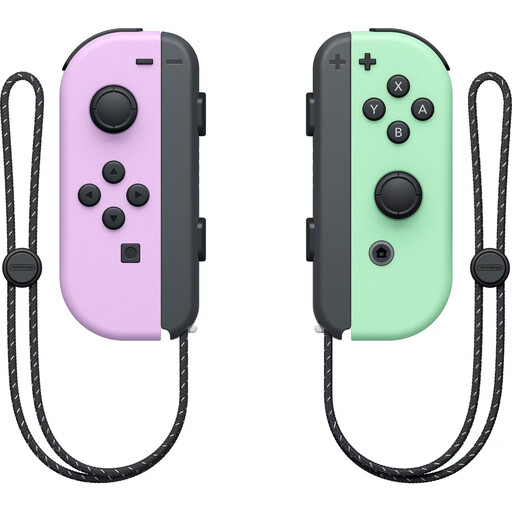 No image available
For supported Switch games with separately usable Joy-Con or motion controls.
The set includes one left Joy-Con, one right Joy-Con and two wrist straps. The product details list an accelerometer, gyroscope and up to 20 hours of battery life.
With Switch 2, older Joy-Con connect wirelessly. Nintendo says you’ll need an original Switch or suitable charging accessories to charge them.
 No image available
For Switch 2 games that support a full Pro Controller.
The product details list a wireless gamepad with motion controls, HD Rumble 2, amiibo functionality and programmable GL/GR buttons.
Nintendo says this controller isn’t compatible with Nintendo Switch Sports. Motion controls alone don’t confirm support for other mini-games.
Only if the specific game and mode support individual Joy-Con as controllers. Nintendo says this use of Joy-Con 2 depends on the software; Super Mario Party Jamboree supports up to four players on one console. So, choose your controller count based on the game’s requirements, not just what’s in the box.
Not by attaching them to Switch 2. Nintendo says you’ll need an original Switch or suitable licensed charging accessories; Joy-Con connect to Switch 2 wirelessly.
Not for every mode. Nintendo specifies a compatible USB-C camera, sold separately, for modes that use CameraPlay; a controller can’t replace the camera. Check in advance whether the mode you want to play needs one and where you could position it in the room.
For a consumer purchase in the EU, European Union consumer information says you have a legal guarantee of at least two years from the date you receive the goods. If there’s a fault, the seller may first be required to provide a free repair or replacement. This is separate from any voluntary manufacturer’s guarantee.
The Bundesnetzagentur lists CE marking, identifiable manufacturer details, German-language instructions with any necessary warnings, and a declaration of conformity among the things it checks during market surveillance. These checks are not proof that any individual listing is compliant.