First, check your console, the specific game and its mini-game mode. Nintendo requires compatible Joy-Con for certain motion-controlled mini-games, while some party games use smartphones as controllers. Once you know which mode you’re playing, you can decide whether you need extra Joy-Con, a full gamepad or no additional controller at all.
Who’s playing round the kitchen table?
A group playing motion-controlled mini-games
If you’re playing mini-games that require individual Joy-Con or specific motion features, the console generation and the requirements of the game itself matter – not just whether the controller has a motion sensor.
A group with changing player numbers
If you sometimes play with two people and sometimes with more, check how many separate inputs the mode supports and which controllers you already have.
A group using a gamepad or smartphone
If you’re using traditional gamepad controls or a smartphone, you won’t necessarily need an extra pair of Joy-Con. What matters is which input devices the specific game and mode are designed to use.
What should you consider when buying?
First, check that the game mode is compatible with your console. Then count the inputs you’ll need and consider how the controllers, table space and seating arrangements will work together.
| Consideration |
What to check before buying |
Who is this important to? |
| Game and console compatibility |
Check that your console, game version, mini-game mode and approved controllers are compatible. |
If I want to play a particular motion-controlled mini-game, the controller must meet its specific requirements. Around 36% of consumers prioritise compatibility between the game, mode and console. |
| Separate inputs |
Check the player limit and supported grip style, and count the controllers you already own. |
If players are taking turns or more people are joining in, I need enough separate inputs for the chosen mode. Around 29% of consumers prioritise multiplayer requirements. |
| Space and movement |
Think about cable routing between the seats and screen; check the table space if you’re using mouse mode. |
If the game involves movement at the table, I want to be able to use the controllers comfortably without a cable trailing across the way. Around 21% of consumers prioritise space and freedom of movement. |
| Charging and extra purchases |
Check smartphone modes, charging options and any model-specific exceptions. |
If smartphones can already be used as controllers, I don’t want to buy an unnecessary gamepad. If I already have Joy-Con, charging options matter too. Around 14% of consumers prioritise avoiding unnecessary purchases and checking charging requirements. |
Avoid common buying mistakes
-
Assuming a motion sensor will work with every motion-controlled mini-game
Nintendo requires compatible Joy-Con for certain mini-games. Another gamepad with a motion sensor won’t automatically meet the game’s requirements.
Check the specific mini-game mode first, then choose the controller model designed for it.
-
Assuming Joy-Con and Joy-Con 2 are interchangeable
Joy-Con 2 are designed for Switch 2. Original Joy-Con can be used wirelessly with Switch 2, but you can’t attach them to the console to charge them.
Before buying, check which console generation you have. If you’re using original Joy-Con with Switch 2, make sure you have a way to charge them.
-
Assuming mouse mode will work on every tabletop
Nintendo warns that glass or highly reflective surfaces can affect Joy-Con 2 mouse controls.
Try the mode on the surface you plan to use, and have a suitable, flat surface ready if needed.
-
Buying extra gamepads when the game uses smartphones
In certain modes of Everybody 1-2-Switch! and supported Jackbox games, smartphones can be used as controllers. The devices you need depend on the game mode.
Check which input devices the game uses before buying. Nintendo requires an internet connection for the smartphone mode in Everybody 1-2-Switch!
Key brands at a glance
Nintendo
A good option for Joy-Con, Joy-Con 2 and the Switch Pro Controller when your chosen Nintendo game requires specific controller features.
- Nintendo explains compatibility by console generation and game. Joy-Con 2 are not designed for the original Switch.
- A Switch Pro Controller won’t automatically replace Joy-Con required for a motion-controlled mini-game. Original Joy-Con cannot be charged directly on Switch 2.
8BitDo
The Ultimate 2C Bluetooth Controller is an option for supported Switch and gamepad modes.
- For this Bluetooth version, 8BitDo lists Switch support from system version 3.0.0 and Switch 2 support from system version 20.1.1.
- This stated compatibility doesn’t mean a game will accept the controller for mini-games that require Joy-Con. Other Ultimate 2C versions aren’t necessarily compatible in the same way.
PowerA
According to the manufacturer, the Nano Enhanced Wireless Controller is licensed for original Switch models and has a compact design.
- PowerA lists Bluetooth, motion control and a rechargeable battery for this model.
- According to PowerA, it doesn’t have HD Rumble, infrared or amiibo NFC. This doesn’t confirm that the model is suitable for Switch 2 or every motion-controlled mini-game.
HORI
The wired HORIPAD Turbo NSW-457U is an option for compatible Switch games with traditional button controls.
- HORI lists wired operation for this model.
- According to HORI, the NSW-457U has neither motion control nor vibration feedback. These details apply to this model, not all HORI controllers.
Xbox
The Xbox Wireless Controller is suitable for compatible games on Xbox consoles or Windows PCs, if that’s where you’re playing.
- Xbox lists support for Xbox and Windows, as well as Bluetooth, for this controller.
- This doesn’t mean it’s compatible with Switch. On PC, support for multiple gamepads also depends on the specific game.
PlayStation
The DualSense is an additional controller option for compatible PS5 and PC games.
- Sony describes connecting to compatible PC games and applications via USB or Bluetooth.
- Using it on a PC requires compatible games or applications. This doesn’t confirm that it’s suitable for Switch-specific Joy-Con mini-games.
Joybuy controller selection
This selection includes Joy-Con for Nintendo Switch and Switch 2, as well as full gamepads for compatible modes on the platforms listed for each product.
 No image available
Nintendo Switch 2 Joy-Con 2 2-Piece Set (Blue/Light Yellow)
For a Switch 2 gaming session when the game uses separate Joy-Con 2 inputs or a supported motion or mouse mode.
Includes one left and one right Joy-Con 2, plus two wrist straps. For Nintendo Switch 2 only; mouse mode depends on compatible games and a suitable tabletop surface.
View at Joybuy
 No image available
BIGBIG WON Rainbow 2 Pro Wired Controller
For compatible gamepad modes on the platforms listed in the product name, if a wired connection suits your seating arrangement.
The product name lists Nintendo Switch, Switch Lite, PC and PS4. Wired connection; take cable routing into account. A full gamepad is not an automatic substitute for Joy-Con in mini-games that require them.
View at Joybuy
 No image available
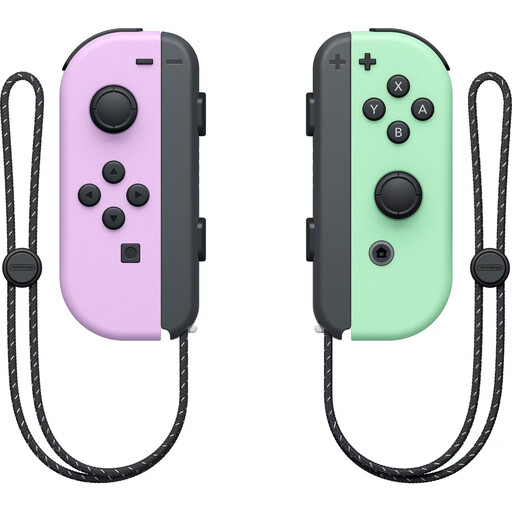
Nintendo Switch Joy-Con Controller Pair (Pastel Purple/Pastel Green)
For supported Switch games that need two separate Joy-Con inputs or compatible motion features.
Includes one left and one right Joy-Con, plus two wrist straps. Nintendo recommends attaching the straps when using Joy-Con separately. Original Joy-Con can only be used wirelessly with Switch 2; you’ll need an original Switch or compatible accessories to charge them.
View at Joybuy
 No image available
PlayStation DualSense Wireless Controller (Midnight Black, with USB Cable)
For an additional gamepad input in compatible PS5 games or PC games and applications.
Bluetooth and USB-C; a USB cable is included. PC use depends on compatible games and applications. The DualSense doesn’t replace Joy-Con in Switch mini-games that require them.
View at Joybuy
 No image available
Xbox Series X/S Wireless Controller (Shock Blue)
For compatible Xbox or Windows PC games when you need an additional gamepad input.
The product name lists Xbox One, Xbox Series X/S and PC; Bluetooth and two AA batteries are specified. This doesn’t mean it’s compatible with Switch.
View at Joybuy
Frequently asked questions
Are two Joy-Con enough for two people?
In supported games, two Joy-Con used separately can provide two individual inputs. Still, check the specific mode: Nintendo specifies one Joy-Con per person for Super Mario Party, and the supported grip style can vary from game to game.
What should I set up before a game at the dining table?
Pair the controllers in the order you want players to join, then check their inputs in the game you’ve chosen. Attach the wrist straps when using Joy-Con separately. For Joy-Con 2 mouse modes, Nintendo recommends a flat surface and warns of possible issues with glass or highly reflective surfaces.
How do I charge older Joy-Con if I only have a Switch 2?
According to Nintendo, original Joy-Con can be used wirelessly with Switch 2, but can’t be attached to the console or charged directly from it. You’ll need an original Switch or suitable licensed charging accessories.
Do I need to buy extra controllers for every party game?
No. Some party games support smartphones as controllers, including the smartphone mode in Everybody 1-2-Switch! and supported Jackbox games. Check the requirements for the specific game; Nintendo requires an internet connection for the smartphone mode in Everybody 1-2-Switch!


